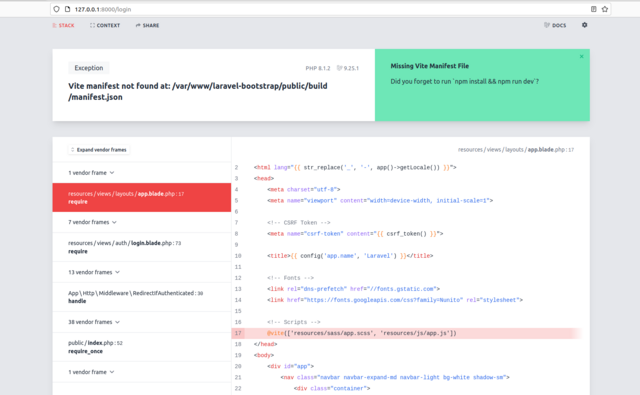
New to Laravel and I am having trouble getting bootstrap going with my project. I am not sure what I'm doing wrong.
I will give steps to see if anyone can repro and advise. Thanks in advance
I started with a fresh install of Ubuntu 22.04
1. Install PHP 8.1.2:
sudo apt install -y php php-common php-cli php-gd php-mysqlnd php-curl php-intl php-mbstring php-bcmath php-xml php-zip
2. Install Composer:
sudo apt install -y curl
curl -sS https://getcomposer.org/installer | sudo php -- --install-dir=/usr/bin --filename=composer
3. Create Laravel Project:
composer create-project laravel/laravel --prefer-dist laravel-bootstrap
cd laravel-bootstrap
4. Install Laravel/UI & Bootstrap
composer require laravel/ui
php artisan ui bootstrap
php artisan ui bootstrap --auth
npm install
npm run dev
When I run npm run dev, I get this message :
dev
vite

file:///var/www/laravel-bootstrap/node_modules/vite/bin/vite.js:7
    await import('source-map-support').then((r) => r.default.install())
    ^^^^^

SyntaxError: Unexpected reserved word
    at Loader.moduleStrategy (internal/modules/esm/translators.js:133:18)
    at async link (internal/modules/esm/module_job.js:42:21)
If I run php artisan serve and go to http://127.0.0.1:8000 I get the default Laravel page and it looks fine, but if I go to http://127.0.0.1:8000/login, I get a Missing Vite Manifest File error message
screenshot of error : https://i.postimg.cc/Njzn2wBp/Screenshot-from-2022-08-18-00-11-28.png