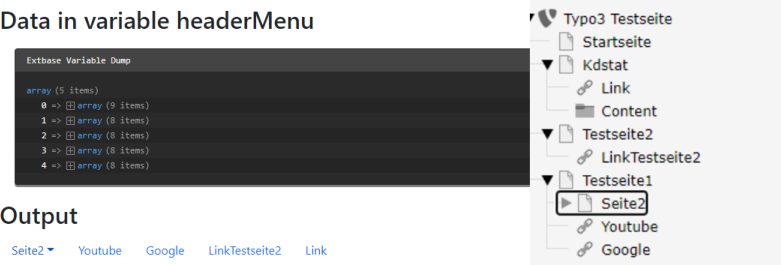
I am using Typo3 version 11.5.12 with a sitepackage generated on the sitepackage builder by Benjamin Kott.
I made a Navbar in the partials folder, that I use on every Page on every Site. It contains links to all Subpages that are on the same Site, however I also want to link all Subpages from all other Sites. Currently it only shows the children of the Site I am on.
I tried fixing this by making a parent Site where I store all other Sites, however that defeats the purpose of splitting those sites at all.
Is there a way to dynamically link all other Sites?
I made my Navbar using this code:
<a href="#" class="open_menu bg-light">
    <f:for each="{mainnavigation}" as="navPoint" iteration="i">
        <div><a href="{navPoint.link}" class="f-heading f-22 link color-white mb-20">{navPoint.title}</a> </div>
    </f:for>
</a>
Edit:
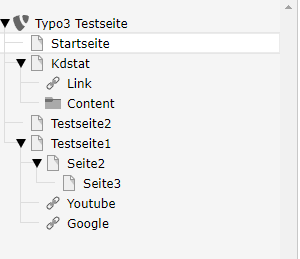
Edit 2: Snippet from setup.typoscript:
page = PAGE
page {
    typeNum = 0
    shortcutIcon = EXT:erstes_template/Resources/Public/Icons/favicon.ico

    10 = FLUIDTEMPLATE
    10 {
        # Template names will be generated automatically by converting the applied
        # backend_layout, there is no explicit mapping necessary anymore.
        #
        # BackendLayout Key
        # subnavigation_right_2_columns -> SubnavigationRight2Columns.html
        #
        # Backend Record
        # uid: 1 -> 1.html
        #
        # Database Entry
        # value: -1 -> None.html
        # value: pagets__subnavigation_right_2_columns -> SubnavigationRight2Columns.html
        templateName = TEXT
        templateName {
            cObject = TEXT
            cObject {
                data = pagelayout
                required = 1
                case = uppercamelcase
                split {
                    token = pagets__
                    cObjNum = 1
                    1.current = 1
                }
            }
            ifEmpty = Default
        }
        templateRootPaths {
            0 = EXT:erstes_template/Resources/Private/Templates/Page/
            1 = {$page.fluidtemplate.templateRootPath}
        }
        partialRootPaths {
            0 = EXT:erstes_template/Resources/Private/Partials/Page/
            1 = {$page.fluidtemplate.partialRootPath}
        }
        layoutRootPaths {
            0 = EXT:erstes_template/Resources/Private/Layouts/Page/
            1 = {$page.fluidtemplate.layoutRootPath}
        }
        dataProcessing {
            10 = TYPO3\CMS\Frontend\DataProcessing\FilesProcessor
            10 {
                references.fieldName = media
            }
            20 = TYPO3\CMS\Frontend\DataProcessing\MenuProcessor
            20 {
                levels = 2
                includeSpacer = 1
                as = mainnavigation
            }
            #
            #I tried to implement the new code here!
            #
        }
    }

    meta {
        viewport = {$page.meta.viewport}
        robots = {$page.meta.robots}
        apple-mobile-web-app-capable = {$page.meta.apple-mobile-web-app-capable}
        description = {$page.meta.description}
        description {
            override.field = description
        }
        author = {$page.meta.author}
        author {
            override.field = author
        }
        keywords = {$page.meta.keywords}
        keywords {
            override.field = keywords
        }
        X-UA-Compatible = {$page.meta.compatible}
        X-UA-Compatible {
            attribute = http-equiv
        }

        # OpenGraph Tags
        og:title {
            attribute = property
            field = title
        }
        og:site_name {
            attribute = property
            data = TSFE:tmpl|setup|sitetitle
        }
        og:description = {$page.meta.description}
        og:description {
            attribute = property
            field = description
        }
        og:image {
            attribute = property
            stdWrap.cObject = FILES
            stdWrap.cObject {
                references {
                    data = levelfield:-1, media, slide
                }
                maxItems = 1
                renderObj = COA
                renderObj {
                    10 = IMG_RESOURCE
                    10 {
                        file {
                            import.data = file:current:uid
                            treatIdAsReference = 1
                            width = 1280c
                            height = 720c
                        }
                        stdWrap {
                            typolink {
                                parameter.data = TSFE:lastImgResourceInfo|3
                                returnLast = url
                                forceAbsoluteUrl = 1
                            }
                        }
                    }
                }
            }
        }
    }

    includeCSSLibs {

    }

    includeCSS {
        erstes_template_layout = EXT:erstes_template/Resources/Public/Css/bootstrap.min.css
    }

    includeJSLibs {

    }

    includeJS {

    }

    includeJSFooterlibs {

    }

    includeJSFooter {
        erstes_template_scripts = EXT:erstes_template/Resources/Public/JavaScript/Dist/bootstrap.bundle.min.js
    }
}
Edit3: