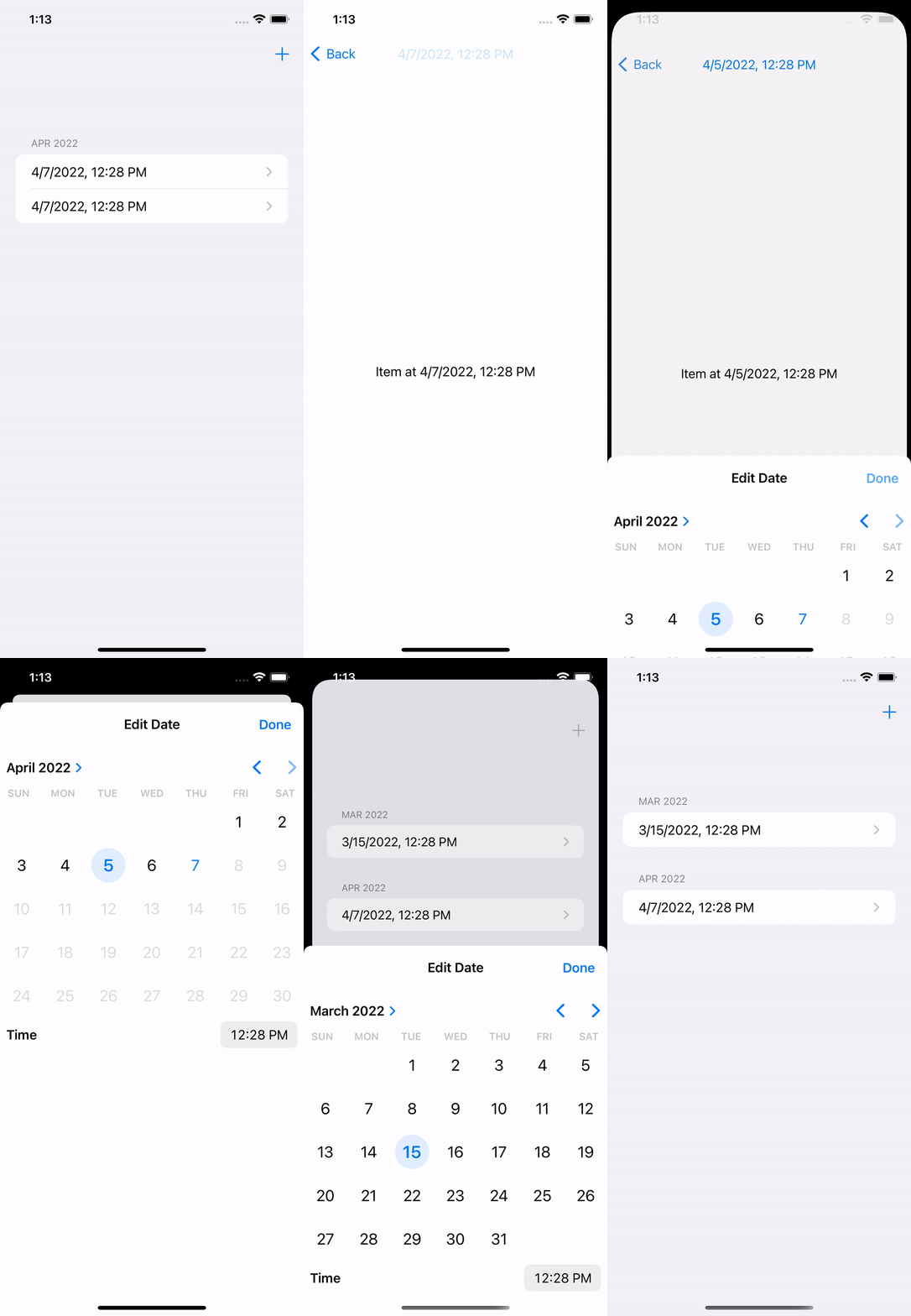
The sample app is a default SwiftUI + Core Data template with two modifications. Detail for Item is a separate view where the user can change the timestamp. And sectioned fetch request is used as opposed to a regular one.
@SectionedFetchRequest(
    sectionIdentifier: \.monthAndYear, sortDescriptors: [SortDescriptor(\.timestamp)]
) private var items: SectionedFetchResults<String, Item>

var body: some View {
    NavigationView {
        List(items) { section in
            Section(header: Text(section.id)) {
                ForEach(section) { item in
                    NavigationLink {
                        ItemDetail(item: item)
                    } label: {
                        Text(item.timestamp!.formatted())
                    }
                }
            }
        }
    }
}
struct ItemDetail: View {
    @ObservedObject var item: Item

    @State private var isPresentingDateEditor = false

    var body: some View {
        Text("Item at \(item.timestamp!.formatted())")
            .toolbar {
                ToolbarItem(placement: .principal) {
                    Button(item.timestamp!.formatted()) {
                        isPresentingDateEditor = true
                    }
                }
            }
            .sheet(isPresented: $isPresentingDateEditor) {
                if let date = Binding($item.timestamp) {
                    DateEditor(date: date)
                }
            }
    }
}
The problem arises when the user changes the timestamp on an Item to a different month. The detail view dismisses behind the model view arbitrarily. However, the issue is not present if the user changes the timestamp to a day within the same month. It does not matter whether we use a sheet or a full-screen cover. When I was debugging this I noticed that any change of the NSManagedObject subclass instance that will change the section in which it is displayed will dismiss the detail view arbitrarily. I’m expecting to stay on the detail view even if I change the timestamp to a different month.
What is the root cause of this issue and how to fix it?