Your code is getting only soup object. You need to take the selector gs_ri which wraps all its contents (title, link, snippet, etc). To find the desired selector, you can use the select() method. This method accepts a selector to search for and returns a list of all matched HTML elements.
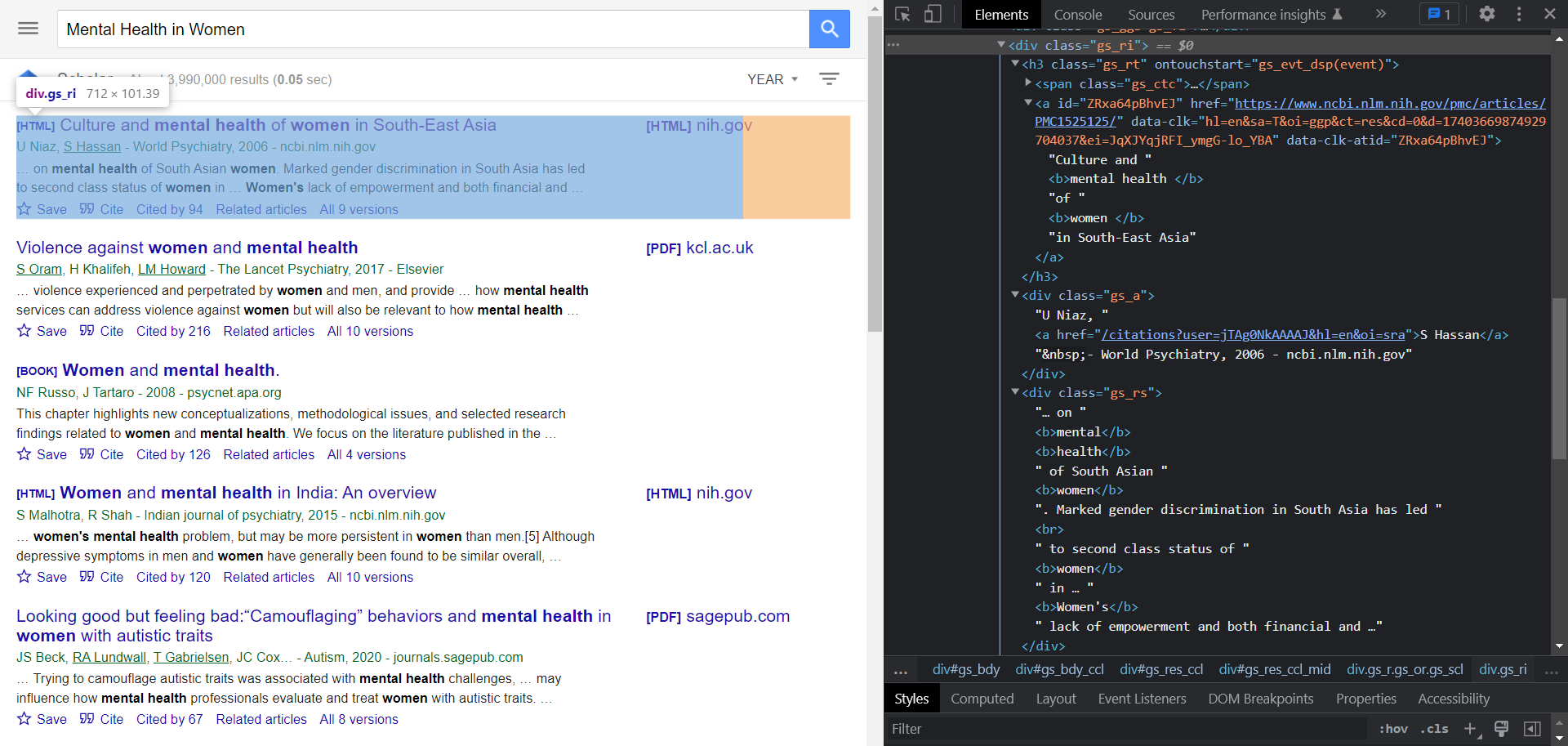
To iterate over all results on the page, we can use for loop and iterate the list of matched elements what select() method returned.
To find title, link and so on you can use the select_one() method. This method is very similar to select() method, but this method will return the first matched HTML element. In order to extract text from there, you must use the text method and use get('href') or ['href'] to extract attributes if you want to get link.
To extract authors, publishers, year and abstract, you can use regular expression. This is very convenient for parsing data based on a given pattern.
Below is a modified snippet of your code:
for result in soup.select(".gs_ri"):
    title = 'Title: ' + result.select_one(".gs_rt a").text
    link = 'Link: ' + result.select_one("a")["href"]

    # https://regex101.com/r/PdMQU6/1
    authors = 'Authors: ' + re.search(r'^(.*?)-', result.select_one(".gs_a").text).group(1)

    # https://regex101.com/r/JoQigB/1
    publisher = 'Publisher: ' + re.search(r'\d+\s?-\s?(.*)', result.select_one(".gs_a").text).group(1)

    # https://regex101.com/r/E6KGbS/1
    year = 'Year: ' + re.search(r'\d+', result.select_one(".gs_a").text)[0]
    abstract = 'Abstract: ' + result.select_one(".gs_rs").text

    print(title, link, authors, publisher, year, abstract, sep="\n", end="\n\n")
Also, make sure you're using request headers user-agent to act as a "real" user visit. Because default requests user-agent is python-requests and websites understand that it's most likely a script that sends a request. Check what's your user-agent.
Code and full example in online IDE:
from bs4 import BeautifulSoup
import requests, lxml, re

# https://docs.python-requests.org/en/master/user/quickstart/#passing-parameters-in-urls
params = {
    "q": "Mental Health in Women",
    "hl": "en",  # language
}

# https://docs.python-requests.org/en/master/user/quickstart/#custom-headers
headers = {
    "User-Agent": "Mozilla/5.0 (Windows NT 10.0; Win64; x64) AppleWebKit/537.36 (KHTML, like Gecko) Chrome/100.0.4896.88 Safari/537.36",
}

html = requests.get("https://scholar.google.com/scholar", params=params, headers=headers, timeout=30)
soup = BeautifulSoup(html.text, "lxml")

for result in soup.select(".gs_ri"):
    title = 'Title: ' + result.select_one(".gs_rt a").text
    link = 'Link: ' + result.select_one("a")["href"]

    # https://regex101.com/r/PdMQU6/1
    authors = 'Authors: ' + re.search(r'^(.*?)-', result.select_one(".gs_a").text).group(1)

    # https://regex101.com/r/JoQigB/1
    publisher = 'Publisher: ' + re.search(r'\d+\s?-\s?(.*)', result.select_one(".gs_a").text).group(1)

    # https://regex101.com/r/E6KGbS/1
    year = 'Year: ' + re.search(r'\d+', result.select_one(".gs_a").text)[0]
    abstract = 'Abstract: ' + result.select_one(".gs_rs").text

    print(title, link, authors, publisher, year, abstract, sep="\n", end="\n\n")
Output:
Title: Culture and mental health of women in South-East Asia
Link: https://www.ncbi.nlm.nih.gov/pmc/articles/PMC1525125/
Authors: U Niaz, S Hassan
Publisher: ncbi.nlm.nih.gov
Year: 2006
Abstract: … on mental health of South Asian women. Marked gender discrimination in South Asia has led
to second class status of women in … Women's lack of empowerment and both financial and …

Title: Violence against women and mental health
Link: https://www.sciencedirect.com/science/article/pii/S2215036616302619
Authors: S Oram, H Khalifeh, LM Howard
Publisher: Elsevier
Year: 2017
Abstract: … violence experienced and perpetrated by women and men, and provide … how mental health
services can address violence against women but will also be relevant to how mental health …

... other results
If you don't want to fiddle around with finding proper selectors or regular expression patterns to extract data, have a look Scrape historic Google Scholar results using Python blog post at SerpApi that shows how to do it with API examples plus how to extract data from all pages.
