AutoCompleteTextView - How to remove margin from top and bottom?

Viewed 802

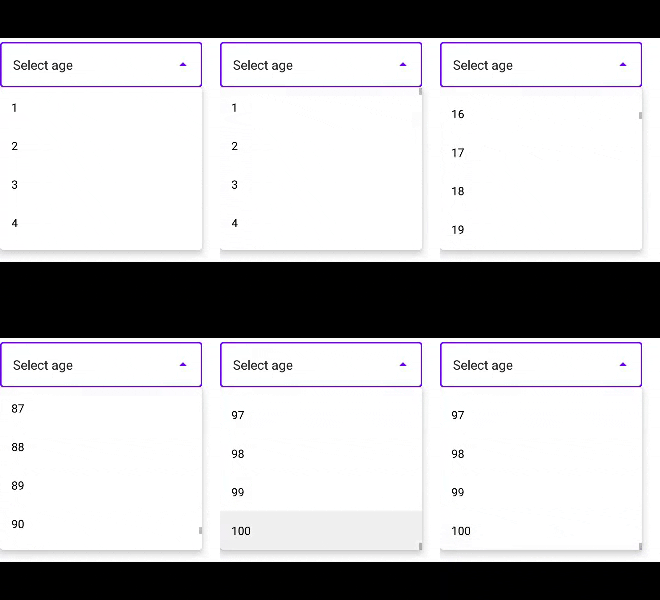
I'm creating a dropdown menu using AutoCompleteTextView. How do I remove the default margins at the top and bottom of the list?

enter image description here

To recreate:

<com.google.android.material.textfield.TextInputLayout
        style="@style/Widget.MaterialComponents.TextInputLayout.OutlinedBox.ExposedDropdownMenu"
        android:layout_width="wrap_content"
        android:layout_height="wrap_content"
        app:layout_constraintStart_toStartOf="parent"
        app:boxBackgroundColor="@color/white"
        android:focusable="false"
        app:boxStrokeWidth="1.5dp"
        app:layout_constraintTop_toBottomOf="@+id/spinner_network">

        <AutoCompleteTextView
            android:id="@+id/autoCompleteTextView"
            android:layout_width="250dp"
            android:layout_height="match_parent"
            android:inputType="none"
            android:dropDownHeight="200dp"
            android:text="Select age" />

    </com.google.android.material.textfield.TextInputLayout>
        List<String> dropdownItems = new ArrayList<>();
        for(int i = 1; i <= 100; i++){
            dropdownItems.add(String.valueOf(i));
        }

        ArrayAdapter<String> spinnerAdapter = new ArrayAdapter<>(
                this, R.layout.dropdown_item, dropdownItems
        );

        AutoCompleteTextView autoCompleteTextView = findViewById(R.id.autoCompleteTextView);
        autoCompleteTextView.setAdapter(spinnerAdapter);

R.layout.dropdown_item

<TextView
    xmlns:android="http://schemas.android.com/apk/res/android"
    android:id="@+id/textView"
    android:layout_width="match_parent"
    android:textColor="@color/black"
    android:padding="14dp"
    android:layout_height="wrap_content"
    android:text="TextView" />
3 Answers

UPDATE

All the credits and efforts back to @MikeM. from the comments. Many thanks to his efforts.

Cause The padding is coming from the TextInputLayout itself where its DropdownMenuEndIconDelegate sets some MaterialShapeDrawables as the dropdown's background. The value of the vertical padding is 8dp which taken from this resource dimen.

Solution 1:

Override this resource dimen to be 0dp:

<dimen name="mtrl_exposed_dropdown_menu_popup_vertical_padding" tools:override="true">0dp</dimen>

Solution 2:

The previous solution will be applied to all AutoCompleteTextView's, but if you want to do this for a certain ones: change the default dropDown background drawable, for instance:

autoCompleteTextView.setDropDownBackgroundDrawable(new ColorDrawable(Color.WHITE));

With reflections (Not recommended as it's anti-pattern)

The drop down popup of the AutoCompleteTextView can be accessed internally by mPopup field. To get it with reflections:

// Java:

public static ListPopupWindow getPopup(AutoCompleteTextView autoCompleteTextView) {
    try {
        Field field = AutoCompleteTextView.class.getDeclaredField("mPopup");
        field.setAccessible(true);
        return (ListPopupWindow) field.get(autoCompleteTextView);
    } catch (NoSuchFieldException e) {
        e.printStackTrace();
    } catch (IllegalAccessException e) {
        e.printStackTrace();
    }
    return null;
}


//  Kotlin:

fun AutoCompleteTextView.getPopup(): ListPopupWindow? {
    try {
        val field = AutoCompleteTextView::class.java.getDeclaredField("mPopup")
        field.isAccessible = true
        return field.get(this) as ListPopupWindow
    } catch (e: NoSuchFieldException) {
        e.printStackTrace()
    } catch (e: IllegalAccessException) {
        e.printStackTrace()
    }
    return null
}

Then remove the padding by setting it to the parent view of the internal ListView:

// Java:

autoCompleteTextView.setOnClickListener(new View.OnClickListener() {
    @Override
    public void onClick(View v) {
        ListPopupWindow popup = getPopup(autoCompleteTextView);
        if (popup != null) {
            ListView listView = popup.getListView();
            if (listView!= null)
                ((View) listView.getParent()).setPadding(0, 0, 0, 0);
        }
    }
});

// Kotlin

autoCompleteTextView.setOnClickListener {
    val popUp = autoCompleteTextView2.getPopup()?.listView?.parent
    if (popUp != null)
        (popUp as View).setPadding(0, 0, 0, 0)
}

This is done in OnClickListener because the nullability checks won't match as the list is formed when the user hits it.

Try removing dropDownHeight attribute from the AutoCompleteTextView

android:dropDownHeight="200dp" --> remove this line

And also set your AutoCompleteTextView height as wrap_content.

It won't let me edit the answer but another solution by https://stackoverflow.com/users/2850651/mike-m to remove padding:

Calling .showDropDown() in autoCompleteTextView's .setOnClickListener()

<com.google.android.material.textfield.MaterialAutoCompleteTextView
        android:id="@+id/autoCompleteTextView"
        android:layout_width="250dp"
        android:layout_height="50dp"
        android:drawableEnd="@drawable/ic_arrow_drop_down"
        android:dropDownHeight="200dp"
        android:inputType="none"
        android:text="Select age" 
        ...../>

List<String> dropdownItems = new ArrayList<>();
for (int i = 1; i <= 10; i++) {
     dropdownItems.add(String.valueOf(i));
}

ArrayAdapter<String> spinnerAdapter = new ArrayAdapter<>(
    this, R.layout.dropdown_item, dropdownItems
);


MaterialAutoCompleteTextView autoCompleteTextView = findViewById(R.id.autoCompleteTextView);
autoCompleteTextView.setAdapter(spinnerAdapter);

//.showDropDown() removes the padding
autoCompleteTextView.setOnClickListener(v -> autoCompleteTextView.showDropDown());

enter image description here

Related