Scraping works sometimes

Viewed 82

I am trying to scrape https://www.trulia.com/sold/32303_zip/6_srl/, I simply need the number of homes sold which is stated in the ...."sold homes on Trulia" sentence at the top right. The code below sometimes gets the number, other times it gets "Nearby" from the "Nearby Real Estate" from the bottom, which is another h2 element. What is wrong or missing from my code?

url = "https://www.trulia.com/sold/32303_zip/6_srl/"
html = requests.get(url)
html = html.content
soup = BeautifulSoup(html, 'html.parser')
soup.get_text()
s = soup.div.h2.get_text()
s = s.split()
s = s[0]
s = s.replace(',', '')
3 Answers

Besides using wget or curl, you can scrape the number for sold houses using BeautifulSoup web scraping library without the need to use selenium as the data you want to extract doesn't render via Javascript. Plus it will be much faster than launching the whole browser.

To get the required data, you need to get a .class selector which is responsible for the desired result. In our case, this is the .fdsGMZ selector. Have a look at the SelectorGadget Chrome extension to easily pick selectors by clicking on the desired element in your browser which is not always working perfectly, if the page heavily uses JS (in this case we can).

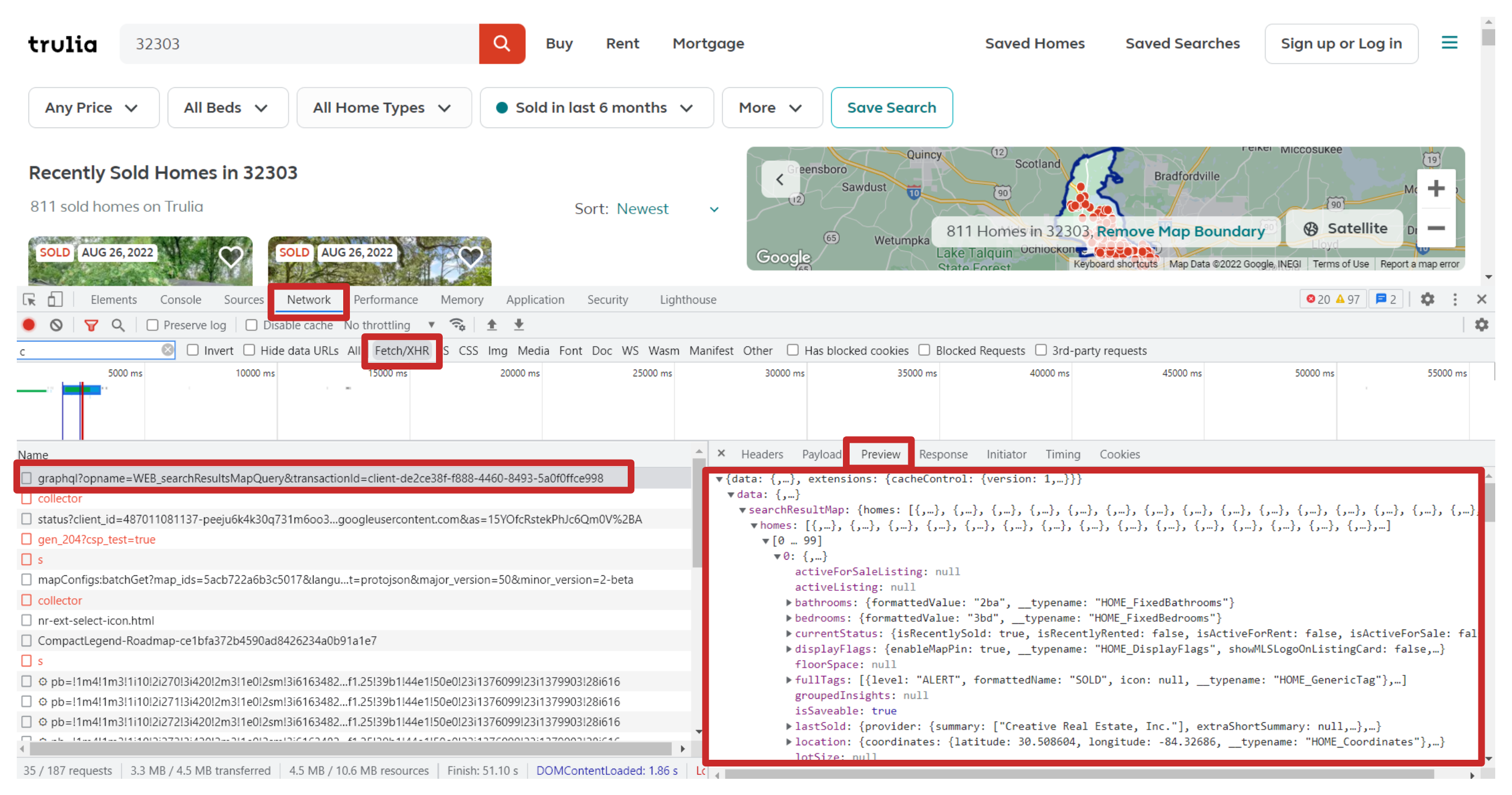
Also, if you need to extract information about house listings (geolocation, address, price, pictures, etc) you can make a direct post request to their GraphQL API. Have a look at curlconverter on how you can make it.

The screenshot shows how the request occurs during page refresh:

image

Check code in online IDE.

from bs4 import BeautifulSoup
import requests, lxml

html = requests.get("https://www.trulia.com/sold/32303_zip/6_srl/", timeout=30)
soup = BeautifulSoup(html.text, "lxml")

sold_homes = soup.select_one(".fdsGMZ").text
  
print(sold_homes)

Example output

809 sold homes on Trulia

I would use selenium. First:

pip install selenium

Then download a webdriver that matches your current chrome browser. After that, add the chromedriver.exe to your working directory and run the following code:

from selenium import webdriver

driver = webdriver.Chrome()
driver.get("https://www.trulia.com/sold/32303_zip/6_srl/")
try:
    homes_sold = (driver.find_element_by_xpath("//*[@id='resultsColumn']/div[1]/div/div[3]/div/h2").text).split(' ')[0]
except:
    homes_sold = (driver.find_element_by_xpath("//*[@id='resultsColumn']/div[1]/div/div[1]/span").text).split(' ')[0]
    homes_sold = homes_sold.replace('(','')
print(homes_sold)

Using requests would work as well. I am just providing an alternate example.

Resolved using wget and parsing the content as a string as per @Tim Roberts suggestion.

filename = wget.download("https://www.trulia.com/sold/32303_zip/6_srl/")
file = open(filename, 'r')
file = str(file.read())
x = file.partition('subHeaderTag":"')
x = x[2]
x = x.split()
x = x[0]
x = x.replace(',', '')
Related