How to set state to api data in the store

Viewed 81

I am trying to set my state to the data I'm getting from my API with a GETTER in the store.

during the mounted() lifecyclehook trigger the GETTER getProducts() which looks like this:

export const getters = {
  async getProducts() {
    axios.get('/api/products')
      .then(res => {
        var data = res.data
        commit('setProducts', data)
      })
      .catch(err => console.log(err));
  }
}

In the GETTER I try to trigger a MUTATION called setProducts() which looks like this:

export const mutations = {
  setProducts(state, data) {
    state.products = data
  }
}

But when I run this I get the error ReferenceError: commit is not defined in my console. So obviously what goes wrong is triggering the MUTATION but after looking for 2 days straight on the internet I still couldn't find anything.

I also tried replacing commit('setProducts', data) with: this.setProducts(data) setProducts(data)

Which all ended with the error "TypeError: Cannot read properties of undefined (reading 'setProducts')"
2 Answers

If your function getProduct is defined in a Vue component, you have to access the store like this : this.$store.commit('setProducts', data)

If your function is not defined in a Vue component but in an external javascript file, you must first import your store

import store from './fileWhereIsYourStore.js'

store.commit('setProducts', data)

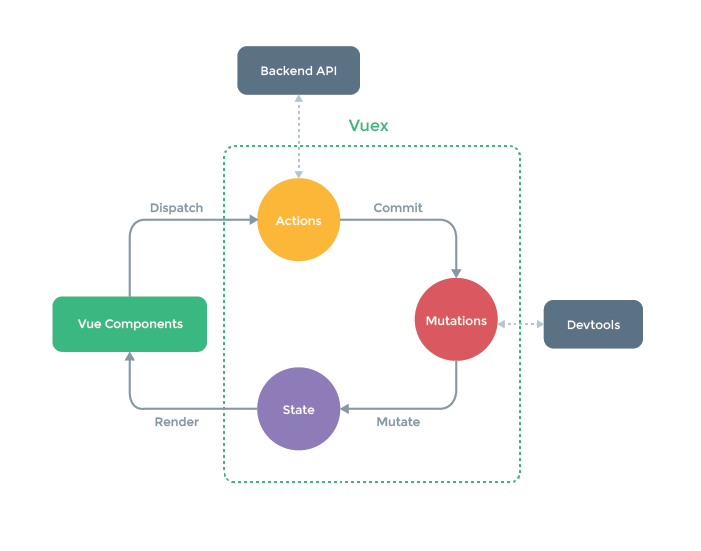
If your getters export is literally the definition of your store's getters, you can use the solution of importing the store first, but you should know that it is clearly not a good practice to make commits in getters. There must be a better solution to your problem.

EDIT : To answer your comment, here's how you could do it:

// Your store module 
export default {
  state: {
    products: []
  },

  mutations: {
    SET_PRODUCTS(state, data) {
      state.products = data
    }
  },

  actions: {
    async fetchProducts(store) {
      await axios.get('/api/products')
        .then(res => {
          var data = res.data
          store.commit('SET_PRODUCTS', data)
        })
        .catch(err => console.log(err));
    }
  }
}

Now, you can fetch products and populate your store in each of your components like this :

// A random Vue Component
<template>
</template>

<script>
export default {
 async mounted() {
   await this.$store.dispatch('fetchProducts')

   // now you can access your products like this
   console.log(this.$store.state.products)
 }
}
</script>

I didn't tested this code but it should be ok.

Only actions do have commit in their context as you can see here.
Getters don't have commit.

Otherwise, you could also use mapActions (aka import { mapActions } from 'vuex'), rather than this.$store.dispatch (just a matter of style, no real difference at the end).

Refactoring your code to have an action as Julien suggested is a good solution because this is how you should be using Vuex.

Getters are usually used to have some state having a specific structure, like sorted alphabetically or alike. For common state access, use the regular state or the mapState helper.

Related