
I am new to selenium and I'm trying to get a value from a dropdown menu, specifically after I open the menu I'd like to select the "40" for a shoe size. This is the html code
https://i.postimg.cc/Bn3Nhv26/codicehtml.png
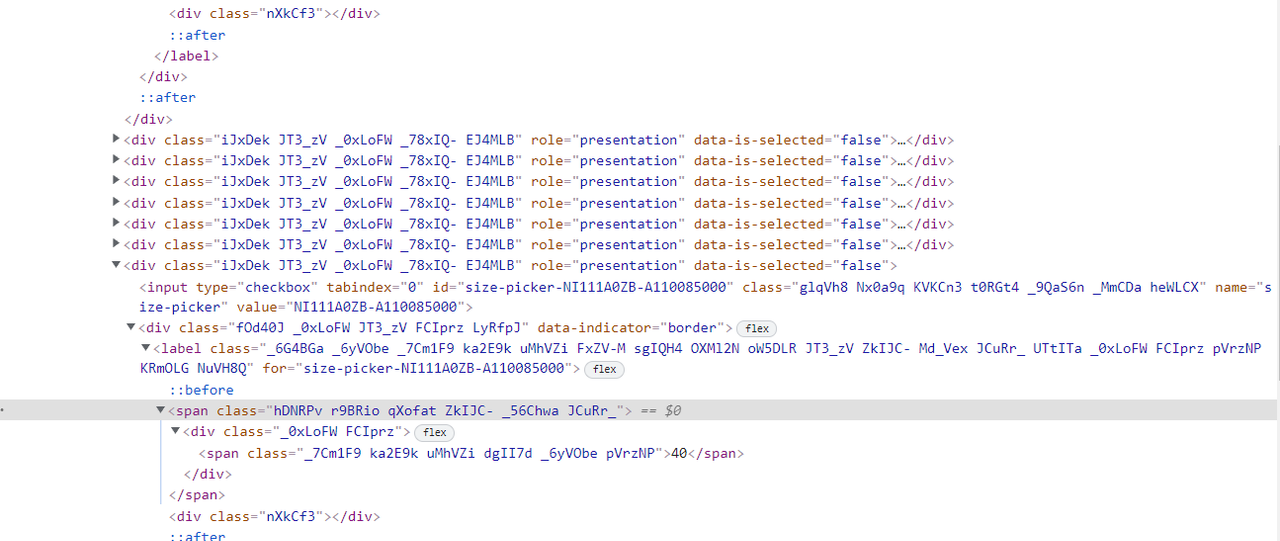
I tried with this code but it doesn't get the element:
driver.find_element_by_xpath("//label[@class='_6G4BGa _6yVObe _7Cm1F9 ka2E9k uMhVZi FxZV-M sgIQH4 OXMl2N oW5DLR JT3_zV ZkIJC- Md_Vex JCuRr_ UTtITa _0xLoFW FCIprz pVrzNP KRmOLG NuVH8Q' and @for='size-picker-NI111A0ZB-A110085000']").click()
Also I tried to think about a different approach because I want the code to work on all items, first get all the options from the menu and then select the one I want, but again after I get the values I don't know how to keep going