
I have 2 examples with code and GIF.
Problem with first - it is not working with appropriate height.
Problem with second - when soft keyboard appears it is not animated.
What is the appropriate way to make soft keyboard appearance on the screen smooth and clean, when you have to move some objects, according to new screen height?
GIFS:
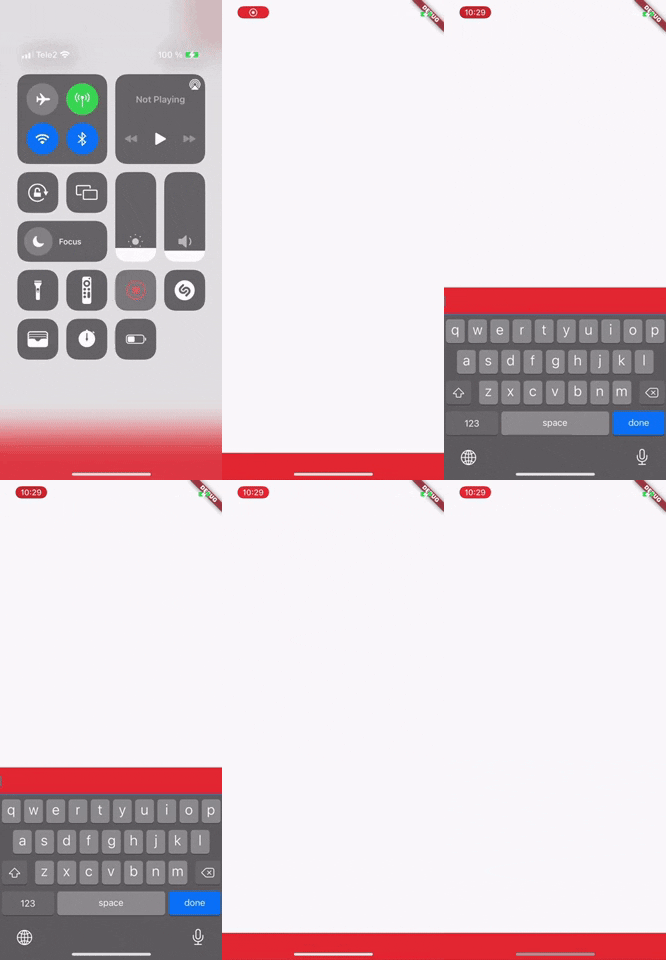

Code first:
import 'package:flutter/material.dart';

void main() {
  runApp(MaterialApp(home: Example()));
}

class Example extends StatelessWidget {
  @override
  Widget build(BuildContext context) {
    return Scaffold(
      body: Column(
        children: [
          Spacer(),
          Container(
            color: Colors.red,
            child: TextField(),
          ),
        ],
      ),
    );
  }
}
Code second:
import 'package:flutter/material.dart';
import 'package:flutter/widgets.dart';

void main() {
  runApp(MaterialApp(home: Example()));
}

class Example extends StatefulWidget {
  @override
  State<Example> createState() => _ExampleState();
}

class _ExampleState extends State<Example> {
  double height = 0;
  FocusNode node = FocusNode();

  @override
  void initState() {
    super.initState();
    node.addListener(() {
      if (height == 0) {
        height = 320;
      } else {
        height = 0;
      }
      setState(() {});
    });
  }

  @override
  Widget build(BuildContext context) {
    return Scaffold(
      resizeToAvoidBottomInset: false,
      body: Column(
        children: [
          Spacer(),
          Container(
            color: Colors.red,
            child: TextField(
              focusNode: node,
            ),
          ),
          AnimatedContainer(
            duration: Duration(milliseconds: 370),
            curve: Curves.ease,
            height: height,
          ),
        ],
      ),
    );
  }
}