
I have a popup in Leaflet.js which on its own works fine (with a normal font). But when I add a custom font-family to it through @font-face the popup loads as two lines of text instead of one.
Refreshing the page causes the popup to behave normally again, but when loading the page for the first time (as in opening a new tab) it defaults to this odd behaviour.
I have tried playing around with line-height, font-size, L.popup({ min/maxWidth }), order of stylesheets etc. none of which seemed to work.
The <p> tag inside .setContent() is necessary for the popup to be styled properly. I have tried several workarounds which neither seemed to work (which might solve the problem).
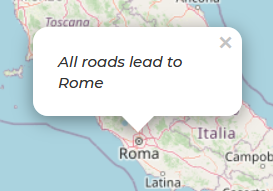
Vs
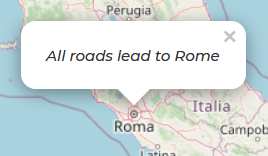
JS
const map = L.map('map').setView([41.9, 12.46], 6);
const address = L.popup({
className: "popup-address",
}).setLatLng([42, 12.46])
.setContent('<p>All roads lead to Rome</p>')
.openOn(map);
L.tileLayer('https://{s}.tile.openstreetmap.org/{z}/{x}/{y}.png', {
attribution: '© <a href="https://www.openstreetmap.org/copyright">OpenStreetMap</a> contributors'
}).addTo(map);
CSS
@font-face {
   font-family: 'Montserrat';
   font-style: italic;
   font-weight: 500;
   src: url(https://fonts.gstatic.com/s/montserrat/v15/JTUPjIg1_i6t8kCHKm459WxZOg3z_PZw.woff2) format('woff2');
   unicode-range: U+0000-00FF, U+0131, U+0152-0153, U+02BB-02BC, U+02C6, U+02DA, U+02DC, U+2000-206F, U+2074, U+20AC, U+2122, U+2191, U+2193, U+2212, U+2215, U+FEFF, U+FFFD;
}

#map {
   margin: 5rem auto;
   height: 400px;
   width: 600px;
}

.popup-address p {
   font-family: "Montserrat", sans-serif;
}
HTML
<div id="map"></div>
Many thanks in advance