
In Native Android, this is my Android View:

If I click the bottom input then keyboard type blind bottom input:

I want to use KeyboardAvoidingView so that if I click input I don't want keyboard blind to input.
Just like this:
https://raw.githubusercontent.com/wiki/APSL/react-native-keyboard-aware-scroll-view/kasv.gif
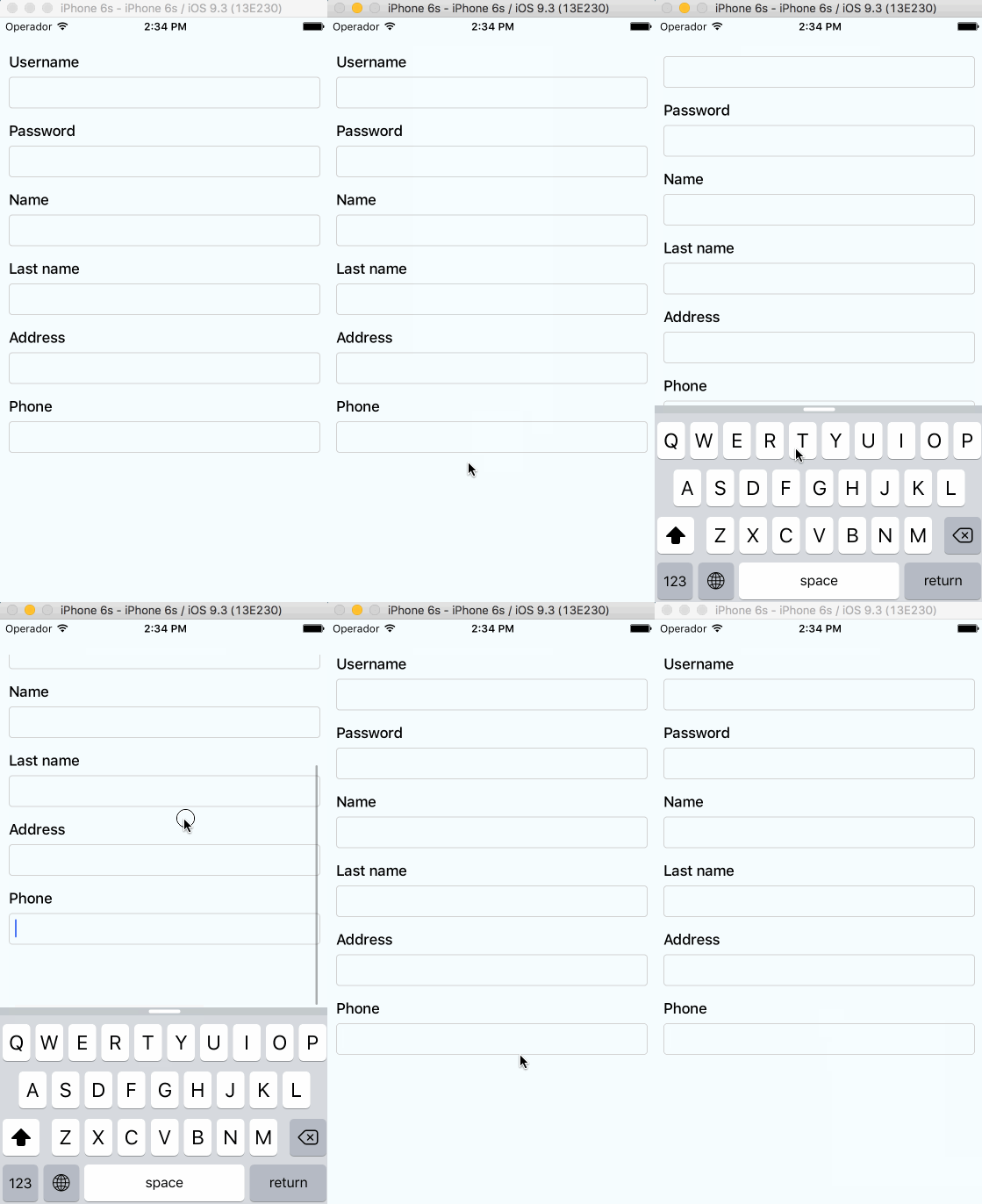
This is my code. How can I do that?
import React, {useCallback, useEffect} from 'react';
import {useDispatch, useSelector} from 'react-redux';
import {KeyboardAvoidingView} from 'react-native';
import styled from 'styled-components/native';
import {LOAD_MY_INFO_REQUEST, logoutRequestAction, FOLLOW_REQUEST} from '../../../reducers/user';
import {COOK_UP_REQUEST} from '../../../reducers/post';
import {INITIAL_REQUEST} from '../../../reducers/post';
import Button from '../../components/Button';
import useInput from '../../hooks/useInput';
import IconButton from '../../components/IconButton';
import Food from '../Food';

const Container = styled.View`
flex:1;
position: relative;
`;

const HeaderRightContainer = styled.TouchableOpacity`
flex-direction: row;

width: 100%;
height: 30px;
justify-content: flex-end;
align-items: center;
background: lightgray;
`;

const Hey = styled.Text`
margin-right:7px;
`;

const InputContainer = styled.View`
width: 100%;
height: 100%;
flex-direction: row;
flex-wrap: wrap;
position: relative;
background: #90EE90;
`;

const InsideContainer = styled.KeyboardAvoidingView`
flex-direction: row;
flex-wrap: wrap;
width: 90%;
height: 100%;
position: absolute;
right:20px;
justify-content: space-between;
top:30px;
`;

const IngreInput = styled.TextInput`
width: 150px;
height: 84px;
color: #292929;

border-radius: 50px;
margin:10px;
position: relative;
background: #FFFFF0;
text-align: center;

`;

const CookButton = styled.TouchableOpacity`
width: 130px;
height: 70px;
border-radius: 50px;
background:    #48D1CC       ;
position: absolute;
border:1px solid  #48D1CC;
justify-content: center;
align-items: center;
right:140px;
bottom:5px;
`;

const Label = styled.Text`
color:#F5FFFA;
font-weight: bold;
font-size: 25px;
`;

const Main = ({navigation}) => {


const {me} = useSelector((state) => state?.user);

const dispatch = useDispatch();

const [ingre1, onChangeIngre1, setIngre1] = useInput('');
const [ingre2, onChangeIngre2, setIngre2] = useInput('');
const [ingre3, onChangeIngre3, setIngre3] = useInput('');
const [ingre4, onChangeIngre4, setIngre4] = useInput('');
const [ingre5, onChangeIngre5, setIngre5] = useInput('');
const [ingre6, onChangeIngre6, setIngre6] = useInput('');
const [ingre7, onChangeIngre7, setIngre7] = useInput('');
const [ingre8, onChangeIngre8, setIngre8] = useInput('');
const [ingre9, onChangeIngre9, setIngre9] = useInput('');
const [ingre10, onChangeIngre10, setIngre10] = useInput('');

console.log("ingre1:",ingre1);
console.log("ingre2:",ingre2);
console.log("ingre3:",ingre3);


useEffect(() => {
if (me === null) {
     navigation.navigate('Login');
}
},[me]);


const onLogout = useCallback(() => {
     dispatch(logoutRequestAction());
}, []);

const CookingButton = useCallback(() => {
     dispatch({
          type: COOK_UP_REQUEST,
          data: {
          ingre1,
          ingre2,
          ingre3,
          }
     })
//    navigation.navigate('Food');
},[ingre1,ingre2,ingre3]);


return (
     <Container>

<HeaderRightContainer onPress={onLogout}>
          <Hey>로그아웃</Hey>
          <IconButton iconName="live">
          </IconButton>
     </HeaderRightContainer>

<InputContainer>
<InsideContainer>

<IngreInput
value={ingre1}
onChange={onChangeIngre1}
placeholder='ingre'
placeholderTextColor="#C3C2C8"

/>

<IngreInput
value={ingre2}
onChange={onChangeIngre2}
placeholder='ingre'
placeholderTextColor="#C3C2C8"
/>

<IngreInput
value={ingre3}
onChange={onChangeIngre3}
placeholder='ingre'
placeholderTextColor="#C3C2C8"
/>

<IngreInput
value={ingre4}
onChange={onChangeIngre4}
placeholder='ingre'
placeholderTextColor="#C3C2C8"
/>
<IngreInput
value={ingre5}
onChange={onChangeIngre5}
placeholder='ingre'
placeholderTextColor="#C3C2C8"
/>

<IngreInput
value={ingre6}
onChange={onChangeIngre6}
placeholder='ingre'
placeholderTextColor="#C3C2C8"
/>

<IngreInput
value={ingre7}
onChange={onChangeIngre7}
placeholder='ingre'
placeholderTextColor="#C3C2C8"
/>

<IngreInput
value={ingre8}
onChange={onChangeIngre8}
placeholder='ingre'
placeholderTextColor="#C3C2C8"
/>

<IngreInput
value={ingre9}
onChange={onChangeIngre9}
placeholder='ingre'
placeholderTextColor="#C3C2C8"
/>

<IngreInput
value={ingre10}
onChange={onChangeIngre10}
placeholder='ingre'
placeholderTextColor="#C3C2C8"
/>

</InsideContainer>
</InputContainer>

<CookButton onPress={CookingButton}>
<Label>COOK !</Label>
</CookButton>

     </Container>
);
};

export default Main;