
I am learning to use react memo, I am applying it to a simple task application, my problem is that I do not know how to make the styles of the items in the list work well.
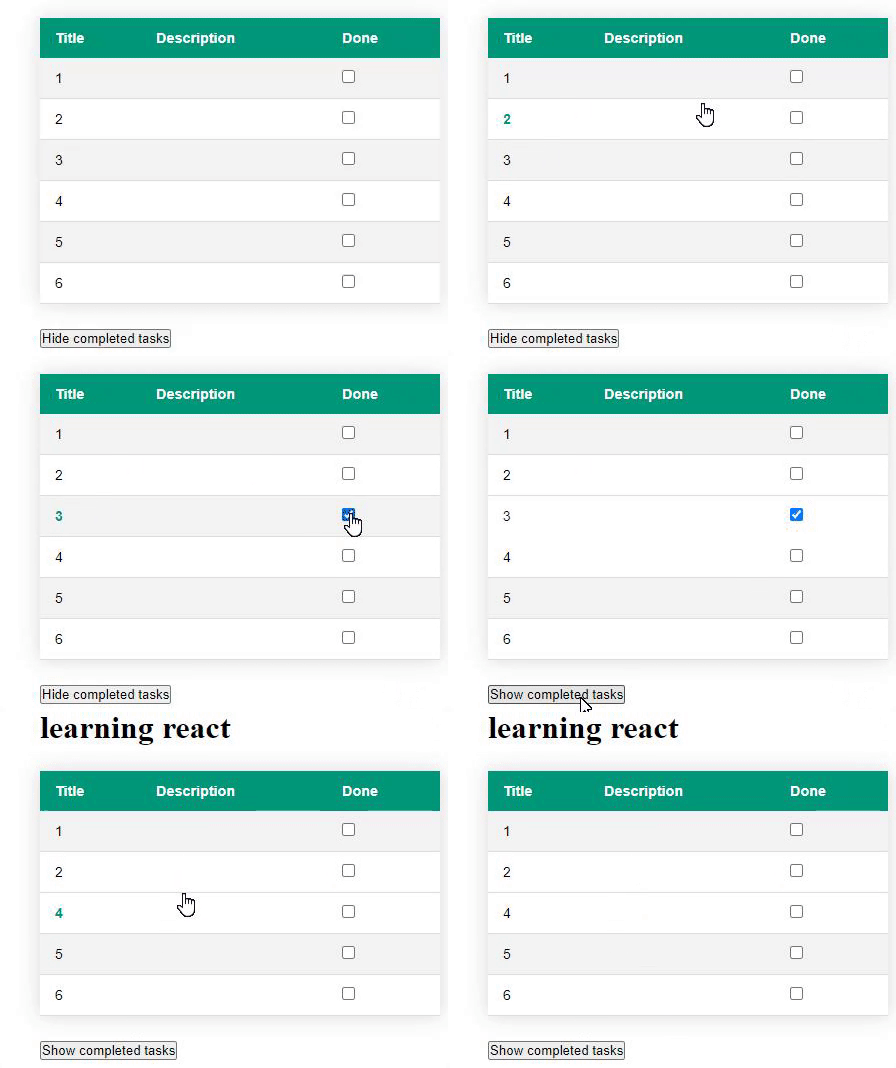
As you can see when completing a task, I don't know how to update the styles of the other items in the list so that it is one in white and one in black.
I tried many things but nothing worked :(
TaskItem.jsx
import React, { memo } from 'react'
import styled from "styled-components"
import { useSelector } from "react-redux";
import store from "../../redux/store";

//STYLES

const DIV = styled.div`

    max-height: ${
        props => !useSelector((state)=> state.toggleDoneTasks.show) && props.done ? "0px" : "50px"
    };

    opacity: ${
        props => !useSelector((state)=> state.toggleDoneTasks.show) && props.done ? "0": "1"
    };

    padding: ${
        props => !useSelector((state)=> state.toggleDoneTasks.show) && props.done ? "0px":"12px 15px"
    };

    overflow: hidden;
    transition: opacity 0.5s, max-height 0.5s, padding 0.5s;
`;

const TR = styled.tr`
    background-color: ${
        (props) => {

            //show completed and not completed tasks
            if(useSelector((state)=> state.toggleDoneTasks.show)){
                return props.index % 2 === 0 ? '#f3f3f3': 'none'
            }

            const tasksNotDone = props.tasks.filter((task) => !task.done)
            const index = tasksNotDone.findIndex(t => t.id === props.task.id)
            return index % 2 === 0 ? '#f3f3f3': 'none'

        }
    };

    /*
    &:nth-child(even) {background: #CCC};
    &:nth-child(odd) {background: #FFF};
    */

    border-bottom: ${
        props => !useSelector((state)=> state.toggleDoneTasks.show) && props.task.done ? "none": "1px solid #dddddd"
    };;

    transition: visibility 0.5s;

    cursor: pointer;
    &:hover{
        font-weight: bold;
        color: #009879;
    }
`;


function TaskRow({ task, toggleDoneTask, index, tasks }) {

    return (

        <TR task={task} tasks={tasks} index={index}>
            <td>
                <DIV done={task.done}>
                    {console.log('render', task)}
                    {task.title}
                </DIV>
            </td>
            <td>
                <DIV done={task.done}>
                    {task.description}
                </DIV>
            </td>
            <td>
                <DIV  done={task.done}>
                    <input type="checkbox"
                        checked={task.done}
                        onChange={toggleDoneTask}
                        style={{cursor: 'pointer'}}
                    />
                </DIV>
            </td>
        </TR>
    )
}


export default memo(TaskRow, (prev, next) => {
    // store.getState().toggleDoneTasks.show

    //COMPARE TASK OBJECT
    const prevTaskKeys = Object.keys(prev.task);
    const nextTaskKeys = Object.keys(next.task);

    const sameLength = prevTaskKeys.length === nextTaskKeys.length;
    const sameEntries = prevTaskKeys.every(key => {
        return nextTaskKeys.includes(key) && prev.task[key] === next.task[key];
    });

    return sameLength && sameEntries;
})
Tasks.jsx
import React, { useEffect, useReducer } from "react";
import TaskItem from "./TaskItem";

function saveLocalStorage(tasks) {
  localStorage.setItem("tasks", JSON.stringify(tasks));
}

function TasksReducer(taskItems, { type, task }) {
  switch (type) {
    case "UPDATE_TAKS": {
      let taskItemsCopy = [...taskItems].map((task) => ({ ...task }));
      let newItems = taskItemsCopy.map((t) => {
        if (t.id === task.id) {
          t.done = !t.done;
        }
        return t;
      });
      saveLocalStorage(newItems);
      return newItems;
    }

    case "ADD_TASK": {
      const newItems = [...taskItems, task];
      saveLocalStorage(newItems);
      return newItems;
    }

    default:
      window.alert("INVALID ACTION");
      break;
  }
}

const initialState = JSON.parse(localStorage.getItem("tasks")) || [];

//STYLES

const styleTable = {
  borderCollapse: "collapse",
  margin: "25px 0",
  fontSize: "0.9em",
  fontFamily: "sans-serif",
  minWidth: "400px",
  boxShadow: "0 0 20px rgba(0, 0, 0, 0.15)"
};

const styleTr = {
  backgroundColor: "#009879",
  color: "#ffffff",
  textAlign: "left"
};

const styleTh = {
  padding: "12px 15px"
};

function Tasks({ newTask, show }) {
  const [taskItems, dispatch] = useReducer(TasksReducer, initialState);

  useEffect(() => {
    if (!newTask) return;
    newTaskHandler({ id: taskItems.length + 1, ...newTask });
  }, [newTask]);

  const newTaskHandler = (task) => {
    dispatch({ type: "ADD_TASK", task });
  };

  const toggleDoneTask = (task) => {
    dispatch({ type: "UPDATE_TAKS", task });
  };

  return (
    <React.Fragment>
      <h1>learning react </h1>
      <table style={styleTable}>
        <thead>
          <tr style={styleTr}>
            <th style={styleTh}>Title</th>
            <th style={styleTh}>Description</th>
            <th style={styleTh}>Done</th>
          </tr>
        </thead>
        <tbody>
          {taskItems.map(
            (task, i) =>
              (show || !task.done) && (
                <TaskItem
                  tasks={taskItems}
                  index={i}
                  task={task}
                  key={task.id}
                  show={show}
                  toggleDoneTask={() => toggleDoneTask(task)}
                />
              )
          )}
        </tbody>
      </table>
    </React.Fragment>
  );
}

export default Tasks;
If you need the complete code:
