
I just recently read that too much logging impacts the performance of our application. But according to me as we know logging is an IO-bound job (like sending a stream of bytes to console or writing into the file) and as we have also read when an IO-bound job occurs then CPU cycles are not used (CPU is idle at that time) then how come IO is impacting my application's performance if it's not consuming my CPU cycles?
4 Answers
Logging can impact your application's performance in two ways.
Firstly, the API you are using is probably creating a lot of strings in your application code which can take CPU cycles and create garbage that will need to be collected.
Secondly, the logging thread(s) needs to format the string before writing it to disk.
Depending on the frequency of your logging and the complexity of the messages you are logging this can consume more CPU cycles than you expect. Note that there are lots of unknowns like the number of cores your machine has, how many cores are needed by your application code, etc...
The ideal course of action would be to profile your application to see where the CPU usage is actually coming from.
So treat it like this:
When you add a lot of logs at debug level and run your application on Info level configuration, you program still computes the message and evaluate the log level condition for the least.
Then there are overheads of GC, you could be sending your logs to some monitoring system, or a centralised logging mechanism, etc this all requires CPU cycles and memory.
There was this strong argument for writing logs in java using lambdas 'cause if you write a log with a string computation the computation will only happen after the levels check are satisfied.
Logging is highly important for application development, as it affects performance.
Logging usually involves writing to files, and such I/O operations are significantly more resource consuming than basic CPU/in-memory flow, as can be seen at example high scale test execution, where we can see that long processing time is spent busy with logging:
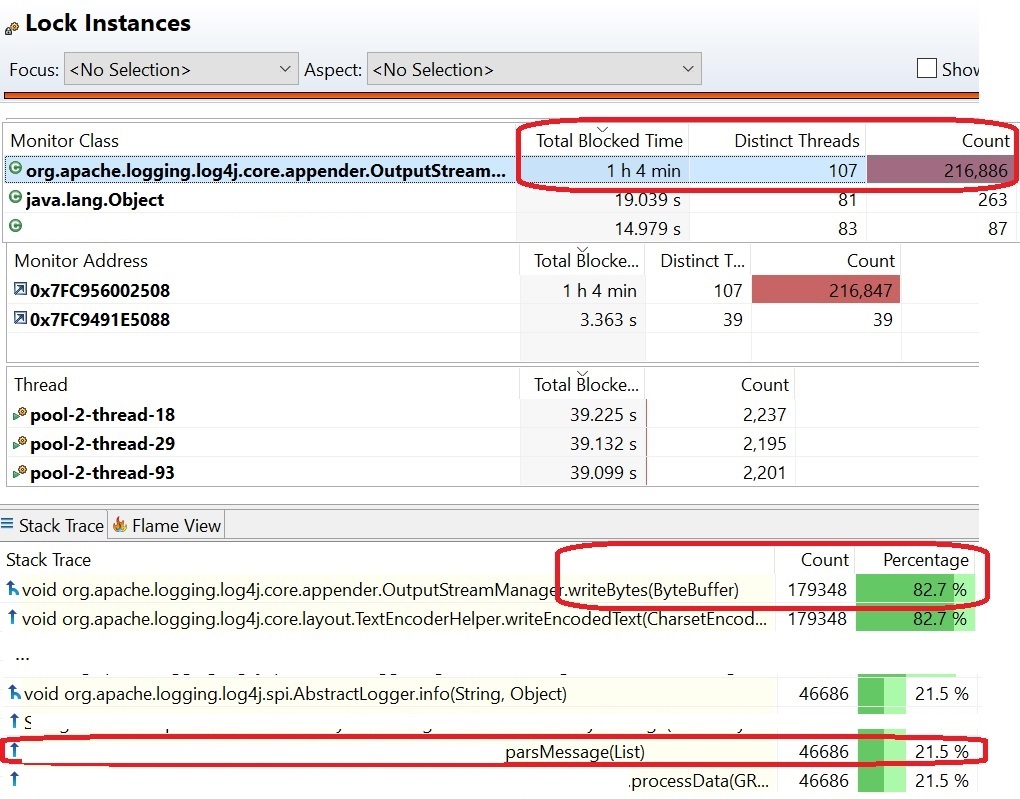
Note: I am the author of this blog post, Logging impact on application performance.
It can certainly impact the application performance.
- When you call a log method, you assign a certain stack to this call. Depends on where you are logging (console, file etc...), CPU usage might be different.
- Strings in themselves are heavy objects from a memory and garbage collection perspective. Usually, the string-pool is of no use in the case of log statements.
- Your log extractor usually added as a library in your app, which reads these logs and pushes them to the remote server (AppInsights). This talk takes a certain CPU and I/O from your app process. These libs usually have micro batching implemented to reduce the side effects, but it is still there.
- Usually logging is async behavior so it should not affect your current call a much, but the overall app might face some pressure. Ideally, this should not much until we literally start logging in bulk. That's why we usually only enable warning and above in prod.
Related