How to make a button (or any other element) show SwiftUI's DatePicker popup on tap?

Viewed 5227

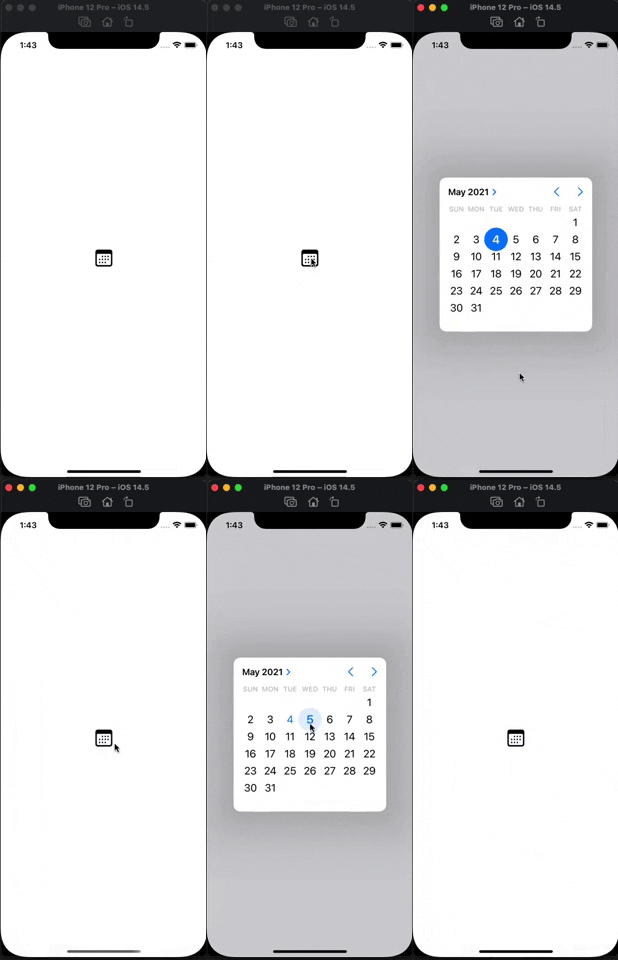
I'm trying to achieve the simplest possible use case, but I can't figure it out. I have a picture of calendar. All I want is to show DatePicker popup when tapping the picture. I tried to put it inside ZStack, but by doing it I can't hide default data textfields:

ZStack {
    Image("icon-calendar")
    .zIndex(1)
    DatePicker("", selection: $date)
    .zIndex(2)
}

How to make this simple layout natively without ridiculous workarounds?
5 Answers

I'm having this problem too. I couldn't sleep for a few days thinking about the solution. I have googled hundred times and finally, I found a way to achieve this. It's 1:50 AM in my timezone, I can sleep happily now. Credit goes to chase's answer here

Demo here: https://media.giphy.com/media/2ILs7PZbdriaTsxU0s/giphy.gif

The code that does the magic

struct ContentView: View {
    @State var date = Date()
    
    var body: some View {
        ZStack {
            DatePicker("label", selection: $date, displayedComponents: [.date])
                .datePickerStyle(CompactDatePickerStyle())
                .labelsHidden()
            Image(systemName: "calendar")
                .resizable()
                .frame(width: 32, height: 32, alignment: .center)
                .userInteractionDisabled()
        }
    }
}

struct NoHitTesting: ViewModifier {
    func body(content: Content) -> some View {
        SwiftUIWrapper { content }.allowsHitTesting(false)
    }
}

extension View {
    func userInteractionDisabled() -> some View {
        self.modifier(NoHitTesting())
    }
}

struct SwiftUIWrapper<T: View>: UIViewControllerRepresentable {
    let content: () -> T
    func makeUIViewController(context: Context) -> UIHostingController<T> {
        UIHostingController(rootView: content())
    }
    func updateUIViewController(_ uiViewController: UIHostingController<T>, context: Context) {}
}

Tried using Hieu's solution in a navigation bar item but it was breaking. Modified it by directly using SwiftUIWrapper and allowsHitTesting on the component I want to display and it works like a charm.

Also works on List and Form

struct StealthDatePicker: View {
    @State private var date = Date()
    var body: some View {
        ZStack {
            DatePicker("", selection: $date, in: ...Date(), displayedComponents: .date)
                .datePickerStyle(.compact)
                .labelsHidden()
            SwiftUIWrapper {
                Image(systemName: "calendar")
                .resizable()
                .frame(width: 32, height: 32, alignment: .topLeading)
            }.allowsHitTesting(false)
        }
    }
}

struct SwiftUIWrapper<T: View>: UIViewControllerRepresentable {
    let content: () -> T
    func makeUIViewController(context: Context) -> UIHostingController<T> {
        UIHostingController(rootView: content())
    }
    func updateUIViewController(_ uiViewController: UIHostingController<T>, context: Context) {}
}
struct ZCalendar: View {
    @State var date = Date()
    @State var isPickerVisible = false
    var body: some View {
        ZStack {
            Button(action: {
                isPickerVisible = true
            }, label: {
                Image(systemName: "calendar")
            }).zIndex(1)
            if isPickerVisible{
                VStack{
                    Button("Done", action: {
                        isPickerVisible = false
                    }).padding()
                    DatePicker("", selection: $date).datePickerStyle(GraphicalDatePickerStyle())
                }.background(Color(UIColor.secondarySystemBackground))
                .zIndex(2)
            }
        }//Another way
        //.sheet(isPresented: $isPickerVisible, content: {DatePicker("", selection: $date).datePickerStyle(GraphicalDatePickerStyle())})
    }
}

Please understand that my sentence is weird because I am not good at English.

In the code above, if you use .frame() & .clipped().
Clicks can be controlled exactly by the icon size.

In the code above, I modified it really a little bit. I found the answer. Thank you.

import SwiftUI

struct DatePickerView: View {
    @State private var date = Date()
    
    var body: some View {
        
        ZStack{
            DatePicker("", selection: $date, displayedComponents: .date)
                .labelsHidden()
                .datePickerStyle(.compact)
                .frame(width: 20, height: 20)
                .clipped()
 
            SwiftUIWrapper {
                Image(systemName: "calendar")
                    .resizable()
                    .frame(width: 20, height: 20, alignment: .topLeading)
            }.allowsHitTesting(false)
        }//ZStack
    }
}

struct DatePickerView_Previews: PreviewProvider {
    static var previews: some View {
        DatePickerView()
    }
}

struct SwiftUIWrapper<T: View>: UIViewControllerRepresentable {
    let content: () -> T
    func makeUIViewController(context: Context) -> UIHostingController<T> {
        UIHostingController(rootView: content())
    }
    func updateUIViewController(_ uiViewController: UIHostingController<T>, context: Context) {}
}

My answer to this was much simpler... just create a button with a popover that calls this struct I created...

struct DatePopover: View {

@Binding var dateIn: Date
@Binding var isShowing: Bool

var body: some View {
    DatePicker("", selection: $dateIn, displayedComponents: [.date, .hourAndMinute])
        .datePickerStyle(.graphical)
        .frame(width: 300, height: 350, alignment: .center)
    Button("Save") {
        isShowing.toggle()
    }
    .padding(.bottom, 20)
}}

Not sure why, but it didn't format my code like I wanted...

Sample of my Button that calls it... it has my vars in it and may not make complete sense to you, but it should give you the idea and use in the popover...

                    Button(item.dueDate == nil ? "" : dateValue(item.dueDate!)) {
                        if item.dueDate != nil { isUpdatingDate = true }
                    }
                    .onAppear { tmpDueDate = item.dueDate ?? .now }
                    .onChange(of: isUpdatingDate, perform: { value in
                        if !value {
                            item.dueDate = tmpDueDate
                            try? moc.save()
                        }
                    })
                    .popover(isPresented: $isUpdatingDate) {
                        DatePopover(dateIn: $tmpDueDate, isShowing: $isUpdatingDate)
                    }

fyi, dateValue() is a local func I created - it simply creates a string representation of the Date in my format

Related