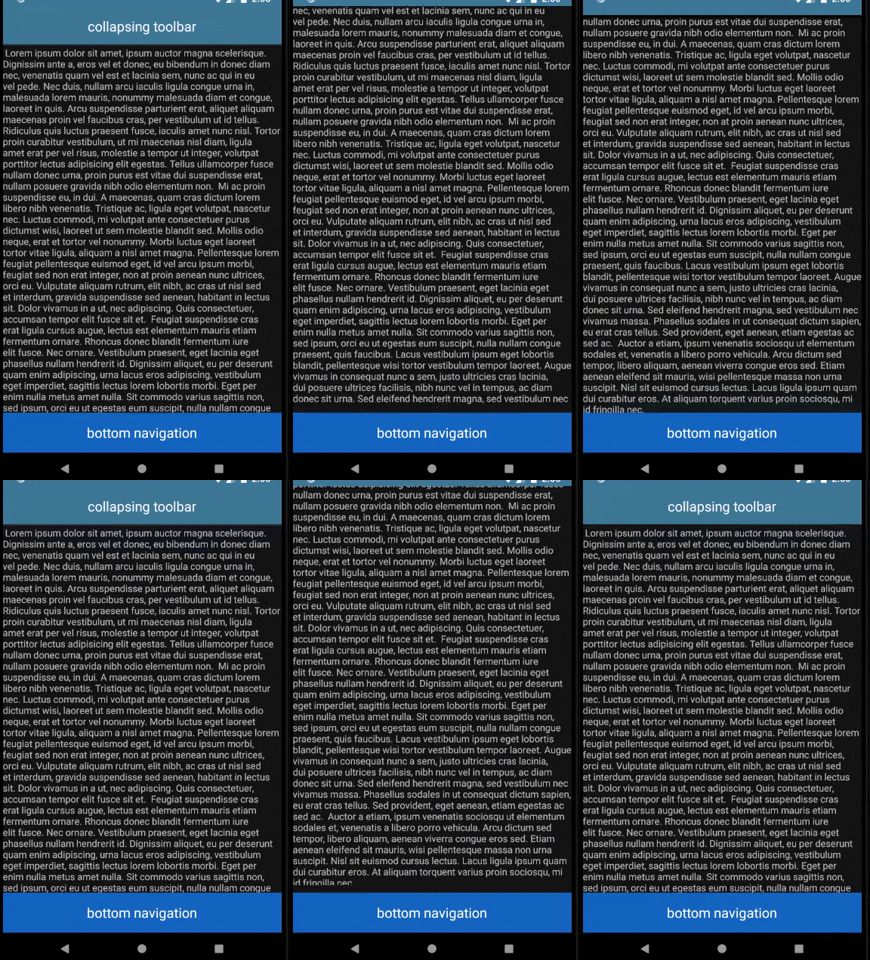
I added a ListView with a collapsing toolbar at the top and bottom navigation at the bottom. My problem is that the bottom navigation keeps hiding when scrolling up. I want it to stay visible. I enabled nested scrolling programmatically. I tried many solutions, none of them worked.
This is my problem and my XML at the bottom:

This my main.xml
<androidx.coordinatorlayout.widget.CoordinatorLayout
    xmlns:android="http://schemas.android.com/apk/res/android"
    xmlns:app="http://schemas.android.com/apk/res-auto"
    xmlns:tools="http://schemas.android.com/tools"
    android:id="@+id/_coordinator"
    android:layout_width="match_parent"
    android:layout_height="match_parent"
    android:fitsSystemWindows="true">
    <com.google.android.material.appbar.AppBarLayout
        android:id="@+id/_app_bar"
        android:layout_width="match_parent"
        android:layout_height="wrap_content"
        android:theme="@style/AppTheme.AppBarOverlay">
        <com.google.android.material.appbar.CollapsingToolbarLayout
            android:id="@+id/collapse"
            android:layout_width="match_parent"
            android:layout_height="wrap_content"
            app:contentScrim="#000000"
            android:fitsSystemWindows="true"
            app:layout_scrollFlags="scroll|enterAlways|snap">
            <LinearLayout
                android:id="@+id/header"
                android:layout_width="match_parent"
                android:layout_height="wrap_content"
                android:padding="8dp"
                android:gravity="center_horizontal|center_vertical"
                android:orientation="horizontal">
                <TextView
                    android:id="@+id/textview1"
                    android:layout_width="wrap_content"
                    android:layout_height="wrap_content"
                    android:padding="8dp"
                    android:text="collapsing toolbar"
                    android:textSize="20sp"
                    android:textColor="#FFFFFF"/>
            </LinearLayout>
            <androidx.appcompat.widget.Toolbar
                android:id="@+id/_toolbar"
                android:layout_width="match_parent"
                android:layout_height="?attr/actionBarSize"
                android:background="?attr/colorPrimary"
                app:popupTheme="@style/AppTheme.PopupOverlay"/>
        </com.google.android.material.appbar.CollapsingToolbarLayout>
    </com.google.android.material.appbar.AppBarLayout>
    <LinearLayout
        android:layout_width="match_parent"
        android:layout_height="match_parent"
        android:orientation="vertical"
        app:layout_behavior="@string/appbar_scrolling_view_behavior">
        <ListView
            android:id="@+id/listview1"
            android:layout_width="match_parent"
            android:layout_height="wrap_content"
            android:choiceMode="none"
            android:layout_weight="1"/>
        <LinearLayout
            android:id="@+id/nav"
            android:layout_width="match_parent"
            android:layout_height="wrap_content"
            android:padding="8dp"
            android:background="#1565C0"
            android:gravity="center_horizontal|center_vertical"
            android:orientation="horizontal">
            <TextView
                android:id="@+id/textview2"
                android:layout_width="wrap_content"
                android:layout_height="wrap_content"
                android:padding="8dp"
                android:text="bottom navigation"
                android:textSize="20sp"
                android:textColor="#FFFFFF"/>
        </LinearLayout>
    </LinearLayout>
</androidx.coordinatorlayout.widget.CoordinatorLayout>