
I'm trying to implement the following css code in SwiftUI
background: #FFFFFF;
box-shadow: 0px 10px 20px rgba(223, 227, 240, 0.2);
border-radius: 27.5px;
It should look like this (barely visible shadow below the button):

Here's the code i'm currently experimenting with:
import SwiftUI

struct RegisterView: View {
    var body: some View {
        VStack(spacing: 0) {

            HStack(alignment: .top) {
                Text("Register")
                    .font(.custom("NotoSans-Regular", size: 24))
                    .fontWeight(.bold)
                    .foregroundColor(Color.tertiaryTitleColor)
            }
            .frame(width: 299, height: 39)
            .padding(.top, 78)

            HStack {
                BroviderButton(imageName: "googleLogo")
                BroviderButton(imageName: "facebookLogo")
            }
            .padding(.top, 47)

            Spacer()
        }
        .frame(maxHeight: .infinity)
        .frame(maxWidth: .infinity)
        .background(Color.loginBackgroundColor)
        .ignoresSafeArea()
    }
}

struct RegisterView_Previews: PreviewProvider {
    static var previews: some View {
        RegisterView()
    }
}


struct BroviderButton: View {
    var imageName: String
    var body: some View {
        ZStack {
            RoundedRectangle(cornerRadius: 27.5)
                .stroke(Color.dropShadowColor,lineWidth: 1)
                .frame(width: 133, height: 56, alignment: .center)
                .shadow(color: .black, radius: 2, x: 1, y: 2)
            VStack {

                VStack {
                    Image(imageName)
                        .resizable()
                        .scaledToFit()
                }
                .frame(height: 28, alignment: .center)
            }
            .frame(width: 133, height: 56, alignment: .center)
            .foregroundColor(.blue)
            .background(Color.loginButtonBackgroundColor)
            .cornerRadius(27.5)
            .opacity(1)

        }
    }
}
And here's how it looks like atm:
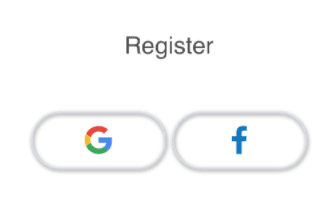
I don't understand how to translate x:10 & y:20 to SwiftUI code and also can't find the way to blur the shadow (20%). Any ideas are welcome.
Also can't figure out why that RoundedRectangle stays visible after i put VStack on top of it.. I was thinking it will hide everything but the shadow below the button.