
Problem
I’m trying to use a web component library built with Stenciljs in a Blazor project.
Many components have custom events
example (slider component):
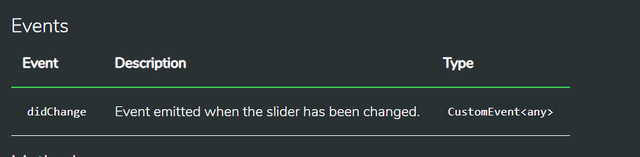
Since it’s a custom web component, the two-way binding does not work. And I can’t find a way on retrieving the event result to pass it to my function.
If I was in VueJs, I would use the '$event' variable.
VueJS
<template>
     <se-slider min="0" max="100" :value="sliderValue" @didChange="UpdateSlideValue($event)"></se-slider>
</template>

<script>

export default {
  data() {
    return {
      sliderValue: 50,
    }
  },
  methods: {
    UpdateSlideValue(event) {
      this.sliderValue = event.detail.valueAsNumber
    }
  }
}
</script>
I had no success on internet to find the equivalent way for Blazor
What I've tried
I tried to use an arrow function with the event as a parameter
Blazor
<se-slider min="0" max="500" value="@sliderValue" @didChange="@((_e) => UpdateSlideValue(_e))"></se-slider>
<p>@sliderValue</p>

@code {
    public class CustomSliderEvent {
        public bool bubble {get; set; }
        public bool cancelBubble {get; set; }
        public bool cancelable {get; set; }
        public bool composed {get; set; }
        public string? currentTarget {get; set; }
        public InputEvent detail {get; set; }
        public double timeStamp {get; set; }
    }

    private int sliderValue = 50;

    private void UpdateSlideValue(CustomSliderEvent event)
    {
        int newvalue = event.detail.valueAsNumber;
        sliderValue = newValue;
    }
}
but it does not compile

My Research
All the documentation that I found are about binding native DOM event (input or change). https://docs.microsoft.com/en-us/aspnet/core/blazor/components/data-binding?view=aspnetcore-3.1
or, the other solution is to create an EventCallback inside the custom component
How to use bind-value and bind-value:event on a custom component Blazor
https://chrissainty.com/creating-bespoke-input-components-for-blazor-from-scratch/
but in my case, the components are closed source and I can't modify them.
Question
How can I get the data from a custom event from a web component with Blazor ?