How To Preview Multiple Images Multiple div Before Upload - jQuery

Viewed 1542

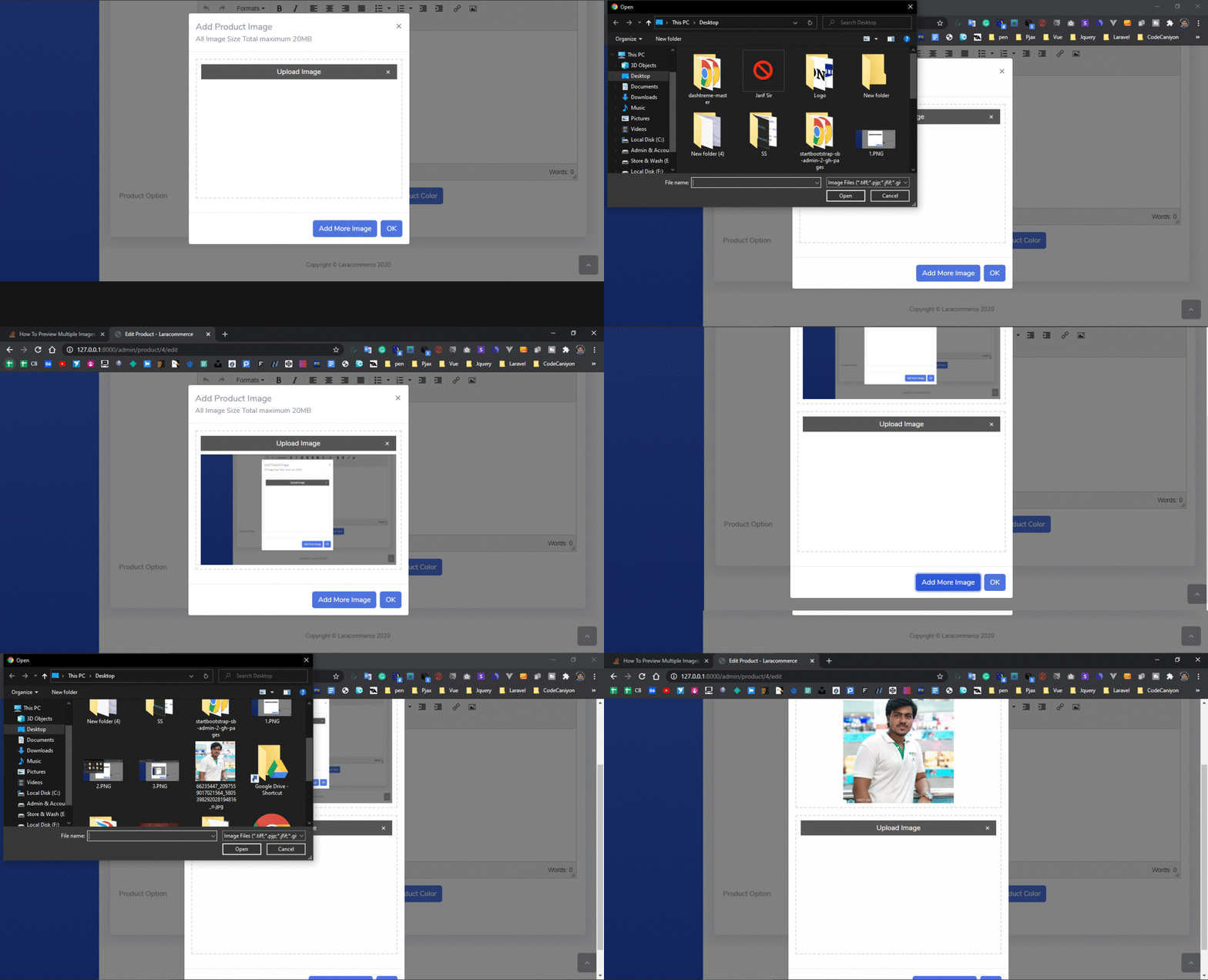
I have a Bootstrap Modal for uploading multiple images. When the User Click 'Add-Product-Image' Button, it will generate a new image upload input-form, and when the user selects an image it will instantly show an image below the upload button. My code works fine but I have a little issue.

My issue: When the User Click 'Add-Product-Image' Button, it will generate a new image upload input-form then select the image and new image replace the first image. I want to show the multiple images

<div class="product-image">
    <div class="form-group">
        <div class="Image-upload">
            <span class="image-option-close">&times;</span>
            <label for="product_images"> Upload Image </label>
            <img src="" id="image"  class="h-100" alt="">
            <input type="file" id="product_images[]" accept="image/*" name="product_images" onchange="readURL(this);">
           </div>
         </div>
       </div>


$(function () {
        $(this).on('click', '#add-product-image', function () {
            var form = '<div class="form-group"><div class="Image-upload"><span class="image-option-close">&times;</span><label for="product_images" class="">Upload Image</label><input type="file" id="product_images" accept="image/*" name="product_images[]" onchange="readURL(this);"></div></div>';
            $('.product-image').append(form)
        });

        $(this).on('click', '.image-option-close', function () {
            var target_input = $(this).parent();
            target_input.remove();
        })
    });

function readURL(input) {
        if (input.files && input.files[0]) {
            var reader = new FileReader();
            reader.onload = function (e) {
                $('#image')
                    .attr('src', e.target.result)
            };
            reader.readAsDataURL(input.files[0]);
        }
    }

Please See the gif file https://i.postimg.cc/MG3njJBS/ezgif-com-gif-maker.gif
2 Answers

I think I missunderstood, what you mean is add jquery handling right? this is no relate to laravel but why you tagged laravel? maybe this will help

$(function () {
        $(this).on('click', '#add-product-image', function () {
            var form = '<div class="form-group"><div class="Image-upload"><span class="image-option-close">&times;</span><label for="product_images" class="">Upload Image</label><input type="file" id="product_images" accept="image/*" name="product_images[]" onchange="readURL(this);"></div></div>';
            $('.product-image').append(form)
        });

        $(this).on('click', '.image-option-close', function () {
            var target_input = $(this).parent();
            target_input.remove();
        })
    });

function readURL(input) {
        if (input.files && input.files[0]) {
            var reader = new FileReader();
            reader.onload = function (e) {
                var newimage = $('#image').clone()
                    .attr('src', e.target.result);
                                $('.product-image').prepend(newimage)

                    
            };
            reader.readAsDataURL(input.files[0]);
        }
    }
<script src="https://cdnjs.cloudflare.com/ajax/libs/jquery/3.3.1/jquery.min.js"></script>
<input type="file" id="product_images" accept="image/*" name="product_images" onchange="readURL(this);">


<div class="product-image">
    <div class="form-group">
        <div class="Image-upload">
            <span class="image-option-close">&times;</span>
            <label for="product_images"> Upload Image </label>
            <img src="" id="image"  class="h-100" alt="">

           </div>
         </div>
       </div>

old answer:

You need different name attribute for each file input or you can simply it by using array. just add suffix [] to the name attribute. example:

<input type="file" id="product_images" accept="image/*" name="product_images[]" onchange="readURL(this);">

then in your controller write something like this:

foreach(request()->product_images as $image){
    $name = $image->getClientOriginalName();
    $image>move(public_path() . '/mytestfile/', $name); 
}

Firstly, you need to use a class selector for your img preview not an id - since the id must be unique for each element in the DOM.

Secondly, to preview each image respectively after clicking on Add-Product-Image you need add its own img element so that we can use this inputs img preview in that relevant section.

To get the actual img and the closest input we need to use jQuery Prev() method.

$(input).prev('img.image').attr('src', e.target.result)

Live Working Demo:

$(function() {
  $(this).on('click', '#add-product-image', function() {
    var form = '<div class="form-group"><div class="Image-upload"><span class="image-option-close">&times;</span><label for="product_images" class="">Upload Image</label><br><img src="" class="image"style="width: 200px;height: 200px;" alt=""><input class="form-control" type="file" id="product_images[]" accept="image/*" name="product_images[]" onchange="readURL(this);"></div></div>';
    $('.product-image').append(form)
  });

  $(this).on('click', '.image-option-close', function() {
    var target_input = $(this).parent();
    target_input.remove();
  })
});

function readURL(input) {
  if (input.files && input.files[0]) {
    var reader = new FileReader();
    reader.onload = function(e) {
      $(input).prev('img.image').attr('src', e.target.result)
    };
    reader.readAsDataURL(input.files[0]);
  }
}
<!-- Latest compiled and minified CSS -->
<link rel="stylesheet" href="https://maxcdn.bootstrapcdn.com/bootstrap/4.5.2/css/bootstrap.min.css">

<!-- jQuery library -->
<script src="https://ajax.googleapis.com/ajax/libs/jquery/3.5.1/jquery.min.js"></script>

<!-- Popper JS -->
<script src="https://cdnjs.cloudflare.com/ajax/libs/popper.js/1.16.0/umd/popper.min.js"></script>

<!-- Latest compiled JavaScript -->
<script src="https://maxcdn.bootstrapcdn.com/bootstrap/4.5.2/js/bootstrap.min.js"></script>
<div class="product-image">
  <div class="form-group">
    <div class="Image-upload">
      <span class="image-option-close">&times;</span>
      <label for="product_images">Upload Image </label>
      <br>
      <img src="" class="image" style="width: 200px;height: 200px;" alt="">
      <input class="form-control" type="file" id="product_images[]" accept="image/*" name="product_images" onchange="readURL(this);">
    </div>
  </div>
</div>
<button id="add-product-image" class="btn btn-success">Add-Product-Image</button>

Related