
Please. How disabled mark tag ? Square around <>. If my coursor is before tag allways mark tag.

Please. How disabled mark tag ? Square around <>. If my coursor is before tag allways mark tag.
GitHub repository: https://github.com/vincaslt/vscode-highlight-matching-tag
This extension highlights matching opening and/or closing tags. Optionally it also shows path to tag in the status bar. Even though VSCode has some basic tag matching, it's just that - basic. This extension will try to match tags anywhere: from tag attributes, inside of strings, any files, while also providing extensive styling options to customize how tags are highlighted.
Officially supported markup: HTML and JSX. Other flavors (XML, Vue, Angular, PHP) should work, but there are no guarantees. Feel free to report the issues on them anyway.
Result:
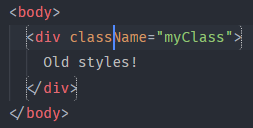
MORE INFO VISITUsing extension highlight-matching-tag and adding these settings
"highlight-matching-tag.style": {
    "backgroundColor": "rgba(63, 191, 63, 0.20)"
},
"editor.occurrencesHighlight": false
You can add this to the settings.json file to disable the matching of the brackets on HTML files:
"[html]": {
    "editor.matchBrackets": "never"
}
But keep in mind, this disables also the bracket matching on every bracket ((), []) inside HTML files.