
Current Behavior
Class names generated by makeStyles in production break functionalty that apparently works correctly in development mode.
The & (nested) operator breaks in production cause the unique identifier in classnames do not match.
Simple example
1 - Development Mode :white_check_mark:
1.1 Inspecting <head> tag, the generated styles:
- Custom
makeStylesgeneration in my component:

1.2 The classnames rendered by MaterialUI:

(Ignore additional properties, there are informative without functionality)
1.3 The matched styles inspected in chrome:

The match its correct and correctly override the styles.
This WORKS
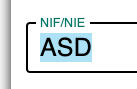
The expected scale of transform is correctly overridden.
2 - Production Mode :x:
2.1 Inspecting <head> tag, the generated styles:
- Custom
makeStylesgeneration in my component:
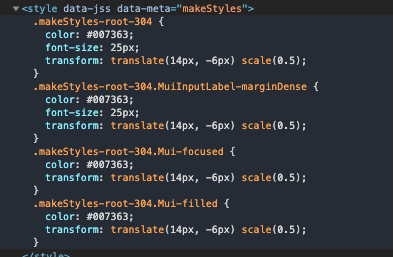
(Obiously is the same that in development)
2.2 - The classnames rendered by MaterialUI:
 (Ignore additional properties, there are informative without functionality)
They have all a random postfix.
(Ignore additional properties, there are informative without functionality)
They have all a random postfix.
2.3 The matched styles inspected in chrome:

The classname .makeStyles-root-304.MuiInputLabel-marginDense generated by makeStyles does no match in the MaterialUi label cause the identifier .MuiInputLabel-marginDense-220. Ends with 220 in the label HTML node, when in the generated makeStyles has not 220 postfix
Do not match. This DO NOT WORKS
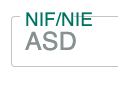
Style is not overridden
Expected Behavior
In production mode, the identifiers can be matched with a variable os something. Maybe I am mistaken hard, but I don't know why this is caused.
Steps to Reproduce
I write a simple example of what i am trying, you can check a Codesandbox example working correctly (Codesandbox as development environment) in https://codesandbox.io/s/simbleapp-1xzgd?file=/public/index.html
To check the issue I am posting its needed be in a production like environment, then just download the same Codesandbox at your local and:
npm install --production
npm run build
npm run start:prod
I am just trying to do a simple library wrapper of material for my projects, and I found this issue casuality checking the production App cause in development i never face that behaviour.
Your Environment
"Core library" dependencies
@material-ui/core  v4.11.0
@material-ui/styles  v4.10.0
React   peer
Browser   Chrome
TypeScript  3.7.3
"App" dependencies
React 16.13.0
Browser Chrome