
I work for a corporation, and we are trying to set up Application Insights for one of our products. We have the instrumentation key and everything integrated into the code where necessary, but we still can't see all the information we want...
The goal is for our screen to look like this: https://docs.microsoft.com/en-us/azure/azure-monitor/app/media/asp-net-dependencies/3-end-to-end.png
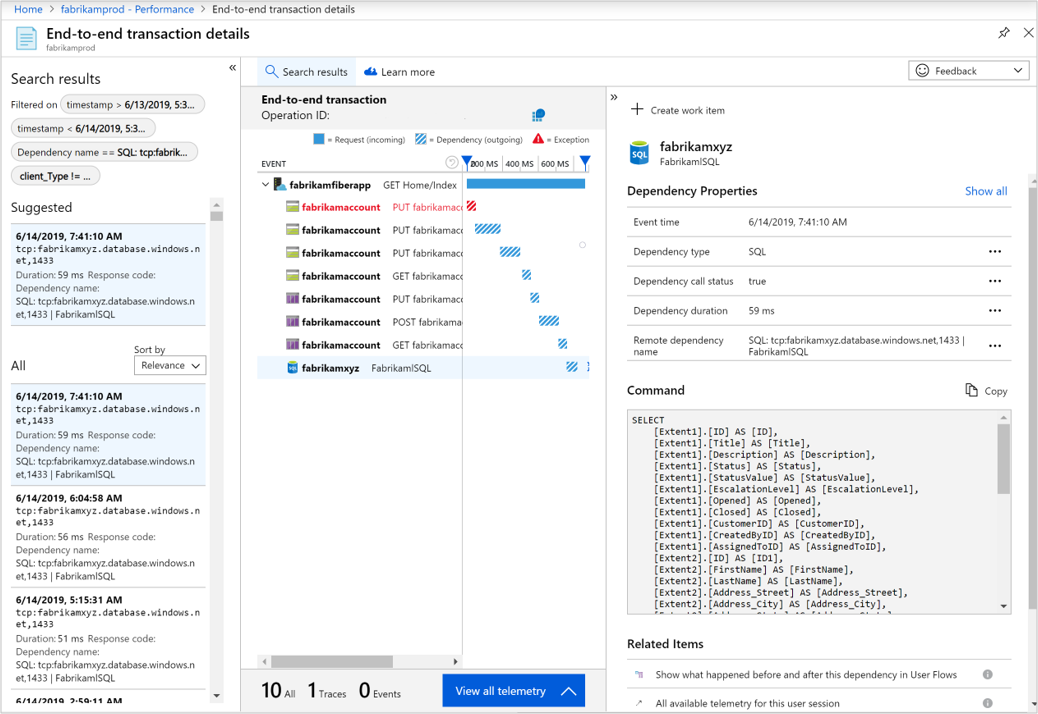
We've been using this link as a reference: https://docs.microsoft.com/en-us/azure/azure-monitor/app/asp-net-dependencies
We have installed Microsoft.Data.SQLClient NuGet Package, and the XML line, but the advanced SQL data still does not show in App Insights. We are running things locally on IIS Express, our project runs, and when we interact with the web app we see spikes in our performance graph, so we know it is collecting some metrics.
We apparently need to be running SDK Version 'rddp'. We are using the version 'rddf' and 'rdddsd' which indicates dependencies are collected via DiagnosticSource or EventSource callbacks, and hence full SQL query aren't being captured.
We got the information about the SDK Version by running this command in Logs in App Insights: dependencies | where timestamp > ago(1d) | summarize count() by cloud_RoleInstance, SDK version
Here is the output from that command.
Our team has scoured the internet and every other stack overflow questions and it feels like we've tried everything. I have found similar posts where people have similar problems, but the fixes that worked for them haven't worked for us.