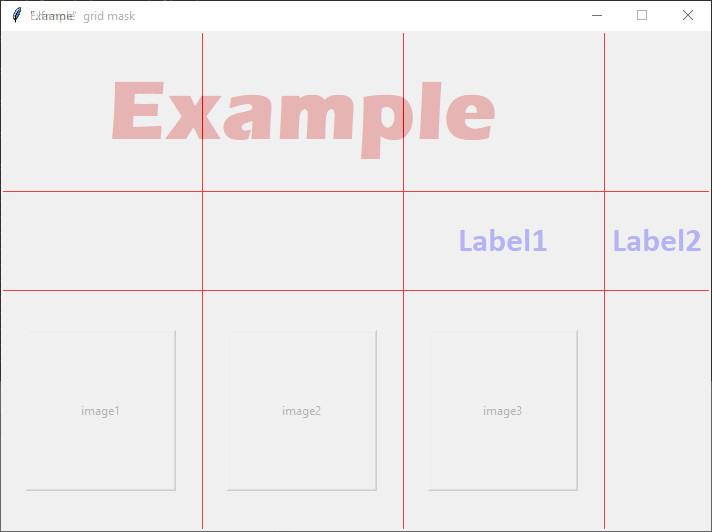
My expected output is:
 _______________________________
|-------------------------------|
|            EXAMPLE            |
|                       Label1  |
| ______     _______    ______  |
||      |   |       |  |      | |
||      |   |       |  |      | |
||______|   |_______|  |______| |
|_______________________________|
Here I want to place these three buttons at a fixed distance apart and at the center, means The size of the buttons are fixed and if the user tries to expand the size of window the ratio of distance between buttons should be maintained
Here is my code:
from tkinter import *

window = Tk()
window.minsize(710, 500)
window.state('zoomed')
window.title('Example')

frame = Frame(window)
frame.pack(fill=BOTH, expand=True)

frame2 = Frame(window)
frame2.pack(fill=BOTH, expand=True)


Label(frame, text="Example", fg='red3',
      font=('Eras Bold ITC', '65', 'bold')).pack(anchor = 'n', pady = 50)

Label(frame, text="Label2", fg='blue',
      font=('Calibri', '25', 'bold')).pack(anchor = 'e', padx = 40)

Button(frame2, height='10', width='20', text = 'image1').grid(row = 0, column = 0, padx = 20)
Button(frame2, height='10', width='20', text = 'image2').grid(row = 0, column = 6, padx = 20)
Button(frame2, height='10', width='20', text = 'image3').grid(row = 0, column = 12, padx = 20)

mainloop()
Here I have used the grid method but I have tried applying
pack()but it places the button just below the first one
Output: https://i.stack.imgur.com/ItxvB.jpg

Expected Output: Even on expanded window (Edited Image) https://i.stack.imgur.com/Koe34.jpg