
I am trying to have the file upload list display to the right of the Upload Dragger element since space on the screen is limited in the vertical sense. For reference, this is an image example of what I am trying to do:
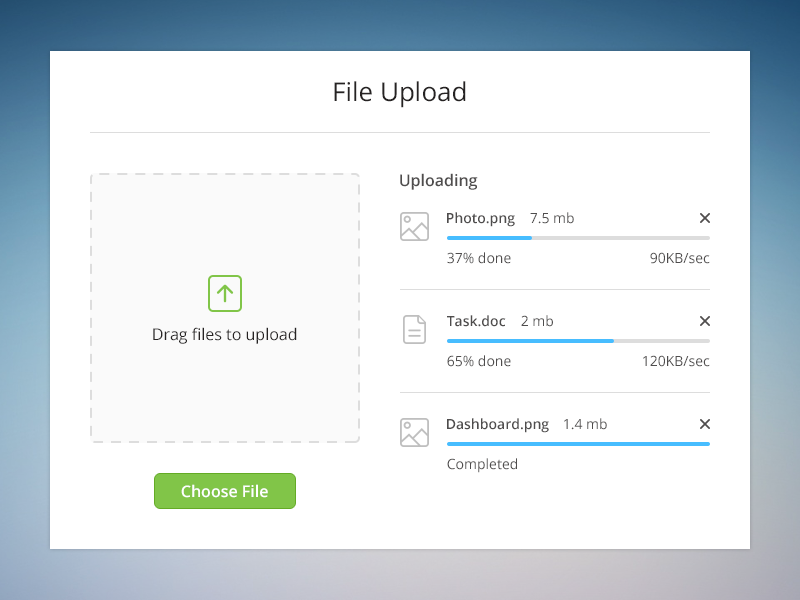
However, whatever I do, the file upload list that is produced is always displayed below the dragger. Even when I specify 'display: inline-block' as the styling. It seems that the upload list gets dynamically generated because of the antd framework and I can't modify its positioning. Can anyone over any insight if this is possible using the antd generated upload list ?
import React from 'react';
import { Upload, Icon, message, Typography, Button } from 'antd';

const { Dragger } = Upload;

export interface projectFilesUploadFormProps {
    handleUpdateAndNext(updateProjectDetails: () => void): void;
    handleBack(): void;

}


const draggerProps = {
    name: 'file',
    multiple: true,
    action: 'https://www.mocky.io/v2/5cc8019d300000980a055e76',
    onChange(info: { file: { status?: any; name?: any; }; fileList: any; }) {
      const { status } = info.file;
      if (status !== 'uploading') {
        console.log(info.file, info.fileList);
      }
      if (status === 'done') {
        message.success(`${info.file.name} file uploaded successfully.`);
      } else if (status === 'error') {
        message.error(`${info.file.name} file upload failed.`);
      }
    },
  };

export const ProjectFilesUploadForm = (props: projectFilesUploadFormProps) => {


    return (
        <div
        style={{
            display: 'flex',
            flexDirection: 'column',
            justifyContent: 'space-between',
            height: 'inherit'
        }}
      >
          <span>
        <Typography.Title level={2}>
          Upload your Project files
        </Typography.Title>
        <Typography.Text >
          It can be any kind of file
        </Typography.Text>
      </span>
      <span style={{ display: 'inline-block'}}> <---- DOESN'T DISPLAY INLINE
        <Dragger  listType="picture" style={{borderRadius: 0, width: '50%'}} {...draggerProps}>
        <p className="ant-upload-drag-icon">
          <Icon type="inbox" />
        </p>
        <p className="ant-upload-text">Click or drag file to this area to upload</p>
        <p className="ant-upload-hint">
          Support for a single or bulk upload. Strictly prohibit from uploading company data or other
          band files
        </p>
      </Dragger>
      </span>
      <span>
      <Button
          type="link"
          data-testid="new-project-button"
          size="large"
          style={{ width: 100 }}
          onClick={() => props.handleBack() }
        >
          Back
        </Button>
        <Button
          type="primary"
          data-testid="new-project-button"
          size="large"
          style={{ width: 100, marginBottom: 50 }}
          onClick={() => props.handleUpdateAndNext(props.updateProjectDetails)}
        >
          Next
        </Button>
      </span>

      </div>

    );
