How to use Visual Studio as an IDE with variable length array(VLA) working?

Viewed 3153

In any normal compiler for C or C++, variable length arrays are working normally but in Visual Studio Community 2019, VLAs are not working. How can i in any way use Visual Studio as an IDE (becasue i like it's features) and still have VLAs in C and C++

I tried to change the compiler it uses. I tried to locate the migwin compiler but couldn't do it. All online tutorials differ from what i see in the latest version of Visual Studio 2019.

int n;
cin>>n;
int arr[n]; // This line gives an error

int arr[n]; //This line should work in Visual Studio 2019. It doesn't matter what compiler it uses. Just I need to make this thing work in VS Community 2019 because i want to use it as an IDE.
3 Answers

This answer is about C++.

Variable length array is not ISO C++ standard, some compilers accept it as an extension. e.g. gcc

Variable-length automatic arrays are allowed in ISO C99, and as an extension GCC accepts them in C90 mode and in C++.


Edit

Such an extension still can be a conforming implementation as long as it doesn't alter the behavior of well formed program.


If you use VLA though, then your code is not portable as other compilers may or may not have such an extension and the one that has now can stop working anytime the vendor decides to drop the support.

If you don't know the size at compile time and want to use C++ then use std::vector. You can simply change your code to:

int n;
cin>>n;
vector<int> arr(n);

However if you need to have VLA anyway here is a list of compilers support it: Live on godbolt (compilers with green mark have the support)

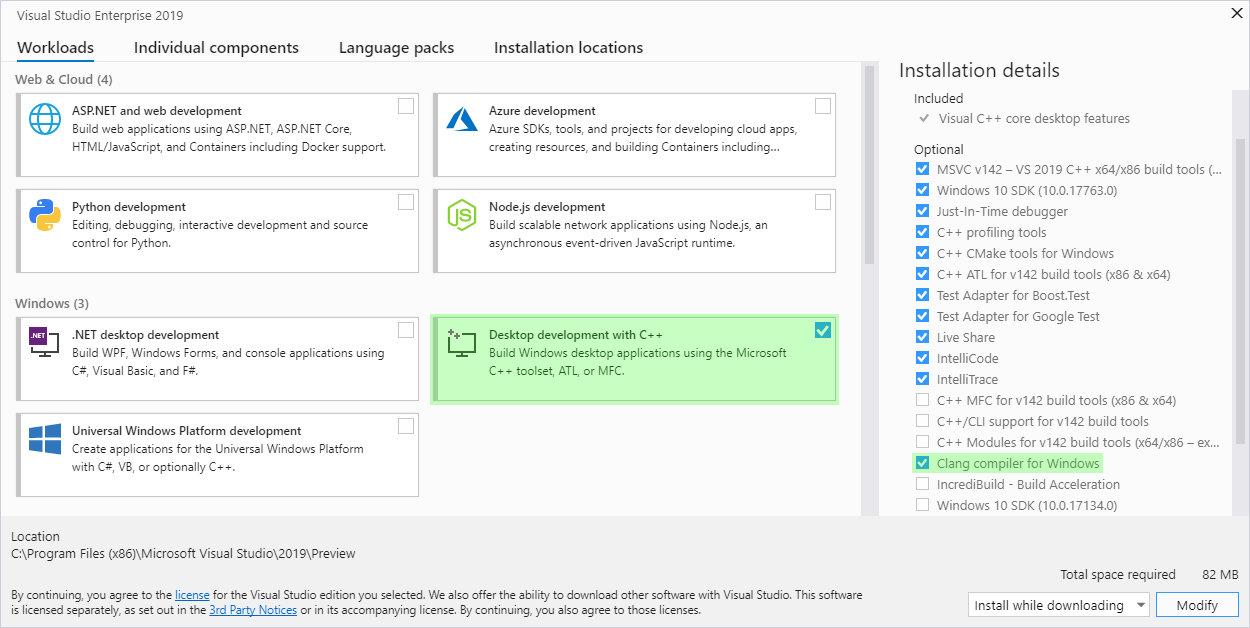
MSVC is not in the list. So you may use clang in your VS. Here is a tutorial. Or even easier you can use out of the box support on VS2019:

On Windows, it’s easy to install the Clang tools. Just grab the “Clang compiler for Windows,” an optional component of the “Desktop development with C++” workload. This will install everything you need to develop with Clang on Windows.

VS19 clang

VLAs can be used in "CMake Project" which are C++ applications. Create a new "CMake Project" instead of "Console Application" and then go to Project in upper-left menus and select the last option (CMake settings for ProjectName). It will open a json file. Under Toolset option, click the drop down menu to select Clang.

Above VS2019 16.1, Clang is already available. If it's not available, click "Modify" VS2019 in Visual Studio Installer and from C/C++ Development tools, select "Clang tools for windows". This will install Clang.

So the main thing is to select "CMake Project" instead of "Console Application" which is often not shown in any instructions. VLAs will work in the .cpp file now and Visual Studio 2019 can be used as an IDE will VLA support.

https://devblogs.microsoft.com/cppblog/clang-llvm-support-in-visual-studio/

In any normal compiler for C or C++, variable length arrays are working normally

Depending on how I read that sentence, it's either tautological or nonsensical. Yes, normal things work normally, but VLA arrays "work" in C++ only in the sense that they're not defined by the language.

VLAs are defined by C, and have been for 20 years. And, yes, many C compilers — but not C++ compilers — support them. A glaring exception is Microsoft's compiler, which does not. It does not conform to the C99 standard (let alone C11, C14, or C17). You could say they're a little behind. Their position seems to be that they'll implement as much of the C language as they find convenient within the context of a C++ compiler. Those parts of C that are not part of C++ don't qualify.

This much is clear: keeping the C compiler current is not a priority for Microsoft.

Just I need to make this thing work in VS Community 2019 because i want to use it as an IDE.

The simple truth of the matter is that if you want to work in modern C, you can't use Microsoft's compiler. You might be able to figure out how to configure the IDE to use the GNU compiler. At some point, though, you might start to ask if it's worth your time to wrestle with a system so hostile to your goals.

Related