Welcome to Stackoverflow community
Now you want to start a different activity for each selected bubble item; please correct me if I am wrong.
To do that you need to start your activity intent within onBubbleSelected() of BubblePickerListener of the BubblePicker widget, and utilize the item argument to differentiate between items; you can use item.getTitle() for that
To to so:
picker.setListener(new BubblePickerListener() {
    @Override
    public void onBubbleSelected(@NotNull PickerItem item) {

        if (item.getTitle() != null) {
            switch(item.getTitle()) {

                case "item1":
                    // start activity of item1
                    break;

                case "item2":
                    // start activity of item2
                    break;

                case "item3":
                    // start activity of item3
                    break;
            }

        }
    }

    @Override
    public void onBubbleDeselected(@NotNull PickerItem item) {

    }
});
And below is the full example semplified with a single activity for all items, but passing in a different value (item title) for each item.
How it looks like
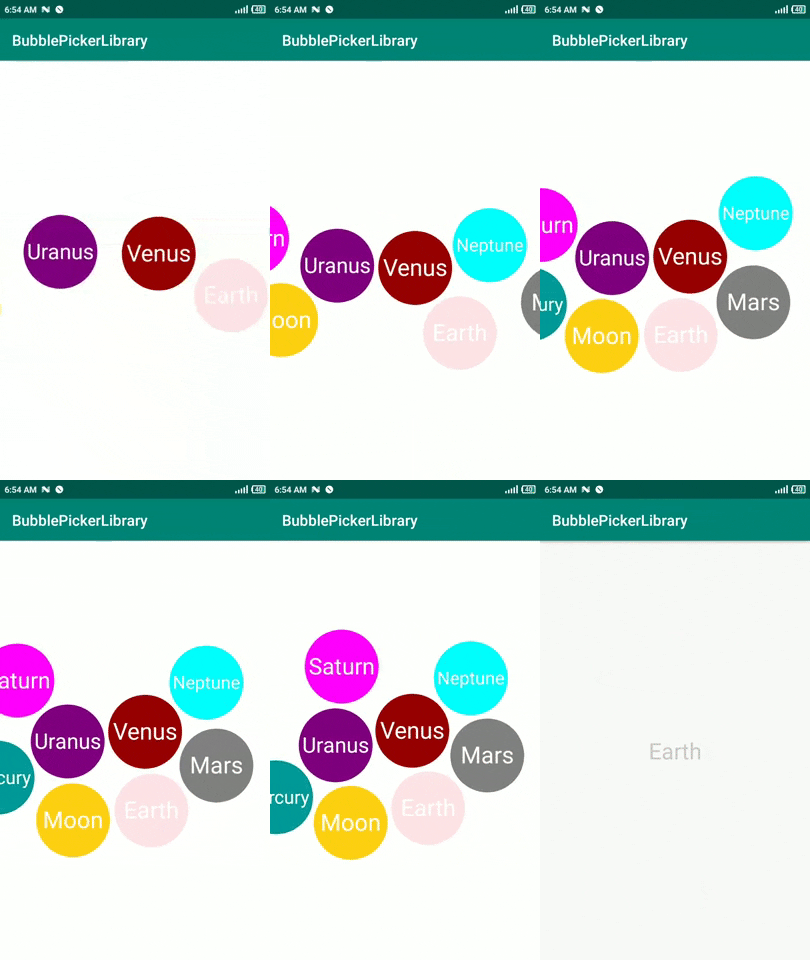
Layout
activity_main.xml
<?xml version="1.0" encoding="utf-8"?>
<androidx.constraintlayout.widget.ConstraintLayout xmlns:android="http://schemas.android.com/apk/res/android"
    xmlns:app="http://schemas.android.com/apk/res-auto"
    xmlns:tools="http://schemas.android.com/tools"
    android:layout_width="match_parent"
    android:layout_height="match_parent"
    tools:context=".MainActivity">

    <com.igalata.bubblepicker.rendering.BubblePicker
        android:id="@+id/picker"
        android:layout_width="match_parent"
        android:layout_height="match_parent"
        app:backgroundColor="@android:color/white"
        app:layout_constraintBottom_toBottomOf="parent"
        app:layout_constraintLeft_toLeftOf="parent"
        app:layout_constraintRight_toRightOf="parent"
        app:layout_constraintTop_toTopOf="parent" />

</androidx.constraintlayout.widget.ConstraintLayout>
activity_planet.xml
<?xml version="1.0" encoding="utf-8"?>
<androidx.constraintlayout.widget.ConstraintLayout xmlns:android="http://schemas.android.com/apk/res/android"
    xmlns:app="http://schemas.android.com/apk/res-auto"
    xmlns:tools="http://schemas.android.com/tools"
    android:layout_width="match_parent"
    android:layout_height="match_parent"
    tools:context=".PlanetActivity">

    <TextView
        android:id="@+id/title"
        android:layout_width="wrap_content"
        android:layout_height="wrap_content"
        android:textSize="30sp"
        app:layout_constraintBottom_toBottomOf="parent"
        app:layout_constraintEnd_toEndOf="parent"
        app:layout_constraintStart_toStartOf="parent"
        app:layout_constraintTop_toTopOf="parent" />

</androidx.constraintlayout.widget.ConstraintLayout>
Behavior
MainActivity
public class MainActivity extends AppCompatActivity {

    @Override
    protected void onCreate(Bundle savedInstanceState) {
        super.onCreate(savedInstanceState);
        setContentView(R.layout.activity_main);

        BubblePicker picker = findViewById(R.id.picker);
        picker.setBubbleSize(10);


        final String[] titles = getResources().getStringArray(R.array.planets);
        final TypedArray colors = getResources().obtainTypedArray(R.array.colors);

        picker.setAdapter(new BubblePickerAdapter() {
            @Override
            public int getTotalCount() {
                return titles.length;
            }

            @NotNull
            @Override
            public PickerItem getItem(int position) {
                PickerItem item = new PickerItem();
                item.setTitle(titles[position]);
                item.setTextSize(80);
                item.setColor(colors.getColor(position, 0));

                item.setTextColor(ContextCompat.getColor(MainActivity.this, android.R.color.white));
                return item;
            }
        });


        picker.setListener(new BubblePickerListener() {
            @Override
            public void onBubbleSelected(@NotNull PickerItem item) {
                Toast.makeText(MainActivity.this, item.getTitle(), Toast.LENGTH_SHORT).show();
                Intent intent = new Intent(MainActivity.this, PlanetActivity.class);
                intent.putExtra("planet", item.getTitle());
                startActivity(intent);
            }

            @Override
            public void onBubbleDeselected(@NotNull PickerItem item) {

            }
        });

    }
}
PlanetActivity
public class PlanetActivity extends AppCompatActivity {

    @Override
    protected void onCreate(Bundle savedInstanceState) {
        super.onCreate(savedInstanceState);
        setContentView(R.layout.activity_planet);

        ((TextView) findViewById(R.id.title)).setText(getIntent().getStringExtra("planet"));

    }
}
Resources
strings.xml
<resources>
    <string name="app_name">BubblePickerLibrary</string>
    <string name="earth">Earth</string>
    <string name="moon">Moon</string>
    <string name="jupiter">Jupiter</string>
    <string name="mercury">Mercury</string>
    <string name="venus">Venus</string>
    <string name="mars">Mars</string>
    <string name="saturn">Saturn</string>
    <string name="uranus">Uranus</string>
    <string name="neptune">Neptune</string>


    <string-array name="planets">
        <item>@string/earth</item>
        <item>@string/moon</item>
        <item>@string/mercury</item>
        <item>@string/venus</item>
        <item>@string/mars</item>
        <item>@string/saturn</item>
        <item>@string/uranus</item>
        <item>@string/neptune</item>
    </string-array>

</resources>
colors.xml
<?xml version="1.0" encoding="utf-8"?>
<resources>
    <color name="colorPrimary">#008577</color>
    <color name="colorPrimaryDark">#00574B</color>
    <color name="colorAccent">#D81B60</color>
    <color name="earth">#ffe3e9</color>
    <color name="moon">#ffd014</color>
    <color name="mercury">#009999</color>
    <color name="venus">#990000</color>
    <color name="mars">#808080</color>
    <color name="saturn">#ff00ff</color>
    <color name="uranus">#800080</color>
    <color name="neptune">#00ffff</color>


    <string-array name="colors">
        <item>@color/earth</item>
        <item>@color/moon</item>
        <item>@color/mercury</item>
        <item>@color/venus</item>
        <item>@color/mars</item>
        <item>@color/saturn</item>
        <item>@color/uranus</item>
        <item>@color/neptune</item>
    </string-array>


</resources>
Dependencies
App Module level
implementation 'com.github.igalata:Bubble-Picker:v0.2.4'
Project Level
allprojects {
    repositories {
        google()
        jcenter()
        maven { url "https://jitpack.io" }
    }
}
