
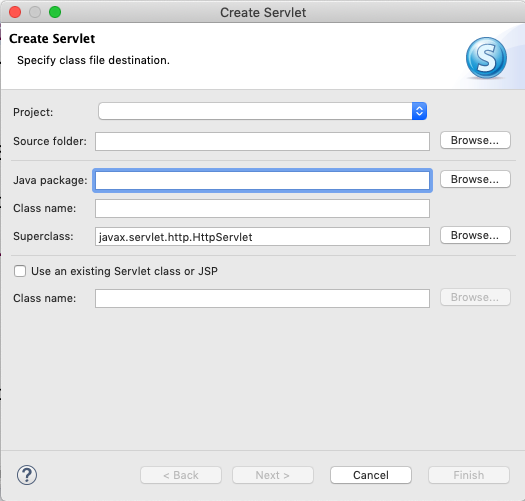
I'm experiencing an issue similar to this one but the solution provided doesn't cut it for me. So the issue in question is I can't select the project in the Create Servlet dialog in Eclipse. This prevents me from completing the process of creating a new servlet.
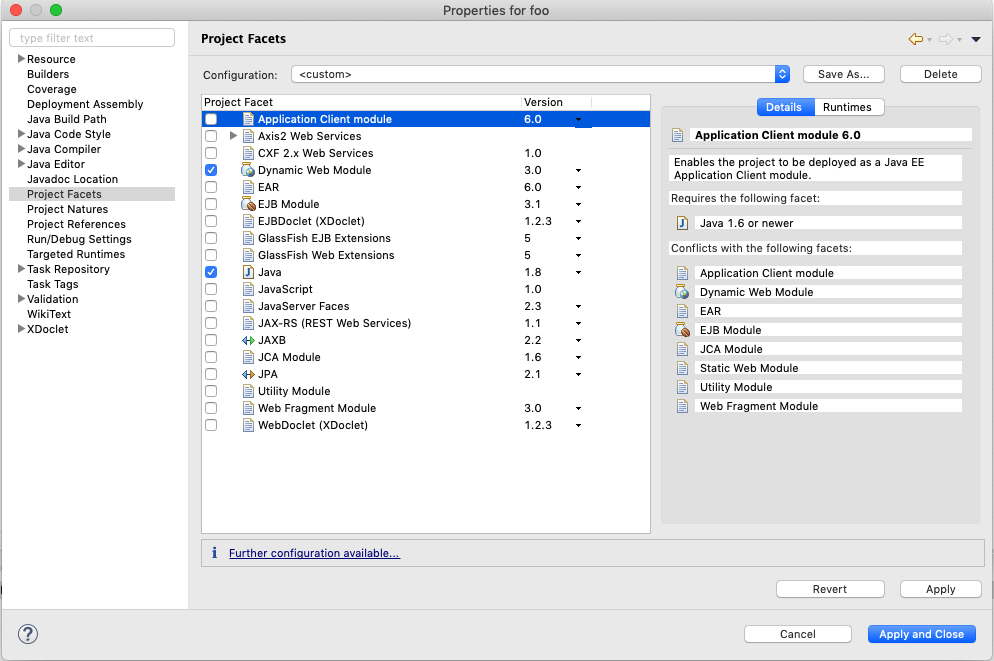
As recommended by the solution I have created a Dynamic Web Project and have ensured that the Dynamic Web Module is checked in foo -> Properties -> Project Facests. I'm also in the Java EE Perspective.
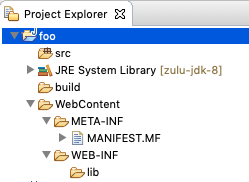
Project structure:-
Create servlet wizard:-
Project properties:-
I'm running the following instance of Eclipse on Mac OS Mojave Version 10.14.5:-
Eclipse IDE for Enterprise Java Developers.
Version: 2018-12 (4.10.0) Build id: 20181214-0600
Any help would be appreciated. Cheers!
Edit (.project file) below:-
   <?xml version="1.0" encoding="UTF-8"?>
      <projectDescription>
      <name>Foo</name>
      <comment></comment>
      <projects>
      </projects>
      <buildSpec>
         <buildCommand>
             <name>org.eclipse.jdt.core.javabuilder</name>
             <arguments>
             </arguments>
         </buildCommand>
         <buildCommand>

     <name>org.eclipse.wst.common.project.facet.core.builder</name>
        <arguments>
        </arguments>
    </buildCommand>
    <buildCommand>
        <name>org.eclipse.wst.validation.validationbuilder</name>
        <arguments>
        </arguments>
    </buildCommand>
</buildSpec>
<natures>
    <nature>org.eclipse.jem.workbench.JavaEMFNature</nature>


<nature>org.eclipse.wst.common.modulecore.ModuleCoreNature</nature>

 <nature>org.eclipse.wst.common.project.facet.core.nature</nature>
     <nature>org.eclipse.jdt.core.javanature</nature>
 </natures>
</projectDescription>