Computationally quickly project 3d object onto 2d plane and get surface area of that (for aerodynamic drag)?

Viewed 1661

I'm trying to simulate swimming in Unity (using c#) by actually having the movements of the object create drag forces which then propel the object through the liquid.

to do this, I'm using the formula

F = -½ * C * d * velocity squared * A

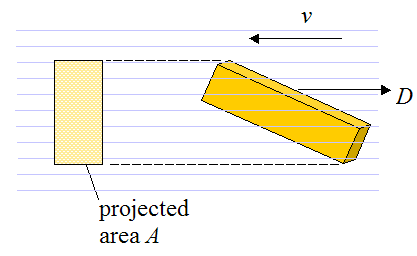
where C is a coefficient of drag, d is the density of liquid, and A is the object's surface area that faces the direction of motion. A is calculated by projecting the 3D object onto a 2D plane perpendicular to the velocity vector.

Here's an image explaining A: https://www.real-world-physics-problems.com/images/drag_force_2.png

Now I suspect Unity has a built in way to do this type of projection (since it does that every time there's a camera in the scene).

My question is:

  1. How do I do this? Searches have not helped me with this (unless you're trying to do it with a camera)
  2. Is there a built in function in Unity?

  3. Is this computationally expensive? I am going to be doing this individual for possibly thousands of objects at a time.

I DO NOT need it to be very accurate. I'm just trying to make it a bit realistic, so I want objects with much bigger A to have more drag than ones with much lower A. Slight differences are inconsequential. The objects themselves won't be super complex, but some may have very different areas depending on orientation. So like a cone, for example, could change quite a bit depending on which direction it's moving. I could approximate the A with a simple shape if needed like ellipsoid or rectangle.

If it is computationally expensive, I read a journal article that used a cool way to approximate it. He created a grid of points (which he called voxels) within the objects spaced evenly, which effectively split the object into equal-sized spheres (which always have a cross-sectional surface area of a circle (easy to calculate). Then he calculated the drag force on each of these spheres and added them up to find the total drag (see images).

Voxels calculated drag

Images from THESIS REPORT ON: Real-time Physics-based Animation of a Humanoid Swimmer, Jurgis Pamerneckas, 2014

link https://dspace.library.uu.nl/bitstream/handle/1874/298577/JP-PhysBAnimHumanSwim.pdf?sequence=2

This successfully estimated drag for him. But I see one problem, that the "voxels" that are deep in object are still contributing to drag, where only the ones near the leading edge should be contributing.

So, I thought of a possibility where I could project just the voxel points onto the 2Dplane (perpendicular to velocity) and then find a bounding shape or something, and approximate it that way. I suspect projecting a few points would be faster than projecting a whole 3d object.

this raises a few more questions:

  1. Does this seem like a better method?
  2. How would I create voxels in Unity?
  3. Is it computationally faster?
  4. Any better ideas?

Another thought I had was to do raycasting of some sort, though I can't think of how to do that, perhaps a grid of raycasts parallel to the velocity vector? and just count how many hit to approximate area?

UPDATE

I managed to implement basic drag force by manually typing in the value for A, now I need to approximate A in some way. Even with manual typing, it works surprisingly well for very basic "swimmers". In the image below, the swimmer correctly spins to the right since his left arm is bigger (I gave it double the value for A). Simmers

UPDATE 2

Based on @Pierre's comments, I tried computing A for the overall shape using the object's vertices (and also by selecting a few points on the vertices), projecting them onto a plane, and calculating the overall area of the resulting polygon. However, This only calculated the overall drag force on the object. It didn't calculate any rotational drag caused by certain parts of the object moving faster than others. For example, think of a baseball bat swing, the farthest part of the bat will be creating more drag since it's swinging faster than the handle.

This made me go back to the "voxel" idea, since I could calculate local drag sampled at several parts of the object.

I'm playing around with this idea, estimating the voxel's surface area by a circle. But still having a few issues making this estimate relatively accurate. Despite it being inaccurate, this seems to work quite well.

First, I'm using recasts to determine if the voxel can "see" in the direction of the velocity to determine if it's on the leading face of the object. If so, then I take the voxel's local (circular) surface area, and multiplying this by the dot product of the circle's normal and the local velocity vector. This scales the area based on how much it's actually facing the direction of motion.

The inaccuracies so far are due to the circles not actually estimating the local surface area very well, especially for weirdly elongated objects. The further vertices are from each other then the worse the estimation becomes. Any help in this department would be appreciated.

Also, I need to optimize this computationally. Right now, doing it with every vertex is proving to be fairly expensive. I'll keep updating as I progress, and any input would be very helpful! I'll post some code soon once I get a bit farther.

UPDATE 3

I did a fairly accurate implementation using voxels which I manually placed on the surface of the object, and manually estimated the local A when facing that voxel. I then used the dot product to estimate how much of that Area was facing the direction of motion. This worked very well. But the problem then was that even voxels that weren't on the leading edge of the object were contributing to drag. So I used Physics.Raycasts to pop a small distance away from the voxel in the direction of velocity, and then raycast back at the voxel. If this raycast hit the collider of the actual object (not the voxel) it meant it was on the leading edge. This worked fantastically and yielded surprisingly accurate natural looking behaviour of drag. Strangely shaped objects would eventually rotate to minimize drag just like you'd expect. However, as soon as I increased the resolution of voxels and/or added a few more objects into the scene, my frame rate dropped to nearly 3fps. The profiler showed that the brunt of the calculations were due to the raycasting step. I've tried to think of other ways to determine if the voxels are on the leading edge, so far to no avail.

So TLDR, I simulated drag really well, but not in a computationally fast manner.

1 Answers

I never figured out a way to speed up the calculations, but the simulation works great as long as the voxel count is low.

The simulation calculates drag based on the velocity of each voxel. It checks whether it's on the leading edge of the object, and if so applies its drag force.

The code is probably a bit difficult to follow but should at least get you started if you want to try it out. Let me know if you have any questions or need clarifications.

This code is a slightly cleaned up version from my Update#3 above.

In action: At start of simulation (object moving in straight line towards bottom right of screen)

start of drag

you can see the force arrows added for visualization and the circles representing the voxels. The force is correctly proportional to the surface area the voxels roughly represent. and only leading edges of the shapes are contributing drag

As the simulation continues, the shape correctly rotates into the most aerodynamic position because of the drag, and the rear sections stop contributing drag.

farther in simulation


Drag Enabled Shape Class

this is dragged on main objet (rigidbody) to enable drag. You can either have it create voxels in a spread around a sphere shape. Or load in your own custom Voxels which are game objects with the Voxel Script attached, and are children of this object.

using System.Collections;
using System.Collections.Generic;
using UnityEngine;
using System.Linq;

[RequireComponent (typeof(Rigidbody))]
public class DragEnabledShape : MonoBehaviour {

    const float EPSILON = 0.0001f;

    public Voxel voxelPrefab;
    public float C = 1f;
    public float d = 0.5f;
    public int resolutionFactor = 2;
    public float maxDistanceFromCenter = 10f;
    public bool displayDragVisualization = false;
    public float forceVisualizationMultiplier = 1f;
    public bool displayVoxels = false;
    public bool loadCustomVoxels = false;

    List<Voxel> voxels;
    Rigidbody rb;


    // Use this for initialization
    void Awake () {
        voxels = new List<Voxel> ();
        rb = GetComponent<Rigidbody> ();
    }

    void OnEnable () {

        if (loadCustomVoxels) {
            var customVoxels = GetComponentsInChildren<Voxel> ();
            voxels.AddRange (customVoxels);
            if (displayDragVisualization) {
                foreach (Voxel voxel in customVoxels) {
                    voxel.DisplayDrag (forceVisualizationMultiplier);
                }
            }
            if (displayVoxels) {
                foreach (Voxel voxel in customVoxels) {
                    voxel.Display ();
                }
            }
        }
        else {
            foreach (Transform child in GetComponentsInChildren<Transform> ()) {
                if (child.GetComponent<Collider> ()) {
                    //print ("creating voxels of " + child.gameObject.name);
                    CreateSurfaceVoxels (child);
                }
            }
        }
    }

    void CreateSurfaceVoxels (Transform body) {
        List<Vector3> directionList = new List<Vector3> ();
        for (float i = -1; i <= 1 + EPSILON; i += 2f / resolutionFactor) {
            for (float j = -1; j <= 1 + EPSILON; j += 2f / resolutionFactor) {
                for (float k = -1; k <= 1 + EPSILON; k += 2f / resolutionFactor) {
                    Vector3 v = new Vector3 (i, j, k);
                    directionList.Add (v);
                }
            }
        }
        //float runningTotalVoxelArea = 0;
        foreach (Vector3 direction in directionList) {
            Ray upRay = new Ray (body.position, direction).Reverse (maxDistanceFromCenter);
            RaycastHit[] hits = Physics.RaycastAll (upRay, maxDistanceFromCenter);
            if (hits.Length > 0) {
                //print ("Aiming for " + body.gameObject.name + "and hit count: " + hits.Length); 
                foreach (RaycastHit hit in hits) {

                    if (hit.collider == body.GetComponent<Collider> ()) {
                        //if (GetComponentsInParent<Transform> ().Contains (hit.transform)) {
                        //print ("hit " + body.gameObject.name);  
                        GameObject empty = new GameObject ();
                        empty.name = "Voxels";
                        empty.transform.parent = body;
                        empty.transform.localPosition = Vector3.zero;
                        GameObject newVoxelObject = Instantiate (voxelPrefab.gameObject, empty.transform);
                        Voxel newVoxel = newVoxelObject.GetComponent<Voxel> ();
                        voxels.Add (newVoxel);
                        newVoxel.transform.position = hit.point;
                        newVoxel.transform.rotation = Quaternion.LookRotation (hit.normal);
                        newVoxel.DetermineTotalSurfaceArea (hit.distance - maxDistanceFromCenter, resolutionFactor);
                        newVoxel.attachedToCollider = body.GetComponent<Collider> ();
                        if (displayDragVisualization) {
                            newVoxel.DisplayDrag (forceVisualizationMultiplier);
                        }
                        if (displayVoxels) {
                            newVoxel.Display ();
                        }
                        //runningTotalVoxelArea += vox.TotalSurfaceArea;
                        //newVoxel.GetComponent<FixedJoint> ().connectedBody = shape.GetComponent<Rigidbody> ();
                    }
                    else {
                        //print ("missed " + body.gameObject.name + "but hit " + hit.transform.gameObject.name); 
                    }
                }


            }

        }

    }

    void FixedUpdate () {
        foreach (Voxel voxel in voxels) {
            rb.AddForceAtPosition (voxel.GetDrag (), voxel.transform.position);
        }
    }


}

Voxel class

This script is attached to small gameObjects placed around a shape. They represent the locations at which drag is computed. SO for complex shapes these should be at any extremities, and should be fairly spread out over the object. The voxel object's rigid body's mass should approximate the portion of the object this voxel represents.

using System.Collections;
using System.Collections.Generic;
using UnityEngine;

public class Voxel : MonoBehaviour {

    Vector3 velocity;


    public Collider attachedToCollider;

    Vector3 drag;

    public Vector3 Drag {
        get {
            return drag;
        }
    }

    float dragMagnitude;

    public float DragMagnitude {
        get {
            return dragMagnitude;
        }
    }

    bool leadingEdge;

    public bool LeadingEdge {
        get {
            return leadingEdge;
        }
    }

    bool firstUpdate = true;
    public float localSurfaceArea;

    Vector3 prevPos;
    public VoxelForceVisualizer forceVisualizer;
    public VoxelVisualizer voxelVisualizer;

    const float AREA_COEFFICIENT = 1.1f;
    const float EPSILON = 0.001f;
    const float FAR_DISTANCE = 5f;
    const float MAX_FORCE = 100f;


    public void DetermineTotalSurfaceArea (float distanceFromCenter, float resolution) {
        float theta = (Mathf.PI / 4) / resolution;
        float localR = distanceFromCenter * Mathf.Tan (theta) * AREA_COEFFICIENT;// * (resolution / 0.01f);
        localSurfaceArea = Mathf.PI * localR * localR;
    }


    bool IsVisibleFromPlane () {
        if (attachedToCollider == null) {
            throw new MissingReferenceException ("attached to collider not set");
        }
        bool visibleFromPlane = false;

        //checks if this is leading edge of this part of object.
        Ray justOutsideSurface = new Ray (this.transform.position, velocity).Reverse (EPSILON);
        RaycastHit hit;
        if (Physics.Raycast (justOutsideSurface, out hit, EPSILON * 2f)) {
            if (hit.collider == attachedToCollider) {

                //checks if other parts of this object are in front, blocking airflow.
                //Ray wayOutsideSurface = new Ray (this.transform.position, velocity).Reverse (FAR_DISTANCE);
                //RaycastHit firstHit;
                //if (Physics.Raycast (wayOutsideSurface, out firstHit, FAR_DISTANCE * 2f)) {
                //if (firstHit.collider == attachedToCollider) {
                visibleFromPlane = true;
                //}
                //}

            }
        }

        //}
        leadingEdge = visibleFromPlane;
        return visibleFromPlane;
    }

    void FixedUpdate () {
        if (firstUpdate) {
            prevPos = transform.position;
            firstUpdate = false;
        }

        velocity = (transform.position - prevPos) / Time.deltaTime;
        prevPos = transform.position;
    }

    public Vector3 GetDrag () {
        if (IsVisibleFromPlane ()) {
            float alignment = Vector3.Dot (velocity, this.transform.forward);
            float A = alignment * localSurfaceArea;
            dragMagnitude = DragForce.Calculate (velocity.sqrMagnitude, A);

            //This clamp is necessary for imperfections in velocity calculation, especially with joint limits!
            //dragMagnitude = Mathf.Clamp (dragMagnitude, 0f, MAX_FORCE);

            drag = -velocity * dragMagnitude;
        }
        return drag;
    }

    public void Display () {
        voxelVisualizer.gameObject.SetActive (true);
    }

    public void TurnOffDisplay () {
        voxelVisualizer.gameObject.SetActive (false);
    }

    public void DisplayDrag (float forceMultiplier) {
        forceVisualizer.gameObject.SetActive (true);
        forceVisualizer.multiplier = forceMultiplier;
    }

    public void TurnOffDragDisplay () {
        forceVisualizer.gameObject.SetActive (false);
    }


}

VoxelForceVisualizer

This is a attached to prefab of a thin arrow that I put as a child of the voxels to allow force arrows to be drawn during debugging the drag force.

using UnityEngine;

public class VoxelForceVisualizer : MonoBehaviour {

    const float TINY_NUMBER = 0.00000001f;

    public Voxel voxel;
    public float drag;
    public float multiplier;

    void Start () {
        voxel = this.GetComponentInParent<Voxel> ();
    }
    // Update is called once per frame
    void Update () {
        Vector3 rescale;
        if (voxel.LeadingEdge && voxel.Drag != Vector3.zero) {
            this.transform.rotation = Quaternion.LookRotation (voxel.Drag);
            rescale = new Vector3 (1f, 1f, voxel.DragMagnitude * multiplier);

        }
        else {
            rescale = Vector3.zero;
        }
        this.transform.localScale = rescale;
        drag = voxel.DragMagnitude;
    }

}

VoxelVisualizer

this is attached to a small sphere object as a child of the voxel empty. It's just to see where the voxels are, and let the above scripts show/hide the voxels without disabling the drag force calculations.

using System.Collections;
using System.Collections.Generic;
using UnityEngine;

public class VoxelVisualizer : MonoBehaviour {


}

DragForce

This calculates the drag force

using System.Collections;
using System.Collections.Generic;
using UnityEngine;

public static class DragForce {

    const float EPSILON = 0.000001f;


    public static float Calculate (float coefficient, float density, float vsq, float A) {
        float f = coefficient * density * vsq * A;
        return f;
    }

    public static float Calculate (float vsq, float A) {
        return Calculate (1f, 1f, vsq, A);
    }


}
Related