Copy items if needed -> Done Case sensitiveness -> Taken care Image is inside the project folder.
What can be the problem here?
Xcode version 9.0
Copy items if needed -> Done Case sensitiveness -> Taken care Image is inside the project folder.
What can be the problem here?
Xcode version 9.0
I solved it by importing the image into assets (Assets.xcassets) and referencing it from there.
Looks like the build process in Xcode 9 no longer copies the images outside of xcassets into the bundle by default, so simply drag & drop doesn't work
As an alternative, although more cumbersome in my opinion, you could add them manually in the project Build Phases > Copy Bundle Resources
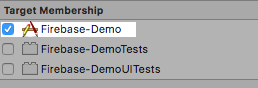
Select image in Xcode, then on right side go to File Inspector check the target as follow image:
I had the same error , Click on a picture file in Xcode. in attribute, on bottom you'll see Target membership. Check the box and it is gonna work. it worked for me . try it once .