Stuck at "A merge operation in progress"

Viewed 46182

Steps

  • In Visual Studio
  • Pulled from remote repo
  • 1 merge conflict
  • Merged manually, clicked 'Accept merge'

Result

  • Message: "A merge operation is in progress in the ... repository. Commit your changes to complete the merge operation."
  • However, there is nothing to commit: There are 0 pending changes, no actions apart from Abort seem to be possible.

Screenshot: https://pbs.twimg.com/media/DBOeRIiXsAEbnLP.jpg
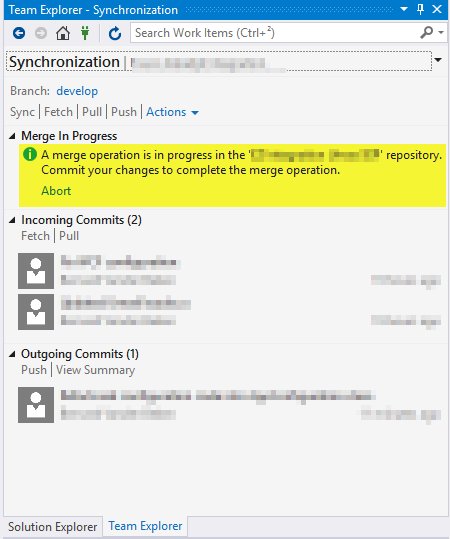
Context

  • Remote git repo is hosted in Visual Studio Team Services
  • Visual Studio 2017 with all updates
6 Answers

I had the same issue. Fixed it with:

git reset --hard HEAD

Note: You can check the last commit ID by:

git rev-parse HEAD // will display the last commit ID

OR

git reset --hard <last_commit_ID>

OR

git reset --soft <last_commit_ID> // this will only move the pointer

If you have Git for Windows (gitk) installed, you can open a command window, navigate to your repo's local directory and launch it, then from the File menu, choose "Start git gui". At that point, you will see that you the merge to be committed and you can do it from there. Then either from gitk or back in Visual Studio, you can now push all your commits back to the origin.

I used an external Tool like Fork to Abort thre merge. Inside VS nothing seems to work.

I manually deleted the

index.lock

file from the .git folder which resolved the issue for me.

Related