cURL error 28: Resolving timed out after 5001 milliseconds

Viewed 22850

I use WordPress and I recently moved my site from the cpanel host to a Linux server with directadmin panel. Right after the transfer realized that customers have the following error when downloading via EDD plugin.

cURL error 28: Resolving timed out after 5001 milliseconds

I also got this error of w3_total_cache plugin.

Server informatin: Centos 6.8 (Final) cURL 7.54.0 (Final) directadmin
5 Answers

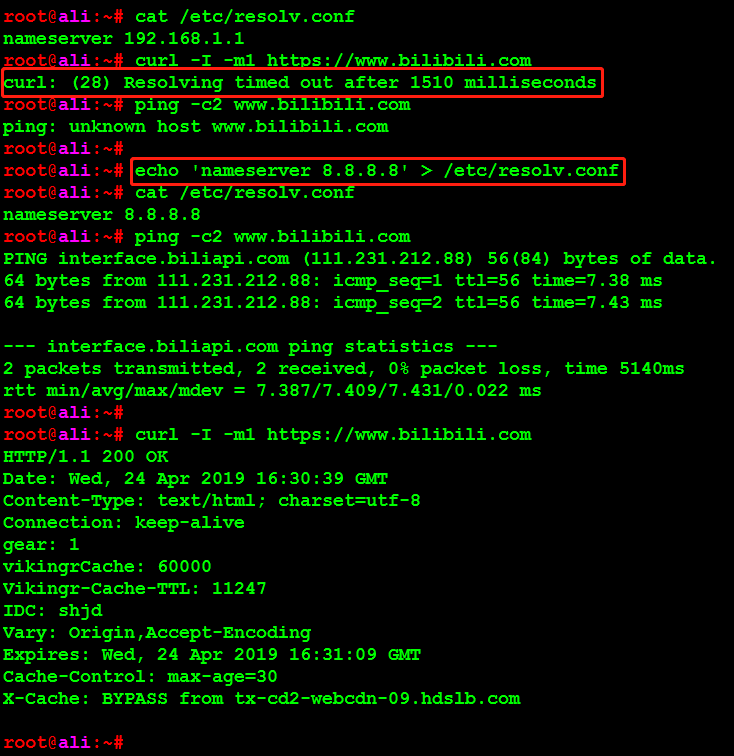
cURL error 28: Resolving timed out after 5001 milliseconds means DNS resolving failed.

so just change the DNS server list in /etc/resolv.conf.

or maybe we can bind the hostname and ip address in /etc/hosts.

this image shows the demo.

curl resolving timed out

To resolve this you have to set the curl connection time out and time out value at the time of curl initialization.
Just changes this two property value.

CURLOPT_CONNECTTIMEOUT => 30,
CURLOPT_TIMEOUT => 60,

For more details check This.

update these two lines here: /usr/share/icingaweb2/modules/jira/library/Jira/RestApi.php

    $opts = array(
        CURLOPT_URL            => $this->url($url),
        CURLOPT_HTTPHEADER     => $headers,
        CURLOPT_USERPWD        => $auth,
        CURLOPT_CUSTOMREQUEST  => \strtoupper($method),
        CURLOPT_RETURNTRANSFER => true,
        CURLOPT_CONNECTTIMEOUT => 30,
        CURLOPT_TIMEOUT => 30,

You can set set_time_limit(120); in the wp-config.php after the MySQL settings section.

Related