
I am trying to create a simple HTML log-in that is placed in a box. I want to have something like this:
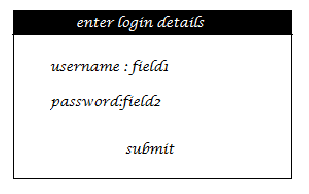
I have tried a few things but they all seem to have been in vain. Here is my code thus far. HTML:
<div id="login_form">
    <form name="f1" method="post" action="login.php" id="f1">
        <table>
            <tr>
                <td class="f1_label">User Name :</td><td><input type="text" name="username" value="" />
                </td>
            </tr>
            <tr>
                <td class="f1_label">Password  :</td><td><input type="password" name="password" value=""  />
                </td>
            </tr>
            <tr>
                <td>
                    <input type="submit" name="login" value="Log In" style="font-size:18px; " />
                </td>
            </tr>
        </table>
    </form>
</div>
CSS:
#login_form {
    position: absolute;
    top: 20%;
    left: 30%;
    right: 30%;
    bottom: 20%;
    font-size: 18px;
}

#f1 {
    background-color: #ccc;
    border-style: solid;
    border-width: 1px;
}
.f1_label {
    white-space: nowrap;
}
I want the login box to be in the center of my browser, so I have made use of #login_form. I have a few questions: is the use of the fieldset tag a better way? When I used the fieldset tag, it created more issues; the appearance of the form and the size of the text & password fields changed.
I understand that <table> should be used for tabular data only, but the use of
label in any other way seems to mess the size/width of password and username fields (it also requires more styling).
Is it poor coding practice to use <table> in a form? Will future browsers render the pages wrongly if I use <table>? Is keeping the name and id of the form the same a bad idea? I feel like keeping them the same does not create any issues (even with the use of jQuery in the same page).