
Does anyone know of syntax highlighting libraries which work on Android? I've looked at jsyntaxpane but that doesn't seem to support Android.
7 Answers
I managed to create a syntax highlighter for Android, based on the Prettify. It was easy, actually, when I found the Java Prettify. Just download it (sadly, it is not published for maven) and add its jar to the build path of you application.
The syntax highlighter I created based on it:
public class PrettifyHighlighter {
    private static final Map<String, String> COLORS = buildColorsMap();

    private static final String FONT_PATTERN = "<font color=\"#%s\">%s</font>";

    private final Parser parser = new PrettifyParser();

    public String highlight(String fileExtension, String sourceCode) {
        StringBuilder highlighted = new StringBuilder();
        List<ParseResult> results = parser.parse(fileExtension, sourceCode);
        for(ParseResult result : results){
            String type = result.getStyleKeys().get(0);
            String content = sourceCode.substring(result.getOffset(), result.getOffset() + result.getLength());
            highlighted.append(String.format(FONT_PATTERN, getColor(type), content));
        }
        return highlighted.toString();
    }

    private String getColor(String type){
        return COLORS.containsKey(type) ? COLORS.get(type) : COLORS.get("pln");
    }

    private static Map<String, String> buildColorsMap() {
        Map<String, String> map = new HashMap<>();
        map.put("typ", "87cefa");
        map.put("kwd", "00ff00");
        map.put("lit", "ffff00");
        map.put("com", "999999");
        map.put("str", "ff4500");
        map.put("pun", "eeeeee");
        map.put("pln", "ffffff");
        return map;
    }
}
The colors of the syntax are hardcoded, but may be also set by i.e. application preferences. In order to display a Java source code in a TextView, just do:
// code is a String with source code to highlight
// myTextView is a TextView component
PrettifyHighlighter highlighter = new PrettifyHighlighter();
String highlighted = highlighter.highlight("java", code);
myTextView.setText(Html.fromHtml(highlighted));
The Java Prettify library made my application around 50kB bigger.
Hi you can use my CodeEditor



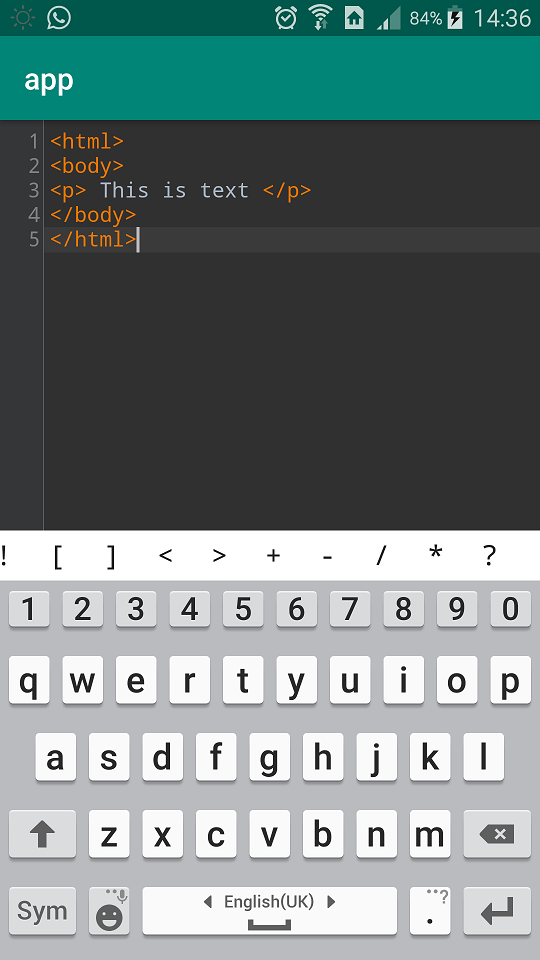
Simply use:
Setup build.gradle (project)
allprojects {
    repositories {
        ...
        maven {
            url 'https://jitpack.io'
        }
    }
}
build.gradle (app)
dependencies {
    ...
    compile 'com.github.ahmadaghazadeh:CodeEditor:1.0.15'
}
XML DataBinding <com.github.ahmadaghazadeh.editor.widget.CodeEditor bind:code="@{viewModel.code}" bind:lang="@{viewModel.lang}" android:layout_width="match_parent" android:layout_height="match_parent"/>
XML
    <com.github.ahmadaghazadeh.editor.widget.CodeEditor
        bind:code="<html></html>"
        bind:lang="html"
        android:layout_width="match_parent"
        android:layout_height="match_parent"/>
920 Text Editor (app on Play Store, source on GitHub) uses a combination of WebView and Ace, an embeddable code editor written in JavaScript.
I'm working on an app which is an IDE for Android, I think I'm going the same way.
If you prefer you can create your own syntax highlight using the Highlight library.
The lib works through schemes, which are basically a combination of a rule (with regex) and a related modification. There are some ready-made, like ColorScheme, SyleScheme, OnClickScheme etc., but you can implement the Scheme interface and create your own.
The base class of the lib is Highlight, where spans are processed. You can use it directly, like in the example below where we highlight some key words of the Java language from TextView
//create Highlight
Highlight highlight = new Highlight();

//scheme color example
highlight.addScheme(
        new ColorScheme(
                Pattern.compile("\\b(private)|(public)|(protected)|(void)\\b"),
                Color.parseColor("#CC7832")
        )
);

//...

//textview example
highlight.setSpan(binding.toolbarTitle);
But to create a syntax highlight more is needed than that, and for that there is the HighlightTextWatcher class, optimized for large texts with processing by altered lines of the LinesTextWatcher class (which you can extend). See an example of using this class.
//create TextWatcher
HighlightTextWatcher highlightTextWatcher = new HighlightTextWatcher();

//scheme color example
highlightTextWatcher.addScheme(
        new ColorScheme(
                Pattern.compile("\\b(private)|(public)|(protected)|(void)\\b"),
                Color.parseColor("#CC7832")
        )
);

//...

//edittext example
binding.edittext.addTextChangedListener(highlightTextWatcher);
You can add as many schemes as you like and the lib does the rest.
implementation 'com.github.Irineu333:Highlight:1.0.1' (jitpack)
Related