Adding button to left of UISearchBar

Viewed 27263

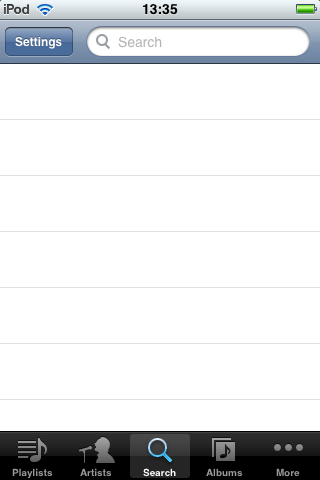
I am tearing my hair out on this one. My client wants to add a button to the left of a search bar like the example below:

alt text
(source: erik.co.uk)

But I just can't figure out how to do it. Apple don't seem to provide any documented method for adding custom buttons to a UISearchBar, let alone to the left of the search bar.

I've tried hacking around in Interface Builder adding a UIToolbar with a button in it to the left but I cannot find any combination of styles where the two line up properly to give the impression that they are one. There is always what looks like one pixel difference in the vertical alignment as you can see from the picture below:

alt text
(source: erik.co.uk)

I've searched around and just can't find the answer, but as we can see from the screenshot it must be possible!

Thank you in advance for your help.

Erik

6 Answers

The easiest solution is to add your SearchBar in TOP of your Toolbar, (not in), I give you the best solution I use in my company eBuildy:

UIBarButtonItem *mySettingsButton = [[UIBarButtonItem alloc] initWithTitle:@"Settings" style:UIBarButtonItemStyleBordered target:self action:@selector(refresh)];
UIBarButtonItem *mySpacer = [[UIBarButtonItem alloc] initWithBarButtonSystemItem:UIBarButtonSystemItemFlexibleSpace target:nil action:nil];
UIBarButtonItem *myRefreshButton = [[UIBarButtonItem alloc] initWithBarButtonSystemItem:UIBarButtonSystemItemRefresh target:self action:@selector(refresh)];
UIToolbar *myTopToolbar = [[UIToolbar alloc]initWithFrame:CGRectMake(0,0,320,40)];
UISearchBar *mySearchBar = [[UISearchBar alloc]initWithFrame:CGRectMake(70,1,220,40)];

[myTopToolbar setItems:[NSArray arrayWithObjects:mySettingsButton,mySpacer,myRefreshButton, nil] animated:NO];
[self.view addSubview:myTopToolbar];
[self.view addSubview:mySearchBar];

answering an old question here but i was struggling with this one myself recently and found some shortcomings with the other answers for the situation i was trying to address. here's what i did in a subclass of UISearchBar:

first add a UIButton property (here "selectButton"). then override the initWithFrame method and do something similar to the following:

-(id)initWithFrame:(CGRect)frame{
if (self = [super initWithFrame:frame])
{
    self.selectButton = [UIButton buttonWithType:UIButtonTypeRoundedRect];
    self.selectButton.contentEdgeInsets = (UIEdgeInsets){.left=4,.right=4};
    [self.selectButton addTarget:self action:@selector(pressedButton:) forControlEvents:UIControlEventTouchUpInside];

    self.selectButton.titleLabel.numberOfLines = 1;
    self.selectButton.titleLabel.adjustsFontSizeToFitWidth = YES;
    self.selectButton.titleLabel.lineBreakMode = UILineBreakModeClip;

    [self addSubview:self.selectButton];
    [self.selectButton setFrame:CGRectMake(5, 6, 60, 31)];
}

return self;
}

Now you want to override the layout subviews method to resize the searchbar to the appropriate width, depending on whether or not the cancel button is showing. That should look something like this:

-(void)layoutSubviews
{
[super layoutSubviews];

float cancelButtonWidth = 65.0;
UITextField *searchField = [self.subviews objectAtIndex:1];

if (self.showsCancelButton == YES)
    [searchField setFrame:CGRectMake(70, 6, self.frame.size.width - 70 - cancelButtonWidth, 31)];
else
    [searchField setFrame:CGRectMake(70, 6, self.frame.size.width - 70, 31)];
}

Note that in the above method I added a constant for the cancelButtonWidth. I tried adding code to get the width from [self cancelButton] but that seems only accessible at runtime and doesn't allow the project to compile. In any case this should be a good start for what you need

Related