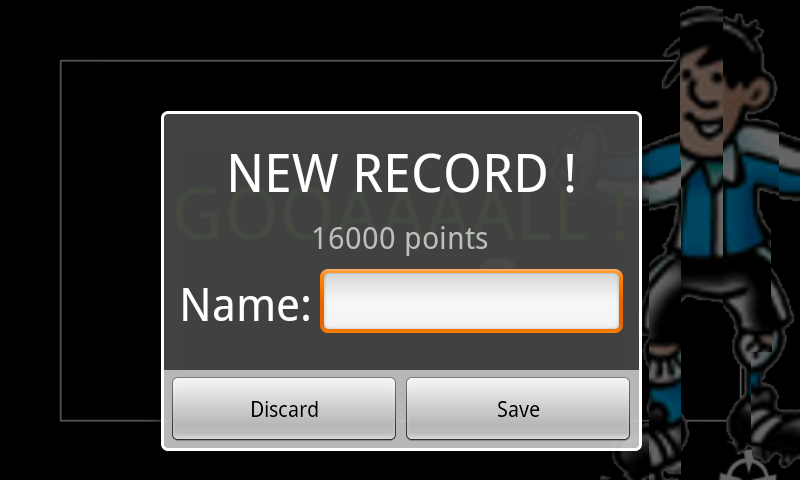
I made a custom alert dialog box to be displayed at the end of my game so that the player can enter its name to save it. The problem is when I call show() on the dialog appears but it's not vertically centered! It's a bit lower than it should and no matter what properties I set in the xml or when using setGravity().
I think this is the same problem as the one mentioned here, but no one gave a proper answer.
Thanks for your help.
For more details, here is my code:
    AlertDialog.Builder builder;

    LayoutInflater inflater = (LayoutInflater)this.getSystemService(LAYOUT_INFLATER_SERVICE);
    View layout = inflater.inflate(R.layout.newrecord,(ViewGroup)findViewById(R.layout.shoot));

    builder = new AlertDialog.Builder(this);
    builder.setView(layout);

    newRecDialog = builder.create();
And here is the code of the first element of the XML layout of newrecord.xml:
<LinearLayout xmlns:android="http://schemas.android.com/apk/res/android"
android:orientation="vertical"
android:layout_height="fill_parent"
android:layout_width="fill_parent"
android:gravity="center"
 android:padding="10dp"
android:baselineAligned="true">
Here is the output screenshot:

(source: free.fr)