Window.Margin & Window.Padding don't work

Viewed 9619

I am setting peroperty Margin and Padding of a window and it doesn't take effect:

Here is an example:

<Window
    xmlns="http://schemas.microsoft.com/winfx/2006/xaml/presentation"
    xmlns:x="http://schemas.microsoft.com/winfx/2006/xaml"
    SizeToContent="WidthAndHeight"
    ResizeMode="NoResize"
    Padding="22"
    Margin="22">

    <Grid>
        <Label 
            FontWeight="Bold"
            FontSize="36"
            BorderThickness="1"
            BorderBrush="Red"
            Content="Hello world!"/>
    </Grid>
</Window>

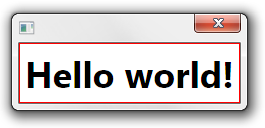
Result:
alt text

The desired result is that the red frame of the lable should be away 44px from the window's frame (margin+padding).

Yes, I know I can set the margin of the label, but that's not what I want. I have a whole project that all its windows are set to a style, I want to set this properties (or other) in the general window style.

I guess if I won't find any solution I will create a named style for greed where I will set the margin/padding, then I will go Window by window and set the Grid's style, but that's the last option I wanna do.
Thanks in advance.

2 Answers

It's not surprising that Margin doesn't work, because Margin is the amount of space to be placed around the control. For a Window, this would mean making the frame smaller (and offset), not the client area, and that would be a bit strange (and might not play nicely with the Win32 hosting environment, not sure). It is a bit surprising that Padding doesn't work, and I'm not sure why that would be.

However, there is a workaround which you can encapsulate in a style: replace the default Window ControlTemplate with your own template that does respect the Padding:

<ControlTemplate TargetType="Window">
  <Border Background="White" Padding="{TemplateBinding Padding}">
    <ContentPresenter />
  </Border>
</ControlTemplate>

(You would probably want the Border Background to be the dynamic window background brush for production code, but you get the idea.)

Obviously you can put this template in a style Template setter so as to avoid having to repeat it on each Window.

Here is the full template (generated with Microsoft Expression):

<Style x:Key="WindowStyle" TargetType="{x:Type Window}">
    <Setter Property="Template">
        <Setter.Value>
            <ControlTemplate TargetType="{x:Type Window}">
                <Border Background="{TemplateBinding Background}"
                    BorderBrush="{TemplateBinding BorderBrush}"
                    BorderThickness="{TemplateBinding BorderThickness}"
                    Margin="{TemplateBinding Margin}"
                    Padding="{TemplateBinding Padding}">

                    <AdornerDecorator>
                        <ContentPresenter/>
                    </AdornerDecorator>
                </Border>
            </ControlTemplate>
        </Setter.Value>
    </Setter>
    <Style.Triggers>
        <Trigger Property="ResizeMode" Value="CanResizeWithGrip">
            <Setter Property="Template">
                <Setter.Value>
                    <ControlTemplate TargetType="{x:Type Window}">
                        <Border Background="{TemplateBinding Background}"
                            BorderBrush="{TemplateBinding BorderBrush}"
                            BorderThickness="{TemplateBinding BorderThickness}">

                            <Grid>
                                <AdornerDecorator>
                                    <ContentPresenter/>
                                </AdornerDecorator>
                                <ResizeGrip
                                    x:Name="WindowResizeGrip"
                                    HorizontalAlignment="Right"
                                    VerticalAlignment="Bottom"
                                    IsTabStop="false"
                                    Visibility="Collapsed"
                                />
                            </Grid>
                        </Border>
                        <ControlTemplate.Triggers>
                            <MultiTrigger>
                                <MultiTrigger.Conditions>
                                    <Condition
                                        Property="ResizeMode"
                                        Value="CanResizeWithGrip"
                                    />
                                    <Condition 
                                        Property="WindowState"
                                        Value="Normal"
                                    />
                                </MultiTrigger.Conditions>
                                <Setter 
                                    Property="Visibility"
                                    TargetName="WindowResizeGrip"
                                    Value="Visible"/>
                            </MultiTrigger>
                        </ControlTemplate.Triggers>
                    </ControlTemplate>
                </Setter.Value>
            </Setter>
        </Trigger>
    </Style.Triggers>
</Style>
Related