Explanation of the UML arrows

Viewed 394606

I have recently been studying UML and drawing simple diagrams with ordinary plain arrows between classes, but I know it's not enough. There are plenty of other arrows: generalization, realisation and etc. which have meaning to the diagram reader.

Is there a nice resource which could explain each arrow (ordinary, plain, dotted, diamond-filled, diamond)?

It would be the best if it will have some code examples for them.
9 Answers

Here's some explanations from the Visual Studio 2015 docs:

UML Class Diagrams: Reference: https://docs.microsoft.com/en-us/previous-versions/visualstudio/visual-studio-2015/modeling/uml-class-diagrams-reference

UML class diagram

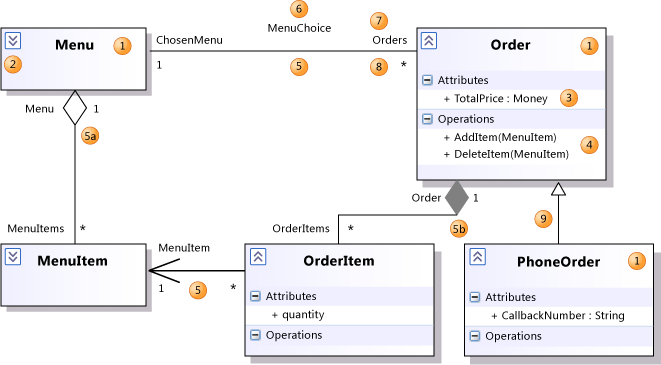
5: Association: A relationship between the members of two classifiers.

5a: Aggregation: An association representing a shared ownership relationship. The Aggregation property of the owner role is set to Shared.

5b: Composition: An association representing a whole-part relationship. The Aggregation property of the owner role is set to Composite.

9: Generalization: The specific classifier inherits part of its definition from the general classifier. The general classifier is at the arrow end of the connector. Attributes, associations, and operations are inherited by the specific classifier. Use the Inheritance tool to create a generalization between two classifiers.

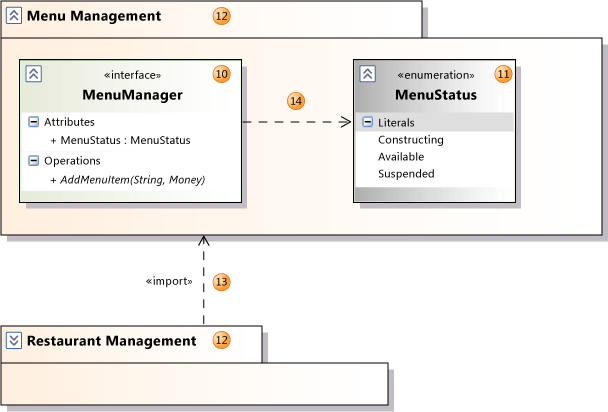
Package diagram

13: Import: A relationship between packages, indicating that one package includes all the definitions of another.

14: Dependency: The definition or implementation of the dependent classifier might change if the classifier at the arrowhead end is changed.

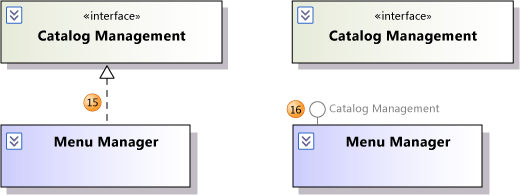
Realization relationship

15: Realization: The class implements the operations and attributes defined by the interface. Use the Inheritance tool to create a realization between a class and an interface.

16: Realization: An alternative presentation of the same relationship. The label on the lollipop symbol identifies the interface.

UML Class Diagrams: Guidelines: http://msdn.microsoft.com/library/dd409416%28VS.140%29.aspx

Properties of an Association

Aggregation: This appears as a diamond shape at one end of the connector. You can use it to indicate that instances at the aggregating role own or contain instances of the other.

Is Navigable: If true for only one role, an arrow appears in the navigable direction. You can use this to indicate navigability of links and database relations in the software.


Generalization: Generalization means that the specializing or derived type inherits attributes, operations, and associations of the general or base type. The general type appears at the arrowhead end of the relationship.

Realization: Realization means that a class implements the attributes and operations specified by the interface. The interface is at the arrow end of the connector.

Let me know if you have more questions.

A very easy to understand description is the documentation of yuml, with examples for class diagrams, use cases, and activities.

Aggregations and compositions are a little bit confusing. However, think like compositions are a stronger version of aggregation. What does that mean? Let's take an example: (Aggregation) 1. Take a classroom and students: In this case, we try to analyze the relationship between them. A classroom has a relationship with students. That means classroom comprises of one or many students. Even if we remove the Classroom class, the Students class does not need to destroy, which means we can use Student class independently.

(Composition) 2. Take a look at pages and Book Class. In this case, pages is a book, which means collections of pages makes the book. If we remove the book class, the whole Page class will be destroyed. That means we cannot use the class of the page independently.

If you are still unclear about this topic, watch out this short wonderful video, which has explained the aggregation more clearly.

https://www.youtube.com/watch?v=d5ecYmyFZW0

Related