
I'm using jQuery UI and the tab control on a series of pages. It seems like, when loading a page, the tabs initially load as a simple list, then they jump to the tabstrip.
When I initially load the page I get this:
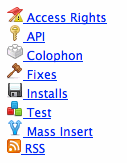
Then, after a few seconds it switches over to this (the way is should be):

Any idea why this is happening? Do I need to load the .js and/or .css files in a particular order? Or, is there a way to hide the initial list and only display the tabs once they are 'loaded'?