How to highlight all occurrences of a word in an Emacs buffer?

Viewed 44862

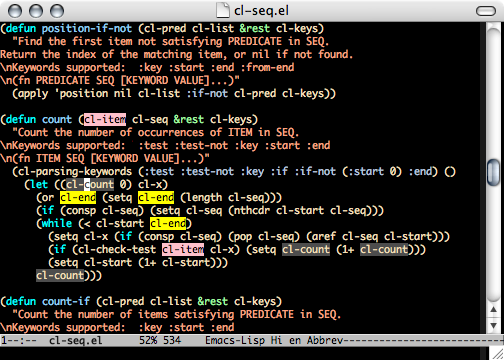
Notepad++ has a convenient feature: if you select a word in your text (not necessarily a keyword), the word is highlighted throughout the text. Can this be done in Emacs as well? And if so, how?

It doesn't necessarily have to work exactly like Notepad++ (i.e., via selection); ideally, I would like to set up a key binding that causes all occurrences of the word under cursor to be highlighted.

It would be great if the highlights were permanent, i.e., moving point away from a highlighted word should not cause the highlight to be removed.

Also, it would be useful if there was a solution that made it possible to navigate between highlights (using custom key bindings).
13 Answers

The hi-lock suggestions are good. I think it's easier to use the M-x versions, though:

M-x highlight-regexp RET <REGEXP>

M-x highlight-phrase RET <REGEXP>

highlight-phrase is just a bit of sugar around highlight-regexp that ignores case and translates a space in the regex to match arbitrary whitespace. Handy.

Type C-s, then type the current word or type C-w. As a bonus, you can now hit C-s again to search for the word.

This is called incremental search.

Light-symbol will highlight whatever symbol point is over.

Alternately, you can use occur, which lists all lines matching a regexp. It's useful to quickly see all functions in a class.

Nobody mentioned symbol-overlay mode. It's basically a better rewrite of highlight-symbol-mode. "Better" as in, lacks bugs of original highlight-symbol (such as, temporary highlight getting stuck, or the temporary highlight disappearing for moving inside the highlighted word; or not being able to highlight symbols like *), better integrated, and maintained. See "Advantages" paragraph of its README.

You can install it as usual, with M-xpackage-install (make sure to update package list beforehand with package-list-packages). For reference, at the bottom I attached code I use to enable the mode and disable a few of the more advanced features which you may or may not want.

Notepad++ has a convenient feature: if you select a word in your text (not necessarily a keyword), the word is highlighted throughout the text. Can this be done in Emacs as well? And if so, how?

Once you enable overlay-symbol, occurrences on the screen will be shown for every word that you put cursor upon after a timeout (timeout by default is 0.5s, can be configured with symbol-overlay-idle-time variable). If a word don't get highlighted, this means there's just one match on the screen (the one you put cursor upon), hence there's no need to highlight it.

It would be great if the highlights were permanent, i.e., moving point away from a highlighted word should not cause the highlight to be removed.

To highlight the word under cursor permanently there's a function symbol-overlay-put. To unhighlight call it once again.

In my config example it's bound to Logo+` key.


(require 'symbol-overlay)
(defun enable-symbol-overlay-mode ()
  (unless (or (minibufferp)
              (derived-mode-p 'magit-mode)
              (derived-mode-p 'xref--xref-buffer-mode))
    (symbol-overlay-mode t)))
(define-global-minor-mode global-symbol-overlay-mode ;; name of the new global mode
  symbol-overlay-mode                                ;; name of the minor mode
  enable-symbol-overlay-mode)
(global-symbol-overlay-mode)                         ;; enable it
(global-set-key (kbd "s-`") 'symbol-overlay-put)
(setq symbol-overlay-ignore-functions nil)           ;; don't ignore keywords in various languages
(setq symbol-overlay-map (make-sparse-keymap))       ;; disable special cmds on overlays

This may not be as nice as what you were hoping but if you put

(global-hi-lock-mode 1)

in your .emacs file then you can type C-x w h REGEX <RET> <RET> to highlight all occurances of REGEX, and C-x w r REGEX <RET> to unhighlight them again. Again, not as elegant as you'd probably like, but it'll work.

Related