What's the best UI for entering date of birth?

Viewed 105212

What is the best method for date of birth selector?

  • 3 text inputs (month / day / year) or one mask input. User MUST use keyboard
  • 3 select boxes. User can use keyboard or mouse.
  • One nice datepicker.

I want to know what is the most usable and problem free solution, so user wont be confused at all.
24 Answers

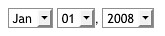
If your goal is to make sure "the user won't be confused at all," I think this is the best option.

three dropdowns for month, day, year

I wouldn't recommend a datepicker for date of birth. First you have to browse to the year (click, click, click…), then to the month (click some more), and then find and click the tiny number on a grid.

Datepickers are useful when you don't know the exact date off the top of your head, e.g. you're planning a trip for the second week of February.

For an advanced user text input is the best, if the user knows the date format, it is very fast. For a not so advanced user I suggest using a datepicker. Since usually you also have advanced and non-advanced users I suggest a combination of text input and datepicker.

I would also recommend the combination of DatePicker and fields

See this demo, where the date picker does reflect the date entered in the fields by the user.
It is based however on a DatePicker using Prototype and Scriptaculous though. I mention it for illustration purpose.

I had tried datePicker with my user but it turn out to be a bad UI to them. What I end up base on their request is to have 3 textbox where they can quickly type [ day ] [ month ] [ year ] :(

Put both and make each update the other. If the user chooses the date from the datepicker, it is easy to fix a minor misclick in the text field or visualize the choise you typed into text field in the datepicker.

Why don't you test all three and pick the one that the performs the best? This seems like a good candidate for Google Website Optimizer to test.

It may be that the type of users you have, or the type of site you are running may dictate that your solution should be different than the "norm".

I normally use both -- a datepicker that populates a textfield in the correct format. Advanced users can edit the textfield directly, mouse-happy users can pick using the datepicker.

If you're worried about space, I usually have just the textfield with a little calendar icon next to it. If you click on the calendar icon it brings up the datepicker as a popup.

Also I find it good practice to pre-populate the textfield with text that indicates the correct format (i.e.: "DD/MM/YYYY"). When the user focuses the textfield that text disappears so they can enter their own.

As perhaps one of the older people here, and born late in the month, I find drop-down menus for birthdates to be frustrating. I typically have to scroll down on two drop-down menus, and that's awkward. I'd much rather type it in.

If you can have a control designed so that it can either accept drop-down menus or be typed into, and make it clear both work, that would be excellent.

I would take a DatePicker. It's the only component that allows expert users to enter it manually and guides novices to enter a date very easy.

The calendar should not pop up if you enter via pressing tab, but clicking on a button. So no expert user is annoyed of it.

I would prefer a datepicker (and a input box with documented format as a fall-back) for an international site.

Date formats vary and are sometimes hard to read if you are now used to them. Too bad many people aren't comfortable with ISO 8601. :-(

I would suggest using a drop down menu for each field, making sure to label each as day, month and year. A date picker might also help, but if the user doesn't have JavaScript enabled, it won't work.

Who don't you use the jQuery UI DatePicker?

It's configurable to suit pretty much any needs. The only downside is if you're including it with jQuery UI it has a somewhat large footprint..

Update

Some of the file sizes appear to have changed, so they are updated below. Keep in mind these numbers will only be correct for the time they were last updated. Things may have changed since then.

  • CSS theme - 23kb
  • jQuery UI - 71kb minified
  • DatePicker - 38kb
  • Plus a couple of images (next month/previous month, which I'm pretty sure are sprited)

But that's not too bad...

Related