Overflow to left instead of right

Viewed 86308

I have a div with overflow:hidden, inside which I show a phone number as the user types it. The text inside the div is aligned to right and incoming characters are added to right as the text grows to left.

But once the text is big enough not to fit in the div, last characters of the number is automatically cropped and the user cannot see the new characters she types.

What I want to do is crop the left characters, like the div is showing the rightmost of its content and overflowing to the left side. How can I create this effect?
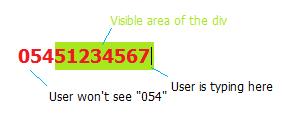
overflowing phone number to left

7 Answers

This worked like a charm:

<div style="direction: rtl;">
  <span style="white-space: nowrap; direction: ltr; display: inline-block;">your short or long comment<span>
</div>

easily done, <span> the numbers and position the span absolute to the right inside an element with overflow hidden.

<div style="width: 65px; height: 20px;
            overflow: hidden; position: relative; background: #66FF66;">
    <span style="position: absolute; right: 0;">05451234567</span>
</div>

:)

rgrds jake

Here is an way easier solution using flexbox. It also works on pseudo elements.

p {
  display: flex;
  justify-content: flex-end;
  white-space: nowrap;
  overflow: hidden;

  font-size: 2em;
  width: 120px;
  background: yellow;
}
<p>156189789123</p>

Modified HTML markup and added some javascript to WebWanderer's jsFiddle solution.

https://jsfiddle.net/urulai/bfzqgreo/3/

HTML:

<div id="outer-div">

    <p>ipsum dolor amet bacon venison porchetta spare ribs, tongue turducken alcatra doner leberkas t-bone rump ball tip hamburger drumstick. Shoulder strip steak ribeye, kielbasa fatback pig kevin drumstick biltong pork short loin rump. Biltong doner ribeye, alcatra landjaeger tenderloin drumstick t-bone pastrami andouille. Sirloin spare ribs fatback, bresaola strip steak alcatra landjaeger kielbasa cupim doner. </p>

</div>

CSS:

#outer-div {
  width:100%;
  margin-left:auto;
  margin-right:auto;
  text-align:right;
  overflow:hidden;
  white-space: nowrap;
  border:1px solid black;
}

JS:

let outer = document.getElementById("outer-div");
outer.scrollLeft += outer.scrollWidth;
Related