I can see that my node_modules/ag-grid-react/lib (the module I'm trying to build locally) have changed (I put console.log commands in main.js, the entry point of ag-grid-react), but the changes are not propagating to my create-react-app even after restarting npm start and running npm cache clean --force. What a I missing?
I believe the crux of the issue is closer to me not understanding how the create-react-app/npm package/typescript/webpack build system works behind the scenes (as opposed to this being an ag-grid issue), but I am including the whole context of my problem in case it's relevant.
Original problem: I'm using ag-grid-react, and I want to inject a button to add a new column, like the image below:
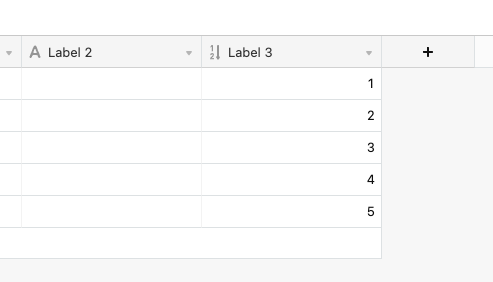
It didn't seem like any of the exposed component allows me to do this, so I have been exploring two options:
- Bring ag-grid into my monorepo and fork/modify it
- Inject a component with appendChild by finding the ref of the ag-header-row element and creating another react root.
(1) seems cleaner so I'm trying that. I cloned ag-grid via git subtree to my repo, and I am trying to load it in my create-react-app. Here is what I have done so far:
- git sub-tree add ag-grid
- npm link the local ag-grid/grid-packages/ag-grid-react to my monorepo node_modules
- make a modification to the files in community-modules/react/src
- run
npm run buildin grid-packages/ag-grid-react - run
npm startin my create-react-app monorepo
I have figured out that grid-packages/ag-grid-react copies the src from community-modules/react before building, via Gulp, but I can't figure out how to load the new build. Anytime I make a modification to community-modules/react/src and run the above steps, no changes propagate to my create-react-app. It almost feels like something is being cached but I can't figure out where.