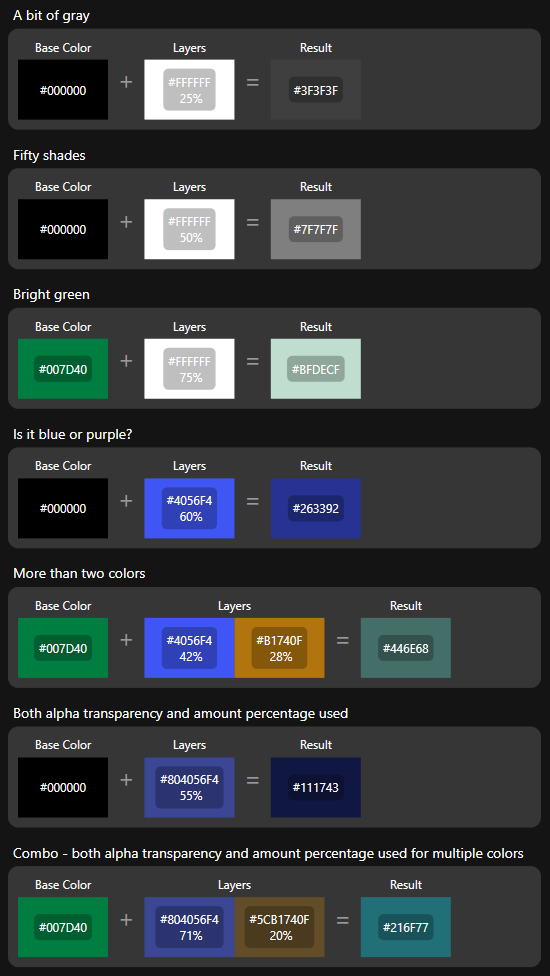
You could combine colors like this:
public static class ColorCombiner
{
    public static Color Combine(Color source, Color added, int addedAmountPercentage)
    {
        //the Alpha channel of the added color converted to double (0-1)
        var addedTransparencyAmount = (double)added.A / 255;

        //the added amount percentage converted to double (0-1)
        var addedAmount = (double)addedAmountPercentage / 100;

        //combined alpha and amount percentage
        var amount = addedTransparencyAmount * addedAmount;

        //blend channels
        var r = BlendChannel(source.R, added.R, amount);
        var g = BlendChannel(source.G, added.G, amount);
        var b = BlendChannel(source.B, added.B, amount);

        //create resulting color
        return Color.FromRgb(r, g, b);
    }

    private static byte BlendChannel(byte source, byte added, double addedAmount)
    {
        //blend channel: if addedAmount is 0.60, use 60% of added color and 40% of source color
        var sourceAmount = 1d - addedAmount;
        var result = (source * sourceAmount) + (added * addedAmount);
        return Convert.ToByte(result);
    }
}
Here's what that results in:

Here's the full code for the demo:
ColorCombiner.cs
using System;
using System.Windows.Media;

namespace WpfSuperimposedColors;

public static class ColorCombiner
{
    public static Color Combine(Color source, Color added, int addedAmountPercentage)
    {
        //the Alpha channel of the added color converted to double (0-1)
        var addedTransparencyAmount = (double)added.A / 255;

        //the added amount percentage converted to double (0-1)
        var addedAmount = (double)addedAmountPercentage / 100;

        //combined alpha and amount percentage
        var amount = addedTransparencyAmount * addedAmount;

        //blend channels
        var r = BlendChannel(source.R, added.R, amount);
        var g = BlendChannel(source.G, added.G, amount);
        var b = BlendChannel(source.B, added.B, amount);

        //create resulting color
        return Color.FromRgb(r, g, b);
    }

    private static byte BlendChannel(byte source, byte added, double addedAmount)
    {
        //blend channel: if addedAmount is 0.60, use 60% of added color and 40% of source color
        var sourceAmount = 1d - addedAmount;
        var result = (source * sourceAmount) + (added * addedAmount);
        return Convert.ToByte(result);
    }
}
Models
using System.Windows.Media;
using System.Collections.Generic;

namespace WpfSuperimposedColors;

public record ColoringItem(string Name, SolidColorBrush Brush, string Hex)
{
    public ColoringItem(string Name, Color Color) : this(Name, new SolidColorBrush(Color), GetHex(Color)) { }

    private static string GetHex(Color c)
    {
        if (c.A < 255)
        {
            return $"#{c.A:X2}{c.R:X2}{c.G:X2}{c.B:X2}";
        }

        return $"#{c.R:X2}{c.G:X2}{c.B:X2}";
    }
}

public record ColoringSection(ColoringItem Source, ColoringItem Added, IEnumerable<ColoringItem> Results);
MainWindow.xaml.cs
using System.Collections.Generic;
using System.Collections.ObjectModel;
using System.Windows;
using System.Windows.Media;

namespace WpfSuperimposedColors;
public partial class MainWindow : Window
{
    public ObservableCollection<ColoringSection> Items { get; } = new();

    public MainWindow()
    {
        InitializeComponent();

        //#2d00b3
        var primary = Color.FromRgb(45, 0, 179);
        //#2d00b3 at 50% transparency
        var primary50 = Color.FromArgb(127, 45, 0, 179);

        Items.Add(CreateDemoSection(Colors.White, "White", primary, "Primary"));
        Items.Add(CreateDemoSection(Colors.White, "White", primary50, "Half Transparent Primary"));
        Items.Add(CreateDemoSection(Colors.Black, "Black", primary, "Primary"));
        Items.Add(CreateDemoSection(Colors.Black, "Black", primary50, "Half Transparent Primary"));

        DataContext = this;
    }

    private ColoringSection CreateDemoSection(Color baseColor, string baseName, Color additionColor, string additionName)
    {
        var baseItem = new ColoringItem(baseName, baseColor);
        var additionItem = new ColoringItem(additionName, additionColor);
        var items = new List<ColoringItem>();

        for (int amountPercentage = 5; amountPercentage <= 100; amountPercentage += 5)
        {
            var color = ColorCombiner.Combine(baseColor, additionColor, amountPercentage);
            items.Add(new ColoringItem($"{amountPercentage}%", color));
        }

        return new ColoringSection(baseItem, additionItem, items);
    }
}
MainWindow.xaml
<Window
    x:Class="WpfSuperimposedColors.MainWindow"
    xmlns="http://schemas.microsoft.com/winfx/2006/xaml/presentation"
    xmlns:x="http://schemas.microsoft.com/winfx/2006/xaml"
    xmlns:d="http://schemas.microsoft.com/expression/blend/2008"
    xmlns:local="clr-namespace:WpfSuperimposedColors"
    xmlns:mc="http://schemas.openxmlformats.org/markup-compatibility/2006"
    Title="MainWindow"
    Width="800"
    Height="450"
    mc:Ignorable="d">

    <ScrollViewer Padding="5">
        <ItemsControl ItemsSource="{Binding Items}">
            <ItemsControl.ItemTemplate>
                <DataTemplate DataType="{x:Type local:ColoringSection}">
                    <StackPanel>
                        <TextBlock Margin="5,15,5,5" FontSize="18">
                            <Run Text="{Binding Added.Name}" />
                            <Run Text="{Binding Added.Hex, StringFormat='({0})'}" />
                            <Run Text="on" />
                            <Run Text="{Binding Source.Name}" />
                            <Run Text="background" />
                        </TextBlock>

                        <WrapPanel>
                            <Border
                                Width="80"
                                Height="60"
                                Margin="5"
                                Background="{Binding Source.Brush}"
                                BorderBrush="Black"
                                BorderThickness="1" />
                            <Border
                                Width="80"
                                Height="60"
                                Margin="5"
                                Background="{Binding Added.Brush}"
                                BorderBrush="Black"
                                BorderThickness="1" />
                        </WrapPanel>

                        <ItemsControl Margin="5" ItemsSource="{Binding Results}">
                            <ItemsControl.ItemsPanel>
                                <ItemsPanelTemplate>
                                    <WrapPanel />
                                </ItemsPanelTemplate>
                            </ItemsControl.ItemsPanel>
                            <ItemsControl.ItemTemplate>
                                <DataTemplate>
                                    <Border
                                        Width="80"
                                        Height="60"
                                        Background="{Binding Brush}">
                                        <Border
                                            Padding="5"
                                            HorizontalAlignment="Center"
                                            VerticalAlignment="Center"
                                            Background="#20000000"
                                            CornerRadius="5">
                                            <StackPanel>
                                                <TextBlock
                                                    Foreground="#fff"
                                                    Text="{Binding Name}"
                                                    TextAlignment="Center"
                                                    TextWrapping="Wrap" />
                                                <TextBlock
                                                    Foreground="#fff"
                                                    Text="{Binding Hex}"
                                                    TextAlignment="Center"
                                                    TextWrapping="Wrap" />
                                            </StackPanel>
                                        </Border>
                                    </Border>
                                </DataTemplate>
                            </ItemsControl.ItemTemplate>
                        </ItemsControl>
                    </StackPanel>
                </DataTemplate>
            </ItemsControl.ItemTemplate>
        </ItemsControl>
    </ScrollViewer>
</Window>
EDIT
I've put together a little color blending library for this task exactly, it's called DarkColors.
Here's what it can do: