How can I dynamically switch web service addresses in .NET without a recompile?

Viewed 134616

I have code that references a web service, and I'd like the address of that web service to be dynamic (read from a database, config file, etc.) so that it is easily changed. One major use of this will be to deploy to multiple environments where machine names and IP addresses are different. The web service signature will be the same across all deployments, just located elsewhere.

Maybe I've just been spoiled by the Visual Studio "Add Web Reference" wizard - seems like this should be something relatively easy, though.
11 Answers

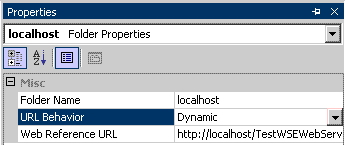
When you generate a web reference and click on the web reference in the Solution Explorer. In the properties pane you should see something like this:

Web Reference Properties

Changing the value to dynamic will put an entry in your app.config.

Here is the CodePlex article that has more information.

If you are truly dynamically setting this, you should set the .Url field of instance of the proxy class you are calling.

Setting the value in the .config file from within your program:

  1. Is a mess;

  2. Might not be read until the next application start.

If it is only something that needs to be done once per installation, I'd agree with the other posters and use the .config file and the dynamic setting.

As long as the web service methods and underlying exposed classes do not change, it's fairly trivial. With Visual Studio 2005 (and newer), adding a web reference creates an app.config (or web.config, for web apps) section that has this URL. All you have to do is edit the app.config file to reflect the desired URL.

In our project, our simple approach was to just have the app.config entries commented per environment type (development, testing, production). So we just uncomment the entry for the desired environment type. No special coding needed there.

Just a note about difference beetween static and dynamic.

  • Static: you must set URL property every time you call web service. This because base URL if web service is in the proxy class constructor.
  • Dynamic: a special configuration key will be created for you in your web.config file. By default proxy class will read URL from this key.

If you are fetching the URL from a database you can manually assign it to the web service proxy class URL property. This should be done before calling the web method.

If you would like to use the config file, you can set the proxy classes URL behavior to dynamic.

Definitely using the Url property is the way to go. Whether to set it in the app.config, the database, or a third location sort of depends on your configuration needs. Sometimes you don't want the app to restart when you change the web service location. You might not have a load balancer scaling the backend. You might be hot-patching a web service bug. Your implementation might have security configuration issues as well. Whether it's production db usernames and passwords or even the ws security auth info. The proper separation of duties can get you into some more involved configuration setups.

If you add a wrapper class around the proxy generated classes, you can set the Url property in some unified fashion every time you create the wrapper class to call a web method.

Related