
i want to change my container's border color when the TextField is on focus. Is in Flutter this thing is ilegal? i've tried several way and it color can't be change when TextField is on focus or loss focus.
open it https://i.postimg.cc/767RT4qW/Screenshot-45.png
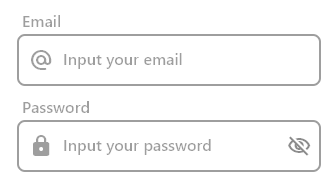
here's my container and textfield code:
                      Container(
                        decoration: BoxDecoration(
                          border: Border.all(
                            color: _myFocusNode.hasFocus
                                ? Colors.black38
                                : Colors.blue,
                            width: 2,
                          ),
                          borderRadius: BorderRadius.circular(8),
                        ),
                        child: Row(
                          mainAxisAlignment: MainAxisAlignment.center,
                          children: [
                            const Padding(
                              padding: EdgeInsets.symmetric(
                                horizontal: 10,
                              ),
                              child: Icon(
                                Icons.alternate_email_rounded,
                                color: Colors.black38,
                              ),
                            ),
                            Flexible(
                              child: TextField(
                                focusNode: _myFocusNode,
                                autofocus: true,
                                style: const TextStyle(
                                  fontSize: 16,
                                  fontWeight: FontWeight.w500,
                                ),
                                cursorHeight: 24,
                                cursorColor: Colors.grey,
                                decoration: const InputDecoration(
                                  border: InputBorder.none,
                                  suffixIcon: SizedBox(
                                    height: 24,
                                    width: 24,
                                  ),
                                  hintText: 'Input your email',
                                  hintStyle: TextStyle(
                                    color: Colors.black38,
                                  ),
                                ),
                              ),
                            ),
                          ],
                        ),
                      ),
                    ],
                  ),