why resizing img changes backgroud size?

Viewed 37

when i try to change logo size, whole background changes size as well. How to do it correctly? i want logo to be 150px by 150px. I want to make signup form page that looks something like this
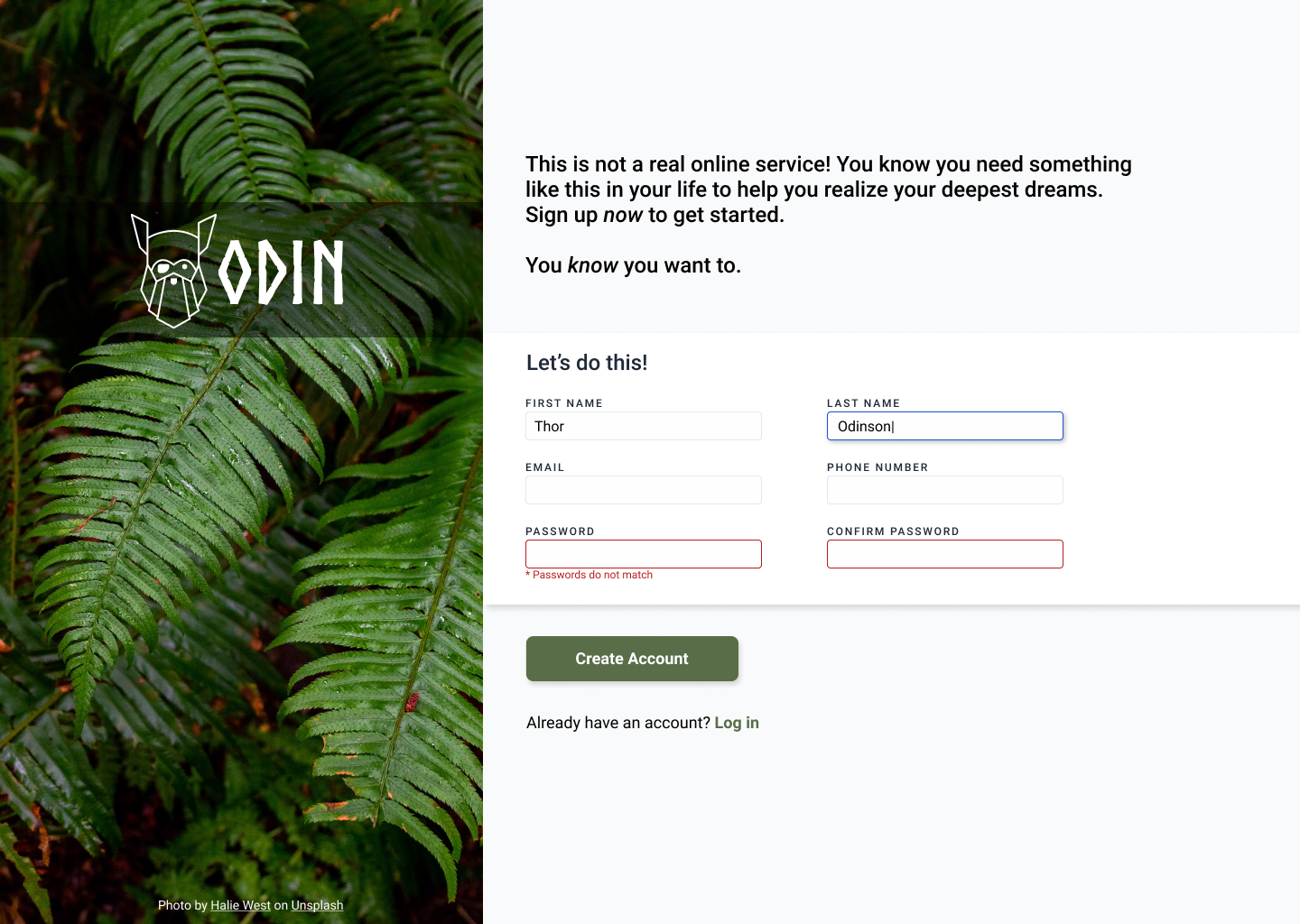
https://cdn.statically.io/gh/TheOdinProject/curriculum/5f37d43908ef92499e95a9b90fc3cc291a95014c/html_css/project-sign-up-form/sign-up-form.png

* {
  height: 100vh;
}

.main-container {
  display: flex;
}

.image {
  background-image: url(https://images.unsplash.com/photo-1584983333849-26ca57622ac2?ixlib=rb-1.2.1&ixid=MnwxMjA3fDB8MHxwaG90by1wYWdlfHx8fGVufDB8fHx8&auto=format&fit=crop&w=656&q=80);
  background-size: contain;
  background-repeat: no-repeat;
}

.logo {
  display: flex;
}

/* .logo img {
  height: 140px;
} */
<!DOCTYPE html>
<html lang="en">
  <head>
    <meta charset="UTF-8" />
    <meta http-equiv="X-UA-Compatible" content="IE=edge" />
    <meta name="viewport" content="width=device-width, initial-scale=1.0" />
    <link rel="stylesheet" href="style.css" />
    <title>Sign-up Form</title>
  </head>
  <body>
    <main class="main-container">
      <div class="image">
        <div class="logo">
          <img
            src="https://logodix.com/logo/20841.png"
            alt="logo"
            class="flower"
          />
          <h1 class="tokyo">Tokyo</h1>
        </div>
      </div>
      <div class="form"></div>
    </main>
  </body>
</html>

1 Answers

By default, your logo size is too big, and parent div was adjusting according to logo, So if the logo size changes, you whole parent div size will also change. So give them definite value to adjust accordingly

Here some changes i made, if that's helps

* {
  box-sizing: border-box;
  margin: 0;
  padding: 0;
}

.main-container {
  display: flex;
  height: 100vh;
}

.logo {
  display: flex;
  align-items: center;
  color: #fff;
}

.logo img {
  width: 150px;
}

.left {
  display: grid;
  place-items: center;
  background-image: url(https://images.unsplash.com/photo-1584983333849-26ca57622ac2?ixlib=rb-1.2.1&ixid=MnwxMjA3fDB8MHxwaG90by1wYWdlfHx8fGVufDB8fHx8&auto=format&fit=crop&w=656&q=80);
  width: 40%;
  background-position: center;
  background-size: cover;
  background-repeat: no-repeat;
}

.right {
  width: 60%;
  padding: 40px;
}
<main class="main-container">
  <div class="left">
    <div class="logo">
      <img src="https://logodix.com/logo/20841.png" alt="logo" class="flower" />
      <h1 class="tokyo">Tokyo</h1>
    </div>
  </div>
  <div class="right">
    <h4>Lorem ipsum dolor sit amet consectetur, adipisicing elit. Repellendus tempore assumenda error! Laudantium non voluptates provident molestias expedita atque eaque!</h4>
    <div class="form"></div>
  </div>
</main>

Related