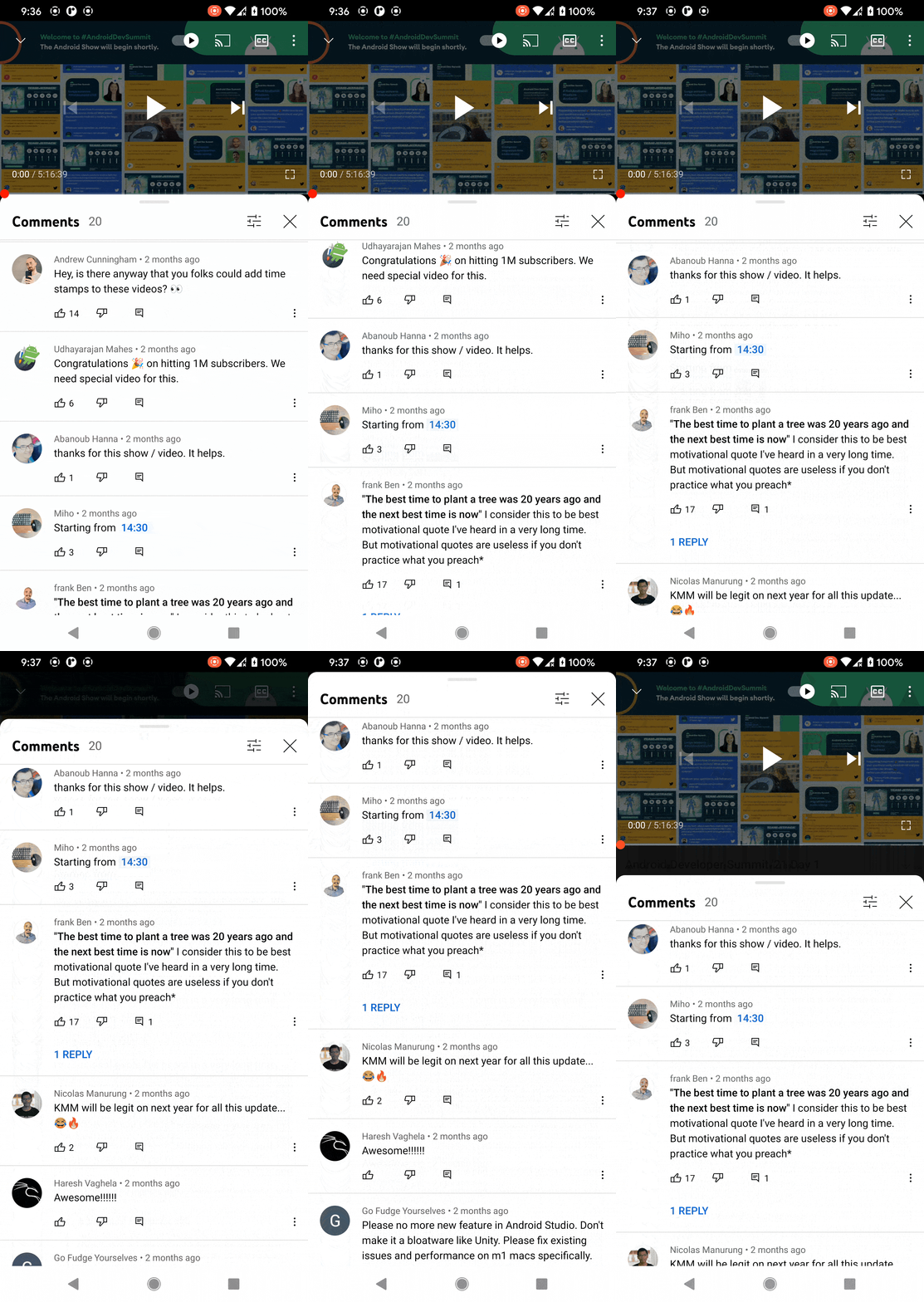
So I have a nested scroll view inside the bottom sheet fragment and the default behavior is to expand the bottom sheet to the top of the screen first and then scroll the long text inside the nested scroll view. how can change the default behavior to scroll the long text inside nested scroll view first and disable draggable when the user tries to scroll the long text and allow the user to draggable manual from the top like the youtube app
Default behavior
https://s10.gifyu.com/images/default.gif
Expected behavior
https://s10.gifyu.com/images/expected.gif
Note : I can't upload the preview to stack overflow because of the 2MB upload limit
    <LinearLayout
    xmlns:android="http://schemas.android.com/apk/res/android"
    xmlns:app="http://schemas.android.com/apk/res-auto"
    android:layout_width="match_parent"
    android:layout_height="wrap_content"
    android:orientation="vertical">


    <LinearLayout
        android:layout_width="match_parent"
        android:layout_height="wrap_content"
        android:gravity="center_vertical"
        android:orientation="horizontal"
        android:padding="10dp">

        <ImageButton
            android:id="@+id/close_btn"
            android:layout_width="wrap_content"
            android:layout_height="wrap_content"
            android:layout_marginStart="8dp"
            android:layout_marginTop="8dp"
            android:layout_marginBottom="8dp"
            android:background="@null"
            app:layout_constraintBottom_toBottomOf="parent"
            app:layout_constraintStart_toStartOf="parent"
            app:layout_constraintTop_toTopOf="parent"
            app:srcCompat="@drawable/ic_close" />


        <TextView
            android:id="@+id/title_tv"
            android:layout_width="wrap_content"
            android:layout_height="wrap_content"
            android:layout_marginStart="8dp"
            android:text="Title text"
            android:textSize="20sp"
            app:layout_constraintBottom_toBottomOf="parent"
            app:layout_constraintStart_toEndOf="@+id/close_btn"
            app:layout_constraintTop_toTopOf="parent" />

    </LinearLayout>

    <androidx.core.widget.NestedScrollView
        android:layout_width="match_parent"
        android:layout_height="match_parent"
        android:layout_marginBottom="8dp"
        android:fillViewport="true"
        app:layout_constraintBottom_toBottomOf="@+id/title_tv">


        <androidx.constraintlayout.widget.ConstraintLayout
            android:layout_width="match_parent"
            android:layout_height="wrap_content">

            <TextView
                android:id="@+id/short_tv"
                android:layout_width="wrap_content"
                android:layout_height="wrap_content"
                android:layout_marginTop="16dp"
                android:text="Short text"
                android:textSize="20sp"
                app:layout_constraintEnd_toEndOf="parent"
                app:layout_constraintStart_toStartOf="parent"
                app:layout_constraintTop_toTopOf="parent" />

            <com.google.android.material.button.MaterialButton
                android:id="@+id/example_btn"
                style="@style/Widget.MaterialComponents.Button"
                android:layout_width="wrap_content"
                android:layout_height="wrap_content"
                android:layout_marginTop="16dp"
                android:text="Example Button"
                app:layout_constraintEnd_toEndOf="parent"
                app:layout_constraintStart_toStartOf="parent"
                app:layout_constraintTop_toBottomOf="@+id/short_tv" />

            <TextView
                android:id="@+id/long_tv"
                android:layout_width="wrap_content"
                android:layout_height="wrap_content"
                android:layout_marginTop="16dp"
                android:padding="15dp"
                android:text="@string/long_text"
                app:layout_constraintEnd_toEndOf="parent"
                app:layout_constraintStart_toStartOf="parent"
                app:layout_constraintTop_toBottomOf="@+id/example_btn" />
        </androidx.constraintlayout.widget.ConstraintLayout>
    </androidx.core.widget.NestedScrollView>

</LinearLayout>
ExampleBottomSheet.kt
class ExampleBottomSheet : BottomSheetDialogFragment() {


    override fun onCreateView(inflater: LayoutInflater, container: ViewGroup?, savedInstanceState: Bundle?): View? {
        // Inflate the layout for this fragment
        return inflater.inflate(R.layout.bottom_sheet, container, false)
    }

    override fun onViewCreated(view: View, savedInstanceState: Bundle?) {
        super.onViewCreated(view, savedInstanceState)
    }