Why would a <div> inscrease in size when a border shows up after the mouse hovers it? CSS

Viewed 47

I'm building a nav bar and trying to do it like in the bbc.com site - when the mouse is over an item, a colored border shows up. I did it using something like

* {
        box-sizing: border-box;
        margin: 0;
        padding: 0;
         }
    
    .cont {
        display:flex;
        border: 1px solid gray;
        background-color: black;
    }
    
    a {
        margin-right:0.1em;
        border: 1px gray;
        border-style: none none none solid;
        padding: 0.5em;
        color: white;
    }

    #nav2:hover {
        border-bottom: 3px solid red;
        cursor:pointer;
    }
    
    #nav4 {
        border-style: none solid none solid;
        margin-right: 5em;
    }
        <div class="cont">
        <a id="nav1">Home</a>
        <a id="nav2">News</a>
        <a id="nav3">Contact</a>
        <a id="nav4">About</a>
        <button id="button1">Sign in</button>
        </div>

But as you put the mouse over the #nav4 item, the whole black background stretches to show the red border. Why is this happening? I thought 'box-sizing: border-box;' was supposed to prevent it.

(On a second note, how can I put the button on the right corner of the page in a way that works in any size of the screen?)

3 Answers

When adding a border you add to the element's height.

There are 2 ways you could avoid that :

  1. add a 3px black border to every element, and only change its color when :hover

  2. specify box-sizing: border-box; and a height, so the element's height includes the border (and the padding)

I used absolute positioned after pseudo-element instead of using border.

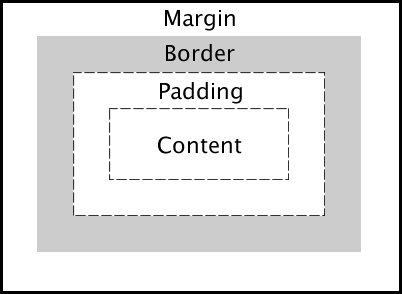
Rememebr the Box model border is outside the content.

codepen

Here is a method using just border css:

* {
  box-sizing: border-box;
  margin: 0;
  padding: 0;
}

.cont {
  display: flex;
  border: 1px solid gray;
  background-color: black;
  /* font-family: Arial, Helvetica, sans-serif; */
  /* height: 2em; */
  /* border-radius:5px; */
}

a {
  margin-right: 0.1em;
  border: 1px gray;
  /* border-style: none none none solid; */
  border-bottom: 3px solid black;
  border-top: 3px solid black;
  padding: 0.5em;
  color: white;
}


/* #nav1 {
        border-style: none none none solid;
        margin-left: 3em;
    } */

#nav2:hover {
  /* border: 3px solid red; */
  border-bottom: 3px solid red;
  cursor: pointer;
}

#nav4 {
  /* border-style: none solid none solid; */
  margin-right: 5em;
}
<div class="cont">
  <a id="nav1">Home</a>
  <a id="nav2">News</a>
  <a id="nav3">Contact</a>
  <a id="nav4">About</a>
  <button id="button1">Sign in</button>
</div>

Related