Discord.py segmentation fault inside Docker using Apple Silicon M1

Viewed 817

I am trying to setup Docker environment for my discord.py bot. I managed to create a Dockerfile, which uses python:3.9-slim-buster as a base image. Everything is working perfectly, when I run the bot inside Docker container on my Ubuntu machine. However, if I use MacBook with Apple Silicon M1 chip, it behaves differently. After running bot.py script and making it join a voice channel, it crashes on message.author.voice.channel.connect() with segmentation fault.

from discord.ext import commands

bot = commands.Bot('!')

@bot.event
async def on_message(message):
    await message.author.voice.channel.connect()

bot.run(DISCORD_TOKEN)

The result is bot joining into my voice channel and immediate crash after that. This is the output I get:

Fatal Python error: Segmentation fault

Thread 0x0000ffffa6c071e0 (most recent call first):
  File "/usr/local/lib/python3.9/threading.py", line 316 in wait
  File "/usr/local/lib/python3.9/threading.py", line 574 in wait
  File "/usr/local/lib/python3.9/site-packages/discord/gateway.py", line 133 in run
  File "/usr/local/lib/python3.9/threading.py", line 973 in _bootstrap_inner
  File "/usr/local/lib/python3.9/threading.py", line 930 in _bootstrap

Thread 0x0000ffffa74a71e0 (most recent call first):
  File "/usr/local/lib/python3.9/concurrent/futures/thread.py", line 75 in _worker
  File "/usr/local/lib/python3.9/threading.py", line 910 in run
  File "/usr/local/lib/python3.9/threading.py", line 973 in _bootstrap_inner
  File "/usr/local/lib/python3.9/threading.py", line 930 in _bootstrap

Current thread 0x0000ffffa8e22010 (most recent call first):
  File "/usr/local/lib/python3.9/ssl.py", line 897 in write
  File "/usr/local/lib/python3.9/asyncio/sslproto.py", line 261 in feed_appdata
  File "/usr/local/lib/python3.9/asyncio/sslproto.py", line 674 in _process_write_backlog
  File "/usr/local/lib/python3.9/asyncio/sslproto.py", line 598 in _write_appdata
  File "/usr/local/lib/python3.9/asyncio/sslproto.py", line 386 in write
  File "/usr/local/lib/python3.9/site-packages/aiohttp/http_writer.py", line 68 in _write
  File "/usr/local/lib/python3.9/site-packages/aiohttp/http_writer.py", line 119 in write_headers
  File "/usr/local/lib/python3.9/site-packages/aiohttp/client_reqrep.py", line 668 in send
  File "/usr/local/lib/python3.9/site-packages/aiohttp/client.py", line 542 in _request
  File "/usr/local/lib/python3.9/site-packages/aiohttp/client.py", line 754 in _ws_connect
  File "/usr/local/lib/python3.9/site-packages/discord/http.py", line 132 in ws_connect
  File "/usr/local/lib/python3.9/site-packages/discord/gateway.py", line 765 in from_client
  File "/usr/local/lib/python3.9/site-packages/discord/voice_client.py", line 321 in connect_websocket
  File "/usr/local/lib/python3.9/site-packages/discord/voice_client.py", line 353 in connect
  File "/usr/local/lib/python3.9/site-packages/discord/abc.py", line 1285 in connect
  File "/workspace/bot.py", line 7 in on_message
  File "/usr/local/lib/python3.9/site-packages/discord/client.py", line 343 in _run_event
  File "/usr/local/lib/python3.9/asyncio/events.py", line 80 in _run
  File "/usr/local/lib/python3.9/asyncio/base_events.py", line 1890 in _run_once
  File "/usr/local/lib/python3.9/asyncio/base_events.py", line 596 in run_forever
  File "/usr/local/lib/python3.9/site-packages/discord/client.py", line 713 in run
  File "/workspace/bot.py", line 9 in <module>
Segmentation fault

Shouldn't Docker containers behave the same on different machines? Do you think it is a Docker bug or is there some way to fix this?

EDIT: Added Dockerfile:

FROM python:3.9-slim-buster

ENV PYTHONFAULTHANDLER=1 \
  PYTHONUNBUFFERED=1 \
  PYTHONHASHSEED=random \
  PIP_NO_CACHE_DIR=off \
  PIP_DISABLE_PIP_VERSION_CHECK=on \
  PIP_DEFAULT_TIMEOUT=100

RUN apt-get update && apt-get install -y \
    build-essential libpq-dev git \
    ca-certificates ffmpeg libopus-dev libsodium-dev ansible gcc git libffi-dev libsodium-dev make musl-dev
RUN pip install poetry

WORKDIR /app
COPY poetry.lock pyproject.toml /app/

RUN poetry config virtualenvs.create false && poetry install

COPY . /app

CMD ["python3", "bot.py"]
2 Answers

I had the same problem on a different project.

I have no idea what exactly the issue is and no idea how I fixed the issue, but my hot guess is that the new python update on 2021-08-30 [for example v3.9.7 (https://docs.python.org/release/3.9.7/whatsnew/changelog.html)] fixed it with OpenSSL 1.1.1 for mac, which makes no sense to me as this should not affect docker containers, but who knows. Just rebuild your image (with the new version) and see if it works. It did for me.

Hope this helps :)

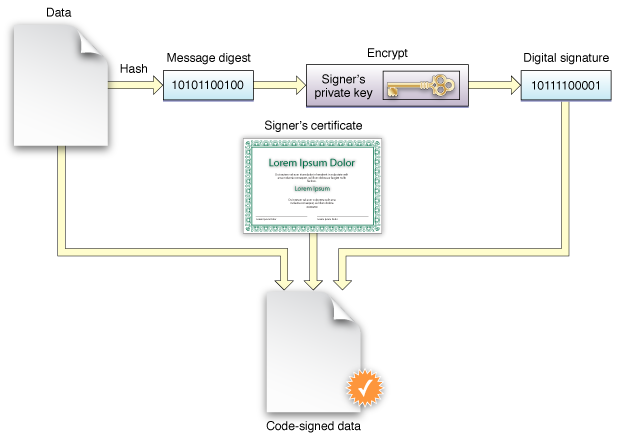
Although you present a complex situation (many moving parts), it seems likely that the culprit is the ffmpeg docker package, which is not code-signed for the Apple Silicon M1/ARM processor.

code signing workflow

Apple Silicon devices can only run signed files.

Here are some options for getting ffmpeg to work:

Build ffmpeg using pre-fab script

Before you start, you must install arm64-based Homebrew to /opt/homebrew.

  1. Clone the helper repository
    1. git clone https://github.com/mavaddat/ffmpeg-on-apple-silicon.git
    2. cd ffmpeg-on-apple-silicon
    3. chmod +x ./build.bash
  2. Run ./build.bash.

DIY Compile FFMPEG on Apple Silicon (M1/ARM Processors)

Download FFmpeg 4.4 (With ARM Neon patch) for Apple Silicon macOS 11.0 and Higher

SHA256 checksum : 5371a20db551b3e04593a052305eb97da3558b1d60271a4fc8f1763a37a6ac43

You can ad-hoc sign the downloaded file in the Terminal:

xattr -cr <pathtotheffmpegfile>  
codesign -s - ~/Downloads/ffmpeg44arm.zip

Note: The FFmpeg file for Apple Silicon includes the x265 NEON patch. This makes the encoding speed of x265 much faster.

How to compile a real static FFmpeg file for macOS

There are several ways to compile FFmpeg. Homebrew is an easy way to compile FFmpeg files but sadly they are not static.
Static means you can copy the FFmpeg file anywhere you want.
It has no dependencies compared to a dynamically build like Homebrew does.

The script below will build an actually-static FFmpeg file. It does not cover all possible external libraries but it will give you a head start. You can, of course, add more libs like Theora, Vorbis, VPX, etc, yourself.

First, download all source files (links to versions may be out-dated):

And, of course, FFmpeg: git clone git://git.ffmpeg.org/ffmpeg.git

You also need to install Apple Xcode.

Build for ARM (M1 Processor)

If you downloaded newer versions of the libraries, please update version numbers accordingly in the script below. ⚠️

echo '♻️ ' Create Ramdisk
    
    if df | grep Ramdisk > /dev/null ; then tput bold ; echo ; echo ⏏ Eject Ramdisk ; tput sgr0 ; fi
    
    if df | grep Ramdisk > /dev/null ; then diskutil eject Ramdisk ; sleep 1 ; fi
    
    DISK_ID=$(hdid -nomount ram://6000000)
    
    newfs_hfs -v tempdisk ${DISK_ID}
    
    diskutil mount ${DISK_ID}
    
    sleep 1
    
    SRC="/Volumes/tempdisk/sw"
    
    CMPLD="/Volumes/tempdisk/compile"
    
    mkdir ${SRC}
    
    mkdir ${CMPLD}
    
    export PATH=${SRC}/bin:$PATH
    
    export CC=clang && export PKG_CONFIG_PATH="${SRC}/lib/pkgconfig"
    
    #
    # ask user to copy all files to ramdisk
    #
    
    echo
    echo Copy all files to ramdisk and press a key when ready
    read -s 
    
    # echo '♻️ ' Start compiling YASM
    
    #
    # compile YASM
    #
    
    cd ${CMPLD}
    
    cd yasm-1.3.0
    
    ./configure --prefix=${SRC}
    
    make -j 16
    
    make install
    
    sleep 1
    
    echo '♻️ ' Start compiling NASM
    
    #
    # compile NASM
    #
    
    cd ${CMPLD}
    
    cd nasm-2.16
    
    ./configure --prefix=${SRC}
    
    make -j 16
    
    make install
    
    sleep 1
    
    echo '♻️ ' Start compiling PKG
    
    #
    # compile PKG
    #
    
    cd ${CMPLD}
    
    cd pkg-config-0.29.2
    
    export LDFLAGS="-framework Foundation -framework Cocoa"
    
    ./configure --prefix=${SRC} --with-pc-path=${SRC}/lib/pkgconfig --with-internal-glib --disable-shared --enable-static
    
    make -j 16
    
    make install
    
    unset LDFLAGS
    
    sleep 1
    
    echo '♻️ ' Start compiling CMAKE
    
    #
    # compile CMAKE
    #
    
    cd ${CMPLD}
    
    cd cmake-3.21.1
    
    ./configure --prefix=${SRC}
    
    make -j 16
    
    make install
    
    sleep 1
    
    echo '♻️ ' Start compiling Lame
    
    #
    # compile Lame
    #
    
    cd ${CMPLD}
    
    cd lame
    
    ./configure --prefix=${SRC} --disable-shared --enable-static
    
    make -j 16
    
    make install
    
    echo '♻️ ' Start compiling X264
    
    #
    # x264
    #
    
    cd ${CMPLD}
    
    cd x264
    
    ./configure --prefix=${SRC} --disable-shared --enable-static
    
    make -j 16
    
    make install
    
    make install-lib-static
    
    # echo
    # echo continue
    # read -s 
    
    sleep 1
    
    echo '♻️ ' Start compiling X265
    
    #
    # x265
    #
    
    rm -f ${SRC}/include/x265*.h 2>/dev/null
    
    rm -f ${SRC}/lib/libx265.a 2>/dev/null
    
    echo '♻️ ' X265 12bit
    
    cd ${CMPLD}
    
    cd /Volumes/tempdisk/compile/x265/source
    
    cmake -DCMAKE_INSTALL_PREFIX:PATH=${SRC} -DHIGH_BIT_DEPTH=ON -DMAIN12=ON -DENABLE_SHARED=NO -DEXPORT_C_API=NO -DENABLE_CLI=OFF .
    
    make -j 16
    
    mv libx265.a libx265_main12.a
    
    make clean-generated
    
    rm CMakeCache.txt
    
    echo '♻️ ' X265 10bit
    
    cd ${CMPLD}
    
    cd /Volumes/tempdisk/compile/x265/source
    
    cmake -DCMAKE_INSTALL_PREFIX:PATH=${SRC} -DHIGH_BIT_DEPTH=ON -DMAIN10=ON -DENABLE_SHARED=NO -DEXPORT_C_API=NO -DENABLE_CLI=OFF .
    
    make clean
    
    make -j 16
    
    mv libx265.a libx265_main10.a
    
    make clean-generated && rm CMakeCache.txt
    
    echo '♻️ ' X265 full
    
    cd ${CMPLD}
    
    cd /Volumes/tempdisk/compile/x265/source
    
    cmake -DCMAKE_INSTALL_PREFIX:PATH=${SRC} -DEXTRA_LIB="x265_main10.a;x265_main12.a" -DEXTRA_LINK_FLAGS=-L. -DLINKED_10BIT=ON -DLINKED_12BIT=ON -DENABLE_SHARED=OFF -DENABLE_CLI=OFF .
    
    make clean
    
    make -j 16
    
    mv libx265.a libx265_main.a
    
    libtool -static -o libx265.a libx265_main.a libx265_main10.a libx265_main12.a 2>/dev/null
    
    make install
    
    sleep 1
    
    echo '♻️ ' Start compiling VPX
    
    #
    # VPX
    #
    
    cd ${CMPLD}
    
    cd libvpx
    
    ./configure --prefix=${SRC} --enable-vp8 --enable-postproc --enable-vp9-postproc --enable-vp9-highbitdepth --disable-examples --disable-docs --enable-multi-res-encoding --disable-unit-tests --enable-pic --disable-shared
    
    make -j 16
    
    make install
    
    echo '♻️ ' Start compiling ZLIB
    
    #
    # ZLIB
    #
    
    cd ${CMPLD}
    
    cd zlib-1.2.11
    
    ./configure --prefix=${SRC}
    
    make -j 16
    
    make install
    
    rm ${SRC}/lib/libz.so*
    
    rm ${SRC}/lib/libz.*
    
    echo '♻️ ' Start compiling EXPAT
    
    #
    # EXPAT
    #
    
    cd ${CMPLD}
    
    cd expat-2.2.10
    
    ./configure --prefix=${SRC} --disable-shared --enable-static
    
    make -j 16
    
    make install
    
    echo '♻️ ' Start compiling LIBICONV
    
    #
    # libiconv
    #
    
    cd ${CMPLD}
    
    cd libiconv-1.16
    
    ./configure --prefix=${SRC} --disable-shared --enable-static
    
    make -j 16
    
    make install
    
    echo '♻️ ' Start compiling ENCA
    
    #
    # ENCA
    #
    
    cd ${CMPLD}
    
    cd enca-1.5
    
    ./configure --prefix=${SRC} --disable-shared --enable-static
    
    make -j 16
    
    make install
    
    echo '♻️ ' Start compiling FREETYPE
    
    #
    # FREETYPE
    #
    
    cd ${CMPLD}
    
    cd freetype-2.10.4
    
    ./configure --prefix=${SRC} --disable-shared --enable-static
    
    make -j 16
    
    make install
    
    echo '♻️ ' Start compiling FONTCONFIG
    
    #
    # FONTCONFIG
    #
    
    cd ${CMPLD}
    
    cd fontconfig-2.13.93
    
    ./configure --prefix=${SRC} --enable-iconv --disable-libxml2 --disable-shared --enable-static --disable-docs
    
    make -j 16
    
    make install
    
    echo '♻️ ' Start compiling FRIBIDI
    
    #
    # FRIBIDI
    #
    
    cd ${CMPLD}
    
    cd fribidi-1.0.5
    
    ./configure --prefix=${SRC} --disable-shared --enable-static
    
    make -j 16
    
    make install
    
    echo '♻️ ' Start compiling HARFBUZZ
    
    #
    # HARFBUZZ
    #
    
    cd ${CMPLD}
    
    cd harfbuzz-2.7.2
    
    ./configure --prefix=${SRC} --disable-shared --enable-static
    
    make -j 16
    
    make install
    
    sleep 1
    
    echo '♻️ ' Start compiling OPUS
    
    echo '♻️ ' Start compiling LIBASS
    
    #
    # LIBASS
    #
    
    cd ${CMPLD}
    
    cd libass-0.15.0
    
    ./configure --prefix=${SRC} --disable-fontconfig --disable-shared --enable-static
    
    make -j 16
    
    make install
    
    sleep 1
    
    echo '♻️ ' Start compiling OPUS
    
    #
    # OPUS
    #
    
    cd ${CMPLD}
    
    cd opus-1.3.1
    
    ./configure --prefix=${SRC} --disable-shared --enable-static
    
    make -j 16
    
    make install
    
    sleep 1
    
    #
    # LIBOGG
    #
    
    cd ${CMPLD}
    
    cd libogg-1.3.4
    
    ./configure --prefix=${SRC} --disable-shared --enable-static
    
    make -j 16
    
    make install
    
    sleep 1
    
    #
    # LIBVORBIS
    #
    
    cd ${CMPLD}
    
    cd libvorbis-1.3.7
    
    ./configure --prefix=${SRC} --with-ogg-libraries=${SRC}/lib --with-ogg-includes=${SRC}/include/ --enable-static --disable-shared
    
    make -j 16
    
    make install
    
    sleep 1
    
    #
    # THEORA
    #
    
    cd ${CMPLD}
    
    cd libtheora-1.1.1
    
    ./configure --prefix=${SRC} --disable-asm --with-ogg-libraries=${SRC}/lib --with-ogg-includes=${SRC}/include/ --with-vorbis-libraries=${SRC}/lib --with-vorbis-includes=${SRC}/include/ --enable-static --disable-shared
    
    make -j 16
    
    make install
    
    sleep 1
    
    #
    # SNAPPY
    #
    
    cd ${CMPLD}
    
    cd snappy
    
    cmake -DCMAKE_INSTALL_PREFIX:PATH=${SRC} -DENABLE_SHARED=OFF -DENABLE_CLI=OFF
    
    make -j 16
    
    make install
    
    sleep 1
    
    echo '♻️ ' Start compiling Vid-stab
    
    #
    # Vidstab
    #
    
    cd ${CMPLD}
    
    cd vidstab-master
    
    cmake -DCMAKE_INSTALL_PREFIX:PATH=${SRC} -DLIBTYPE=STATIC -DBUILD_SHARED_LIBS=OFF -DUSE_OMP=OFF -DENABLE_SHARED=off .
    
    make -j 16
    
    make install
    
    sleep 1
    
    echo '♻️ ' Start compiling AOM
    
    #
    # AOM
    #
    
    cd ${CMPLD}
    
    cd aom
    
    mkdir aom_build
    
    cd aom_build
    
    cmake ${CMPLD}/aom -DENABLE_TESTS=0 -DCMAKE_INSTALL_PREFIX:PATH=${SRC} -DLIBTYPE=STATIC -DAOM_TARGET_CPU=ARM64 -DCONFIG_RUNTIME_CPU_DETECT=0
    
    make -j 16
    
    make install
    
    sleep 1
    
    echo '♻️ ' Start compiling FFMPEG
    
    cd ${CMPLD}
    
    cd ffmpeg
    
    export LDFLAGS="-L${SRC}/lib"
    
    export CFLAGS="-I${SRC}/include"
    
    export LDFLAGS="$LDFLAGS -framework VideoToolbox"
    
    ./configure --prefix=${SRC} --extra-cflags="-fno-stack-check" --arch=arm64 --cc=/usr/bin/clang --enable-fontconfig --enable-libaom --enable-gpl --enable-libopus --enable-libmp3lame --enable-libx264 --enable-libx265 --enable-libvpx --enable-libass --enable-libfreetype --enable-libtheora --enable-libvorbis --enable-libsnappy --enable-libvidstab --enable-version3 --pkg-config-flags=--static --disable-ffplay --enable-postproc --enable-nonfree --enable-neon --enable-runtime-cpudetect --disable-indev=qtkit --disable-indev=x11grab_xcb
    
    make -j 16
    
    make install

Courtesy of OS X Experts: https://www.osxexperts.net

Related