How to add recyclerview item(s) remove animation

Viewed 18528

When I use this, it removes one element with animation

{
    notificationItems.remove(0);
    adapterForNotification.notifyItemRemoved(0);                        
    adapterForNotification.notifyItemRangeRemoved(0,count-1);
}

But, when I use this, it removes all element without animation

count = adapter.getItemCount();
for(int i = 0 ; i < count; ++i){
    notificationItems.remove(0);
    adapterForNotification.notifyItemRemoved(0);
    adapterForNotification.notifyItemRangeRemoved(0,count-1)
}
4 Answers

As I can understand, you are able to remove items, but you need to add sort of animation while removing.

It can be done by deleting a single item at a time with a single animation for each item.

For instance by simulating a swipe animation on an item at a time, and post a delay before deleting the next item, and so on to the way down to the last item of the RecyclerView

Steps:

Step No.1:

In your activity that holds the clear all button and the RecyclerView instance: Create a method of single item delete

private void deleteItem(View rowView, final int position) {

    Animation anim = AnimationUtils.loadAnimation(requireContext(),
            android.R.anim.slide_out_right);
    anim.setDuration(300);
    rowView.startAnimation(anim);

    new Handler().postDelayed(new Runnable() {
        public void run() {
            if (myDataSource.size() == 0) {
                addEmptyView(); // adding empty view instead of the RecyclerView
                return;
            }
            myDataSource.remove(position); //Remove the current content from the array
            myRVAdapter.notifyDataSetChanged(); //Refresh list
        }

    }, anim.getDuration());
}

Step No.2:

Create the method that will delete all RecyclerView list items >> call it in your button click callback.

boolean mStopHandler = false;

private void deleteAllItems() {

    final Handler handler = new Handler();
    Runnable runnable = new Runnable() {
        @Override
        public void run() {
            
            if (myDataSource.size() == 0) {
                mStopHandler = true;
            }
            
            if (!mStopHandler) {
                View v = myRecyclerView.findViewHolderForAdapterPosition(0).itemView;
                deleteItem(v, 0);
            } else {
                handler.removeCallbacksAndMessages(null);
            }
            
            handler.postDelayed(this, 250);
        }
    };
    requireActivity().runOnUiThread(runnable);
}

Also it's important to handle configuration change in manifest, activity section, as if the configuration changes while clearing your recycler view list, an exception will be raised

<activity
    android:name=".activities.MainActivity"
    android:configChanges="orientation|screenSize|keyboard"
    android:label="@string/app_name"
    ...
</activity>
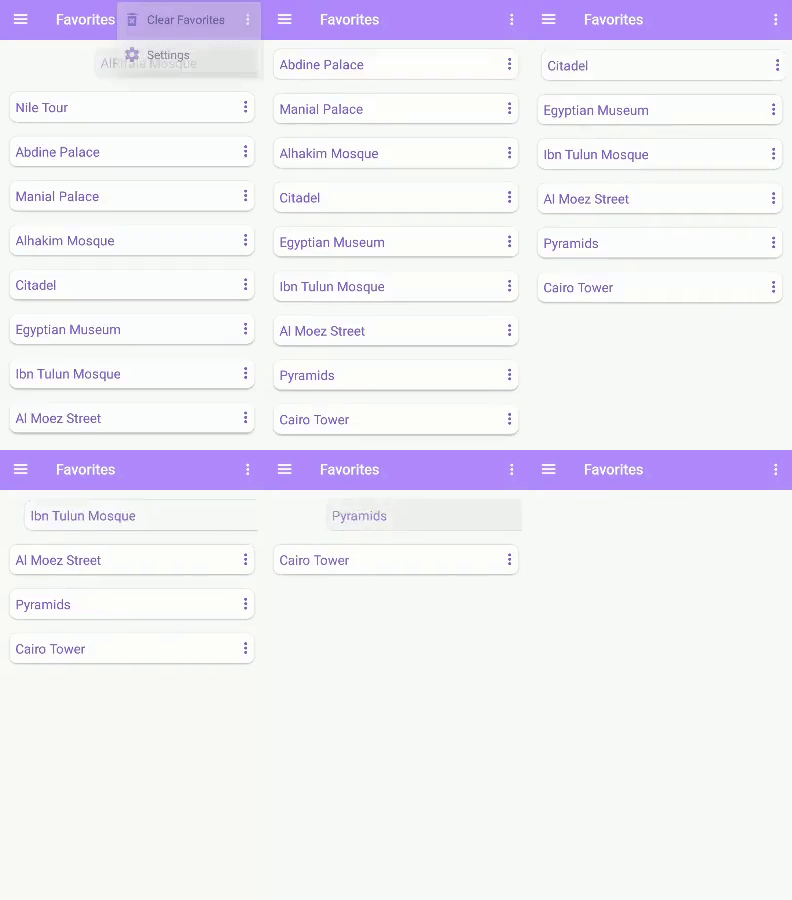
You shouldn't be using both notifyItemRemoved() and notifyItemRangeRemoved(). Only use one at a time.

If you want to remove one item:

notificationItems.remove(index);
adapterForNotification.notifyItemRemoved(index);

If you want to remove all items:

int origCount = notificationItems.size();
notificationItems.clear();
adapterForNotification.notifyItemRangeRemoved(0, origCount - 1);

If you want to remove a range of items:

notificationItems.subList(startIndex, endIndex).clear();
adapterForNotification.notifyItemRangeRemoved(startIndex, endIndex);

EDIT:

If you want to remove each item one by one and show the removal animation for each, try this:

for (int i = 0; i < notificationItems.size(); i++) {
    notificationItems.remove(i);
    adapterForNotification.notifyItemRemoved(i);
}
count = adapter.getItemCount();

for (int i = 0 ; i < count; ++i){
    notificationItems.remove(0);
}
adapterForNotification.notifyItemRangeRemoved(0, count-1)

I did this by accessing the views of the list items directly from the adapater of the recyclerview, animating them, and notifying the adapter after the last animation has played.

fun deleteMultipleAnimated(){
    val oldSize = myList.size
    
    myList.removeAt(3)
    myList.removeAt(4)

    val newSize = myList.size

    for(i in newSize until oldSize){

        val listItemView = myRecycler.findViewHolderForAdapterPosition(i) as MyAdapater.MyViewHolder            

        if(i == oldSize-1){ 

            //only the last animation notifies the adapter
            listItemView.myView.animate().scaleX(0f).setDuration(250).withEndAction{
                myAdapter.notifyItemRangeRemoved(newSize, oldSize)}
        }else{

            //every other view is animated without an end action
            listItemView.myView.animate().scaleX(0f).duration = 250
        }
    }
}    
Related