Flyway - Cannot find migrations location in

Viewed 22009

I can't seem to let flyway know where to look for my migrations. My file structure is the default generated from spring initializr. My migrations are in: ./demo/src/main/kotlin/db/migration My migrations are java based

My application.properties file looks like this:

spring.datasource.driverClassName=org.postgresql.Driver
spring.jpa.database-platform=org.hibernate.dialect.PostgreSQLDialect
spring.datasource.url=jdbc:postgresql://${JDBC_DATABASE_URL}/jpaTestDatabase
spring.datasource.username=${JDBC_DATABASE_USERNAME}
spring.datasource.password=${JDBC_DATABASE_PASSWORD}

spring.flyway.baseline-on-migrate=true
spring.flyway.locations=classpath:demo/src/main/kotlin/db/migration

spring.jpa.generate-ddl=true
spring.jpa.hibernate.ddl-auto=validate
spring.session.store-type=none

I tried several classpaths:

/demo/src/main/kotlin/db/migration
demo/src/main/kotlin/db/migration
/src/main/kotlin/db/migration
src/main/kotlin/db/migration

None of the above seem to work.

How can I let flyway know where the migrations are?
6 Answers

I had a different problem, my migration file name was V1_Base_version.sql instead of V1__Base_version.sql. Flyway requires double underscore __ in name prefix.

In my case, I got that error message because I created the folders via copy-paste in the IDE (and not manually, as one usually does).

I actually had (which didn't work):

src/main/resources/db.migration/

instead of the correct (which worked):

src/main/resources/db/migration/

The db.migration version obviously does not work, but it is hard to spot on the IDE.

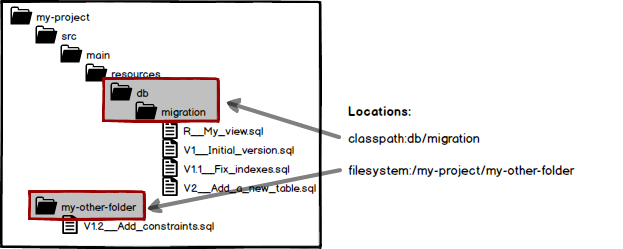
By default Flyway will look for migrations on the classpath under db/migration, which on a Maven project means src/main/resources/db/migration.

Ensure that you have directory like this.

Refer flyway-db-migration-folder

In my case, the trick was: once Flyway has succeeded in running the update script, it creates the table flyway_schema_history, that recorded that I have already run the create script successfully once.

I was playing back and forward with the implementation, changing spring.jpa.hibernate.ddl-auto to validate and then create-drop, and then back.

So, when I tried to run the script second time, that was rejected but since the originally created table (in my case called 'bike') was deleted when the app shut down when run in spring.jpa.hibernate.ddl-auto=create-drop mode previous time, I was getting the

SchemaManagementException: Schema-validation: missing table [bike] Exception.

Solution is: drop the flyway_schema_history table or remove the records corresponding to the previous run and roll again!

you must agregate or uncomment the line flyway.locations with

flyway.localtions=filesystem:.

into flyway.conf configuration file.

in my case i had - (dash character) in the name of migration like V20220508-1900__init.sql. removing - fixed the problem

Related